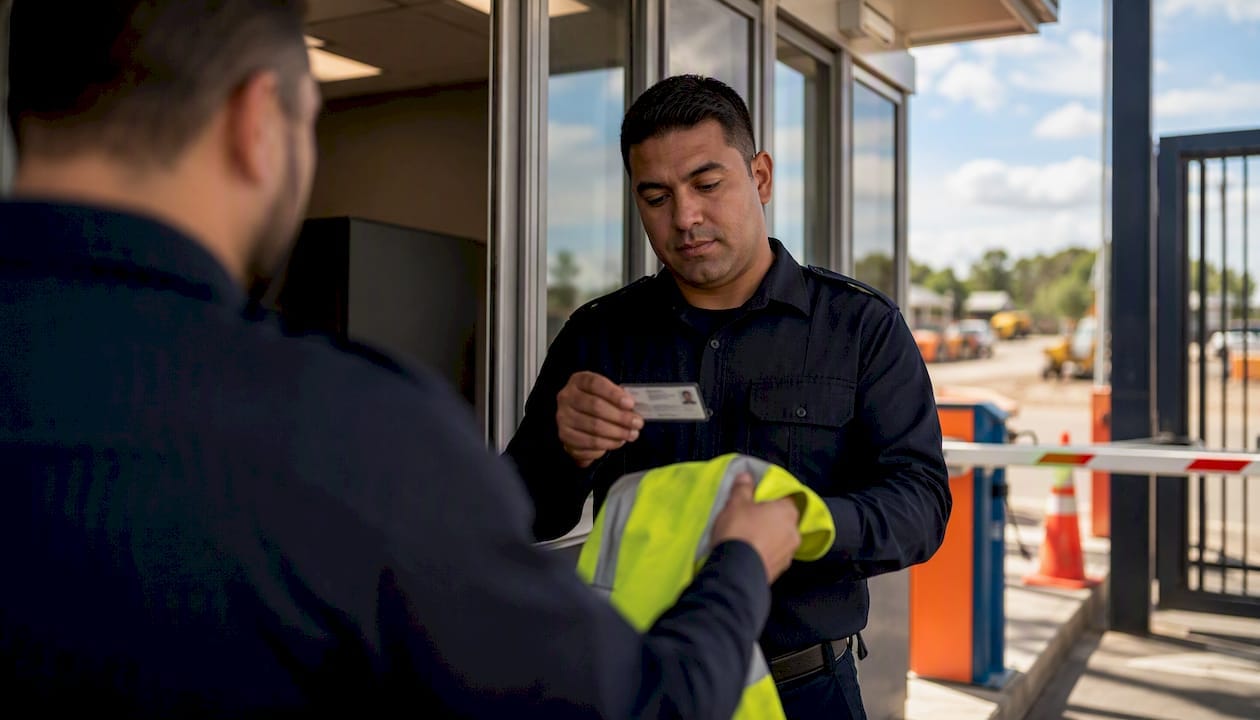
Effective gatehouse security procedures cover six non-negotiable functions: identity and authority verification, vehicle and delivery screening, CCTV and alarm monitoring, radio communications and escalation, complete record keeping, and emergency response. Get those six right and you control who enters, what comes in, and what happens when something goes wrong.
Start here — implement these today:
- Confirm every visitor’s identity against a government-issued photo ID before issuing a pass
- Log every vehicle by registration, driver name, cargo and authorising contact before the gate opens
- Check CCTV feeds and badge reader status at the start of every shift
- Use a standardised radio call format for all communications (location, nature, action taken)
- Complete a written shift handover before the outgoing officer leaves
- Run regular emergency drills periodically and document the results
Compliance callout: All gatehouse staff should hold or be working towards CPPSEC2109 competency. Site systems must reference AS/NZS IEC 60839.11.1:2019 for electronic access control, the AS/NZS 2201 series for alarm systems, and AS 4421 for guard service governance.
Key takeaways
Effective gatehouse security procedures require six core functions — access control, vehicle screening, surveillance monitoring, communications, record keeping, and emergency response — all documented in a tested, version-controlled SOP aligned to Australian standards.
| Point | Details |
|---|---|
| Six core functions | Access control, vehicle screening, surveillance, communications, records, and emergency response must all be documented and tested. |
| Australian standards | Reference AS/NZS IEC 60839.11.1:2019 for access hardware, AS/NZS 2201 for alarms, and AS 4421 for guard service governance. |
| CPPSEC2109 competency | All gatehouse officers should hold or be working towards this national training unit covering ID checks, vehicle inspection and access-control operation. |
| Signed shift handover | A written, signed handover checklist is the single fastest fix for continuity failures between shifts. |
| Abcosecurity | Provides site audits, SOP authoring, licensed gatehouse officers, and 24/7 monitoring for Australian sites across all major sectors. |
Table of Contents
- What are gatehouse security procedures and who needs them?
- Step-by-step gatehouse security procedures for access control and ID verification
- How to screen vehicles and manage deliveries at the gatehouse
- How to monitor CCTV, access-control hardware and alarm systems effectively
- Gatehouse communications, reporting and escalation procedures
- Emergency, evacuation and lockdown procedures for the gatehouse
- Records, logs and documentation standards for the gatehouse
- Shift handover procedures that prevent gaps between officers
- Training, licensing and competency requirements for Australian gatehouse staff
- How to write, test and audit your gatehouse SOPs
- Abcosecurity’s sample gatehouse SOP and 24-point checklist
- What Abcosecurity has observed: the six most common gatehouse failures
- Abcosecurity’s gatehouse security services: from SOP to ongoing support
- Sources
- FAQ
What are gatehouse security procedures and who needs them?
Gatehouse security procedures are the documented, step-by-step instructions that govern how people, vehicles and goods enter and exit a controlled site. They define what a gatehouse officer checks, records, escalates and reports at every interaction. The primary objectives are controlled access (only authorised people and vehicles get through), deterrence (a visible, procedurally consistent gatehouse discourages opportunistic intrusion), emergency coordination (the gatehouse is often the first point of contact for first responders), and evidence capture (logs and CCTV footage that hold up in investigations).
These procedures apply to any site with a staffed entry point: construction sites, hospitals, corporate campuses, industrial facilities, government buildings, and residential estates. The people responsible for following them include gatehouse officers on shift, their supervisors, and the site or facility manager who owns the SOP. Gatehouse guard duties commonly span emergency response readiness, access control, vehicle and visitor checks, and record keeping — all of which require documented procedures to be performed consistently.
Measure effectiveness with these three indicators:
- Unauthorised entry attempts detected and refused per week
- Average incident response time from detection to escalation
- Log completeness rate (percentage of entries with all required fields filled)
Step-by-step gatehouse security procedures for access control and ID verification
Pedestrian access is where most gatehouse failures begin. An officer who skips one step — accepting a verbal name instead of checking a photo ID, or waving through a familiar face without logging the visit — creates a gap that an incident report will later expose. The procedure below closes those gaps.
Pedestrian access checklist:
- Greet the visitor and ask for the purpose of their visit.
- Request a current, government-issued photo ID (driver’s licence, passport, or employer-issued card with photo).
- Cross-reference the name against the authorised visitor list, pre-registered appointment, or a call to the site contact.
- Verify the visitor’s authority to enter: who invited them, which zone they are permitted to access, and for how long.
- Record the visit in the visitor log (name, ID type and number, time in, host name, zone, expected time out).
- Issue a site-specific visitor badge and explain any site rules (PPE requirements, restricted zones, emergency muster points).
- Direct the visitor to their destination or arrange an escort for high-security zones.
- On exit, collect the badge, record the time out, and note any incidents during the visit.
CPPSEC2109 sets the national competency standard for these tasks, covering ID checks, baggage and vehicle inspection, and access-control system operation. Officers who have not yet completed this unit should be supervised on access control tasks until they do.
Acceptable ID and authority evidence under most site policies includes a current Australian driver’s licence, passport, or state-issued proof-of-age card. For contractors, a company ID combined with a purchase order or work order number is standard. For deliveries, a signed manifest or consignment note serves as authority evidence.
Scripted refusal response: “I’m sorry, I’m not able to authorise your entry without [specific missing item]. Please contact [site contact name] on [number] and they can arrange access. I’ll note your visit in the log.” Keep the tone neutral and factual. If the person becomes agitated, do not argue. Step back, maintain eye contact, and call your supervisor immediately.
Pro Tip: Implement two-factor entry for high-risk zones: require both a valid badge scan AND a visual ID check by the officer. Badge-only entry is vulnerable to tailgating and lost-card misuse. Escalate to your supervisor any time a badge scan succeeds but the person cannot produce matching photo ID.
How to screen vehicles and manage deliveries at the gatehouse
Vehicle screening is the procedural step most likely to be compressed under time pressure, particularly during peak delivery windows. A truck queue at the gate does not justify skipping the manifest check.
Vehicle arrival procedure:
- Signal the vehicle to stop at the designated waiting point before the gate.
- Approach from the driver’s side and request the driver’s photo ID and delivery documentation (manifest, consignment note, or purchase order).
- Record the vehicle registration, make and colour against the driver’s name.
- Check the manifest against the site’s expected delivery schedule or call the authorising contact to confirm.
- Inspect the load visually where safe to do so, or request the driver to open the vehicle for inspection if the site policy requires it.
- Direct the vehicle to the designated unloading bay and note the time in.
- On exit, confirm the vehicle is leaving with only what is authorised (no site materials removed without a gate pass), record the time out.
Vehicle log — required fields for every entry and exit:
| Field | Description |
|---|---|
| Date and time in/out | 24-hour format, both entry and exit |
| Vehicle registration | Full plate number |
| Vehicle make and colour | For visual identification |
| Driver name | As per photo ID |
| Company name | Employer or transport company |
| Cargo description | As per manifest or verbal declaration |
| Authorising site contact | Name and contact number |
| Manifest or PO number | Document reference for audit trail |
| Officer name | Gatehouse officer who processed the entry |
| Notes | Any anomalies, refused access, or incidents |

For hazardous or restricted loads, the chain-of-custody requirement extends further: the officer must sight the relevant dangerous goods documentation (such as a Safety Data Sheet for chemical deliveries), record the document reference number, and notify the site’s WHS officer before the vehicle proceeds. Never allow a hazardous load to enter without that notification on record.
How to monitor CCTV, access-control hardware and alarm systems effectively
A CCTV system that nobody is actively monitoring is a recording device, not a security tool. Gatehouse officers need a daily equipment health routine that takes no more than ten minutes but catches faults before they become blind spots.
Daily equipment health checklist:
- Confirm all CCTV feeds are live and displaying the correct date/time stamp
- Check the recorder has sufficient storage and is actively writing (no “disk full” or “recording stopped” alerts)
- Wipe camera lenses if dust, condensation or spider webs are obscuring the image
- Test each badge reader by scanning a known valid card and confirming the gate or door responds correctly as explained in the Small Business Access Control: Miami-Dade Guide
- Check gate motors for unusual sounds, slow response or error lights
- Confirm the alarm panel shows no unacknowledged faults or tamper alerts
- Log the check result and the officer’s name in the equipment log
AS/NZS IEC 60839.11.1:2019 sets minimum functionality and test-method requirements for electronic access-control systems. When your site specifies or procures access-control hardware, this standard defines the performance grades and test criteria the equipment must meet. The AS/NZS 2201 series covers intruder alarm systems and monitoring centres, and is the reference point for alarm response protocols and transmission system requirements.
Common faults and first-response steps:
- CCTV feed frozen or black: check network cable connection at the camera and recorder; restart the recorder if the feed does not restore within two minutes; escalate to technical support if the fault persists.
- Badge reader unresponsive: check power supply and cable connection; try a manual override if site policy permits; revert to manual ID checks at that point and log every entry until the reader is repaired.
- Gate motor not responding: do not force the gate manually; use the manual release only if trained to do so; place a traffic cone and manage access on foot while waiting for maintenance.
Preventative maintenance should be scheduled monthly for camera cleaning and recorder storage checks, quarterly for full system testing (including alarm trigger tests and access-control failover), and annually for a third-party technical audit. Security gate installation guidance covers commissioning steps and integration checks that are equally relevant to ongoing maintenance routines.
Pro Tip: Pair your CCTV system with monitored alarm systems so that a camera fault or alarm trigger reaches a 24/7 monitoring centre even when the gatehouse is briefly unmanned. A standalone system with no off-site monitoring has a single point of failure.
Gatehouse communications, reporting and escalation procedures
Procedural checklists alone are insufficient without standardised radio and phone phrasing. An officer who says “something’s happening at the front gate” gives their supervisor nothing to act on. The standard format fixes that.
Standard radio call format: Location, then nature, then action taken. Example: “Control, this is Gate 1. I have an unauthorised vehicle refusing to leave the holding bay. I have requested the driver’s ID and am awaiting your instruction. Over.”
Every call should end with “Over” when a response is expected, and “Out” when the exchange is complete. Use plain language, not codes, unless your site has a documented code system that all officers know.
Escalation matrix:
Incident report — minimum required fields:
- Date, time and location of incident
- Name and contact details of all persons involved
- Description of what occurred (factual, chronological, no opinion)
- Actions taken by the gatehouse officer
- Names of witnesses
- Photographic or CCTV evidence reference numbers
- Officer’s name, signature and time of report completion
All communications and incident reports must be entered into the gatehouse log before the end of the shift. The outgoing officer is responsible for ensuring the log is current; the incoming officer signs to confirm they have read it.
Emergency, evacuation and lockdown procedures for the gatehouse
The gatehouse’s role in an emergency is to secure the perimeter, communicate with first responders, and account for everyone who has entered the site. That sounds simple. Under pressure, without a rehearsed procedure, it rarely is.
BLUF: For fire, activate the alarm and call 000, then close the gate and begin accounting for personnel on site. For a medical emergency, call 000 and guide the ambulance to the correct entry point. For a security breach, lock down the gate, notify your supervisor and police if required, and do not attempt physical intervention. For an active threat, lock down immediately, call 000, and follow the site’s lockdown protocol.
Emergency response steps:
- Identify the incident type and activate the appropriate alarm or notification.
- Secure the gatehouse entry point: close and lock the gate, do not allow new entries or exits until instructed by the incident controller.
- Notify your supervisor using the standard radio format, stating the incident type, location and your current actions.
- Contact emergency services (000) if not already done, and provide the site address, entry point location and nature of the emergency.
- Guide emergency vehicles to the correct gate and provide a site map if available.
- Begin a personnel accountability check using the visitor and contractor logs to identify who is on site.
- Do not leave the gatehouse unless directed by the incident controller or emergency services.
- Document all actions taken, with timestamps, in the incident log.
Drill schedule: Run fire/evacuation drills, lockdown drills, and communications-failure drills on a regular basis and document each drill’s outcome. Document the date, scenario, participants, findings and corrective actions for every drill.
Post-incident checklist: Preserve all CCTV footage from the incident period (do not allow it to be overwritten), complete the incident report before leaving the shift, brief the incoming officer, and flag the SOP for review if any step failed during the incident.
Pro Tip: Keep a laminated one-page emergency quick-reference card at the gatehouse console at all times. It should list the 000 call script, the site address and entry point coordinates, the escalation contacts, and the location of the nearest first-aid kit and fire extinguisher. Officers under stress revert to what they can see.
Records, logs and documentation standards for the gatehouse
A gatehouse log that is incomplete, illegible or missing entries is worse than useless in an investigation — it actively undermines your position. Minimum fields and retention periods are not optional.
Essential log fields by record type:
- Visitor log: full name, ID type and number, host name, zone accessed, time in, time out, badge number issued
- Contractor log: company name, contractor name, licence or induction number, work order reference, zone, time in, time out
- Vehicle log: all fields from the vehicle table above
- Incident log: all fields from the incident report template above
- Equipment log: date, equipment checked, fault found (if any), action taken, officer name
Retention guidance: Visitor and vehicle logs should be retained for a minimum of 12 months. Incident reports should be retained for at least seven years, particularly where they relate to injury, property damage or legal proceedings. Equipment logs should be retained for the life of the equipment plus two years.
Store physical logs in a locked cabinet accessible only to authorised personnel. Electronic logs should be stored on a system with access controls, automatic backups, and an audit trail showing who accessed or modified each record. Any correction to a log entry must be made by drawing a single line through the error (never erasing or using correction fluid), writing the correct information, and initialling and dating the correction. This preserves the integrity of the original entry.
Privacy note: Visitor and vehicle records contain personal information governed by the Privacy Act 1988 (Cth) and the Australian Privacy Principles. Collect only what is necessary for security purposes, store it securely, and do not share it with third parties without authorisation. When exporting logs for an investigation or regulatory request, document who requested the export, the date, and what was provided.
Shift handover procedures that prevent gaps between officers
A shift handover that takes three minutes and covers nothing is the single most common source of continuity failures at a gatehouse. The outgoing officer knows the site’s current state; the incoming officer does not. That gap is where incidents slip through.
Handover checklist:
- Brief the incoming officer on all open incidents from the shift (status, actions taken, next steps).
- Report any equipment faults, including temporary workarounds in place.
- Advise of scheduled arrivals or departures expected in the next two hours.
- Pass on any special instructions from site management or the supervisor.
- Confirm the visitor and vehicle logs are current and all entries are complete.
- Hand over keys, access cards, radios and any other equipment, confirming each item is present and functional.
- Both officers sign the handover record.
Handover signoff template fields:
- Date and time of handover
- Outgoing officer name and signature
- Incoming officer name and signature
- Supervisor name (if present for the handover)
- Summary of open incidents
- Equipment status notes
- Special instructions
Supervision rules: Supervisors are recommended to conduct unannounced spot checks regularly during shift cycles. The supervisor’s contact number must be posted at the gatehouse console. Any issue the incoming officer cannot resolve within 15 minutes of starting the shift should be escalated to the supervisor immediately, not held until the next check-in.
Training, licensing and competency requirements for Australian gatehouse staff
Gatehouse officers in Australia are required to hold a security licence issued by their relevant state or territory licensing authority. The specific licence class varies by jurisdiction, but all require completion of nationally recognised training. CPPSEC2109 is the unit of competency that maps directly to gatehouse tasks: monitoring and controlling access and exit of persons and vehicles, checking ID, inspecting baggage and vehicles, and operating access-control systems.
Training matrix:
| Role | Required competency | Refresher cadence | Verification method |
|---|---|---|---|
| New gatehouse officer | CPPSEC2109 + state licence | On commencement | Licence check + supervised assessment |
| Existing officer | CPPSEC2109 currency | Every 3 years or per licence renewal | Training register review |
| Supervisor | CPPSEC2109 + supervisory unit | Annually | Competency observation |
| Site manager | Awareness of CPPSEC2109 scope | Annually | SOP review sign-off |
Check licence currency through your state’s licensing authority: Service NSW, Victoria Police Licensing and Regulation Division, Queensland Police Service Weapons Licensing, or the equivalent in your jurisdiction. Officers should not perform gatehouse duties unsupervised if their security licence has expired.
AS 4421 provides governance-level requirements for guard service organisations, including training, supervision and operational management. If your site engages a contracted guard company, AS 4421 compliance is a reasonable expectation to include in your service agreement. The onsite security guards compliance guide covers licensing requirements and compliance checkpoints relevant to contracted gatehouse staff.
Supervisor competency checks during shifts: Ask the officer to walk through the pedestrian access procedure verbally. Check the last five log entries for completeness. Confirm the officer knows the escalation contacts without looking them up. These three checks take under five minutes and identify gaps before they become incidents.
How to write, test and audit your gatehouse SOPs
An SOP that lives in a folder and is never tested is a liability document, not a security tool. The writing is the easy part; the testing is where most sites fall short.
SOP template essentials:
- Scope: which site, which entry points, which staff roles the SOP covers.
- Responsibilities: who owns the SOP (site manager), who follows it (gatehouse officers), who reviews it (supervisor and security manager).
- Stepwise procedures: numbered steps for each procedure type (access control, vehicle screening, surveillance checks, communications, emergency response).
- Forms and records: which forms to use, where to find them, and where to file completed copies.
- Escalation points: at which step in each procedure the officer must escalate, and to whom.
- Version control: document number, version number, date of issue, date of next review, and name of approving manager.
Testing schedule:
- Tabletop exercise: quarterly, with the gatehouse team and supervisor walking through a scenario (e.g., an unauthorised vehicle refusing to leave) using the SOP as a script.
- Live drill: every six months for evacuation and lockdown scenarios, with findings documented.
- System failover test: annually, simulating a badge reader or CCTV failure and testing the manual backup procedure.
- Third-party audit: annually or after a significant incident, using an external security consultant to review SOP compliance and identify gaps.
Audit checklist items: Are all log fields being completed? Are handover records signed by both officers? Are equipment checks being logged daily? Are incident reports filed within the shift? Are drill records current? Are all officers’ licences valid?
After every drill or incident, update the SOP within 30 days. Increment the version number, record what changed and why, brief all gatehouse staff on the change, and file the superseded version for reference.
Abcosecurity’s sample gatehouse SOP and 24-point checklist
The following SOP and checklist are adapted from Abcosecurity’s gatehouse solutions framework and are designed to be tailored to your site. Replace the bracketed placeholders with site-specific details before issuing to staff.
Sample SOP — core procedures:
Opening procedure: Arrive 15 minutes before shift start. Inspect the gatehouse for damage or tampering. Confirm all CCTV feeds are live. Test badge readers. Check the visitor and vehicle log for overnight entries. Brief the outgoing officer and sign the handover record.
Access control: Follow the eight-step pedestrian access procedure. Issue visitor badges from the numbered badge register. Log every entry before the visitor proceeds.
Vehicle screening: Stop all vehicles at the holding point. Check driver ID and manifest. Log all required fields. Direct to designated bay. Check out on exit.
Surveillance checks: Every two hours, confirm all CCTV feeds are active and recording. Log any faults immediately.
Communications: Use the standard radio format for all calls. Log all significant communications in the gatehouse log.
Emergency response: Follow the eight-step emergency procedure. Keep the laminated quick-reference card visible at all times.
Closing procedure: Ensure all visitors and contractors have signed out. Complete the equipment log. Brief the incoming officer and sign the handover record.
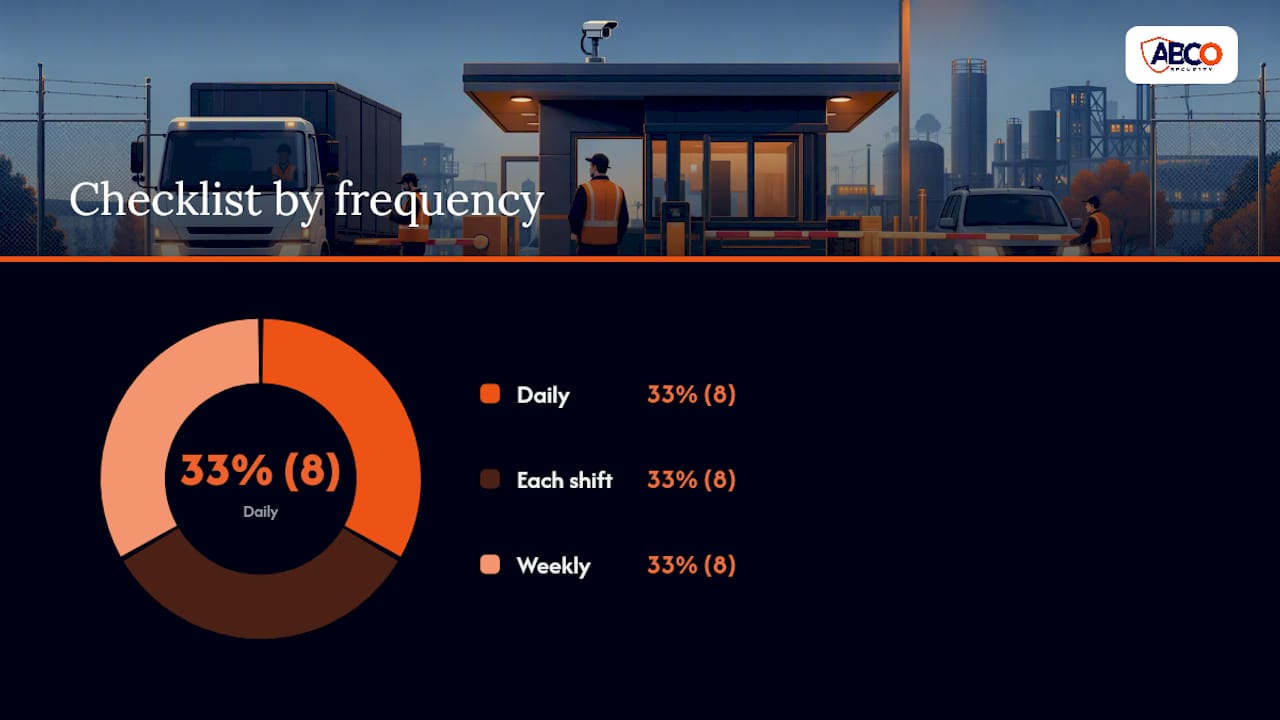
24-point daily, shift and weekly checklist:
Daily (start of shift):
- CCTV feeds live and timestamped correctly
- Recorder storage adequate
- Badge readers tested and functional
- Gate motors operational
- Alarm panel clear of faults
- Visitor log current from previous shift
- Vehicle log current from previous shift
- Handover record signed
Each shift:
- Every visitor logged with all required fields
- Every vehicle logged with all required fields
- Every incident reported and logged
- All radio communications logged
- Two-hourly CCTV check completed and logged
- Escalation contacts confirmed available
- Visitor badges accounted for (issued vs. returned)
- No unauthorised persons in restricted zones
Weekly:
- Equipment log reviewed by supervisor
- Visitor and vehicle logs reviewed for completeness
- Incident reports filed and forwarded to site management
- SOP version confirmed current
- Staff licences checked for currency
- Drill schedule reviewed
- Access control system audit log reviewed
- Consumables (badge stock, log books, PPE) replenished
Tailoring notes for high-risk sites: Construction sites should add a daily induction check (confirming all workers have completed site induction before entry) and a plant and equipment register. Healthcare sites should reference AS 4485.1:2021 for additional procedural requirements specific to hospital and health facility security, including patient and visitor management protocols. For construction site security management, vehicle screening is particularly critical given the volume of deliveries and the value of plant on site.
What Abcosecurity has observed: the six most common gatehouse failures
The same six failures appear across sites regardless of industry. They are not caused by bad officers; they are caused by SOPs that were never tested, equipment that was never maintained, and handovers that were never formalised.
1. Incomplete visitor and vehicle logs
Officers skip fields under time pressure, particularly during peak entry periods. The quick fix is a laminated log template on the counter that makes every required field visible. The medium-term fix is a digital visitor management system that makes incomplete entries impossible to submit.
2. Broken badge readers left unrepaired
A faulty reader gets a workaround (propping the door, manual override) that becomes permanent. The quick fix is a fault-reporting form that triggers a maintenance call within 24 hours. The medium-term fix is a preventative maintenance contract with a defined response time SLA.
3. Handovers that cover nothing
The outgoing officer says “all quiet” and leaves. The incoming officer discovers three open incidents in the log. The quick fix is the signed handover checklist above, made mandatory before the outgoing officer can clock off. The medium-term fix is supervisor sign-off on every handover.
4. Unclear escalation paths
Officers know to call their supervisor but do not know who to call when the supervisor is unavailable, or which incidents require police notification. The quick fix is a laminated escalation matrix at the console. The medium-term fix is a quarterly tabletop exercise that rehearses escalation decisions.
5. CCTV blind spots that nobody has mapped
Cameras are installed and never reviewed for coverage gaps. A vehicle parks in a spot the cameras cannot see, and nobody notices until an incident occurs. The quick fix is a coverage audit: walk the perimeter and mark every blind spot on a site map. The medium-term fix is a camera placement review against the security systems with cameras guidance and, where needed, additional cameras or repositioning.
6. Inconsistent vehicle checks
Familiar drivers get waved through without a log entry. The quick fix is a rule: no vehicle enters without a log entry, no exceptions. The medium-term fix is a gate barrier that physically prevents entry until the officer completes the log entry in the system.
Abcosecurity’s gatehouse security services: from SOP to ongoing support
Abcosecurity delivers end-to-end gatehouse security for Australian sites across construction, healthcare, corporate and government sectors. The difference between a generic guard company and Abcosecurity is the structured approach, including site audit, SOP customisation, staff training and competency verification, and ongoing monitoring and support.
The process starts with a site assessment that identifies access control gaps, equipment deficiencies and SOP weaknesses. Abcosecurity then authors or refines your gatehouse SOPs to align with CPPSEC2109 competency requirements and the relevant Australian standards. Licensed gatehouse officers are supplied, trained to your site-specific procedures, and supported by 24/7 monitoring through Abcosecurity’s operations centre. For construction environments, the construction site security technology guide outlines the integrated technology options available. For healthcare, Abcosecurity’s healthcare security services address the additional procedural requirements of patient and visitor management.
Request a site assessment at Abcosecurity and have a security coordinator review your current gatehouse procedures within 48 hours.
Sources
The following standards and training units are the primary compliance references for Australian gatehouse operations.
- National Training Register – CPPSEC2109 Monitor and control access and exit of persons and vehicles from premises
- Electronic Security Standards | ASIAL
- AS 4421:2023 PDF_Guard and patrol security services
- Security Guard Gatehouse Duties
Essential reading by role: Gatehouse officers need CPPSEC2109 and familiarity with the site’s SOP. Operations and technical teams need the AS/NZS IEC 60839 series and AS/NZS 2201. Site and security managers need AS 4421 as their governance reference. Healthcare sites add AS 4485.1.
FAQ
What does a gatehouse security officer do?
A gatehouse security officer controls who enters and exits a site by verifying identity, checking vehicle manifests, monitoring CCTV and alarm systems, maintaining visitor and vehicle logs, and responding to emergencies. Gatehouse duties also include managing deliveries, escalating incidents and completing shift handovers.
What training does a gatehouse officer need in Australia?
Gatehouse officers must hold a current state or territory security licence and should hold the CPPSEC2109 unit of competency, which covers access control, ID verification, vehicle inspection and SOP compliance. Licence currency must be verified against the relevant state licensing authority.
What is a security gatehouse?
A security gatehouse is a staffed entry point that controls access to a site, typically combining a physical barrier (gate or boom gate), an officer post, and electronic systems such as badge readers and CCTV. It serves as the primary access control, communications and emergency coordination point for the site.
What Australian standards apply to gatehouse security systems?
The key standards are AS/NZS IEC 60839.11.1:2019 for electronic access-control hardware, the AS/NZS 2201 series for alarm and monitoring systems, and AS 4421:2023 for guard service governance. Healthcare sites should also reference AS 4485.1:2021.
How often should gatehouse security procedures be tested?
Tabletop exercises should run quarterly, evacuation and lockdown drills every six months, system failover tests annually, and a third-party audit at least once per year or after any significant incident. All drill results must be documented and used to update the SOP.
Recommended
about
avada factory
Sempery ultricies nibh at dolor cras urna eleifend nec. Atiam efficitur tempor.