Access control comes in three layers, and you choose one option from each. The permission model decides who is allowed in. The credential and reader decide how people prove it. The system setup (standalone, networked or cloud-managed) decides where decisions are made and who administers them. For most Australian sites, the right answer is a role-based model, a secure card or mobile credential, and a networked or cloud-managed system with local fallback at the door. At ABCO Security we install and support electronic security, including access control, and we work these choices through with site managers before any hardware is specified.
TL;DR
- There are four permission models: discretionary (DAC), mandatory (MAC), role-based (RBAC) and attribute-based (ABAC). Most commercial sites run on RBAC.
- Methods of entry include cards, fobs, PINs, QR codes, biometrics and phones. Credentials can be combined for higher-risk doors.
- Reader type sets your security level. A cheap, old proximity card is a weaker choice than an encrypted smart card or mobile credential.
- Standalone suits a single simple door. Networked or cloud systems suit sites that need logs, schedules, named users and several doors.
- Match the setup to the site: construction, healthcare, office, event and retail doors each have different priorities.
Table of Contents
- What access control actually is
- The four permission models
- Access control methods: how people prove who they are
- Access control reader types
- Standalone, networked and cloud-managed systems
- Matching the type to your site
- Questions to settle before you ask for quotes
- Our view on access control
- How ABCO Security can help
- FAQ
- Sources
What access control actually is
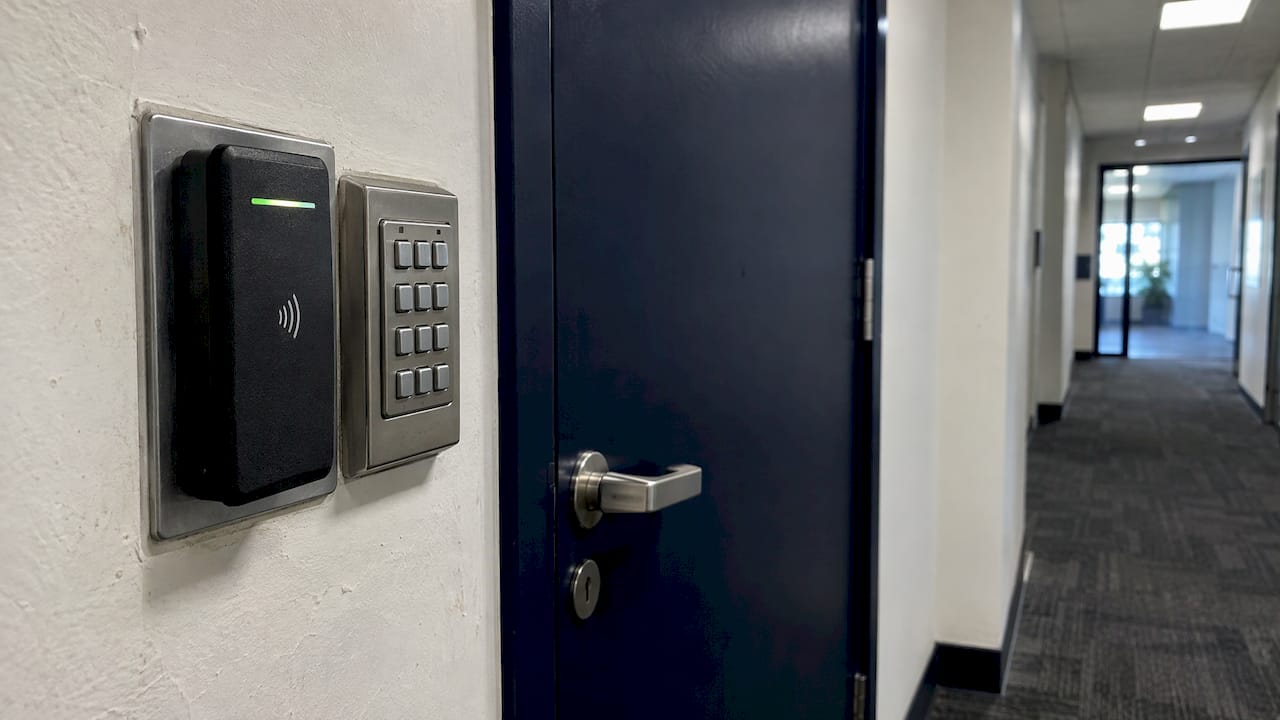
Access control is the set of rules and equipment that decide who may pass through a door, gate, lift or room, and when. The Security Industry Association, a US trade body, describes a physical access control system as technology that monitors and enforces physical security to prevent unauthorised access to specified areas. The same guide lists the basic parts: a credential, a reader, a locking device, a door-position switch, a request-to-exit device and a controller.
In plain terms:
- Credential: what the person presents (card, fob, phone, PIN, fingerprint).
- Reader: the device at the door that reads the credential.
- Controller: the unit that checks the credential against the rules and tells the lock what to do.
- Lock: the magnetic lock, electric strike or similar that physically secures the door.
- Door-position switch and request-to-exit device: these tell the system whether the door is shut and let people leave without setting off an alarm.
The reason to move beyond keys is accountability. The same guide notes that administrators can change access levels quickly and cancel credentials after a staff change or a lost credential, which a metal key cannot do. If you are weighing the two, our comparison access control versus keys sets out the trade-offs for Australian sites.
The four permission models
When search results talk about “types of access control”, most of them mean these models. They describe the logic behind who gets in, not the hardware.
Discretionary access control (DAC)
The owner of a resource decides who may use it. Microsoft describes DAC as letting object owners grant access at their discretion. It is flexible, which suits a small team where one manager knows everyone. It becomes hard to manage as numbers grow, because every decision sits with an individual and there is no central rulebook.
Mandatory access control (MAC)
A central authority assigns each person a clearance and organises rights into tiers. Microsoft notes MAC is common in government and military contexts. Individual managers cannot hand out exceptions. It is the strictest model and is rarely needed outside high-security facilities.
Role-based access control (RBAC)
Rights are granted by job function rather than by person or seniority. Microsoft describes RBAC as granting rights by defined business function. A site electrician gets the switchboard room, a nurse gets the ward, a cleaner gets the floors they service. When someone changes jobs, you change their role and every door follows. This is the model most commercial buildings, construction sites and healthcare facilities use, and the one we usually recommend as the starting point.
Attribute-based access control (ABAC)
Access depends on attributes and conditions such as time, location or device. Microsoft calls it the most granular model. An example: a contractor can enter the loading dock only between 6 am and 4 pm on days their induction is current. ABAC is powerful, but it needs clean data about people and sites to work well.
Which model fits you
| Model | Who decides | Best for | Management effort |
|---|---|---|---|
| DAC | Resource owner | Very small teams, one or two doors | High as you grow |
| MAC | Central authority | Government and high-security areas | High, strictly controlled |
| RBAC | Role definitions | Offices, hospitals, construction, retail | Moderate, scales well |
| ABAC | Rules on attributes | Multi-site, contractor-heavy, time-limited access | Higher set-up, low ongoing |
Most sites do best with RBAC and a few time-based rules borrowed from ABAC, such as restricting contractor access to working hours.
Access control methods: how people prove who they are
The method is the credential a person presents. Common options include cards, key fobs, mobile credentials, PINs, QR codes and biometrics, and they can be used alone or combined, for example a PIN plus a card for a sensitive room.
Cards and fobs. Still the most common. They are quick to issue and cheap to replace. Their security depends heavily on the card technology (see the reader section below).
PIN codes. A keypad needs no physical item, which suits low-risk doors. The weakness is that codes get shared. A PIN works best as a second factor alongside a card.
QR codes. Useful for visitors, event ticketing and one-off deliveries, because a code can be sent to a phone and expire after use.
Biometrics. Fingerprint or face readers tie entry to the person rather than to something they carry. They suit areas such as medication stores or server rooms where credential sharing is a real risk.
Mobile credentials. Phones and watches act as the card. FM Magazine reported in August 2026 that a Melbourne tower, 101 Collins Street, uses mobile credentials in digital wallets for entry, lifts and smart lockers, and that tenants can tap a phone or smartwatch without opening an app. The lesson for building managers is that a phone credential can serve as one pass across the whole tenant experience, not only the front door. Our page on mobile access credentials goes into what security managers need to plan for.
Multi-factor entry
Combining two methods, such as card plus PIN or phone plus fingerprint, is the simplest way to lift security on a few critical doors without making the whole site slow. Reserve it for pharmacies, cash rooms, comms rooms and plant areas, and keep single-credential entry on general doors so people are not queuing.
Access control reader types
The reader is where the credential meets the system, and it largely sets how hard your system is to defeat. These are the types you will see in a quote.
- RFID (proximity and smart card) readers: read contactless cards or fobs. They come in low-frequency (125 kHz) and high-frequency (13.56 MHz) forms, and some support UHF for longer-range reading, for example of vehicle tags.
- NFC readers: work with compatible cards and with phones held close to the reader.
- Keypad readers: take a PIN.
- QR readers: use a camera to read a code from a phone screen or paper.
- Bluetooth readers: work with smartphones from a short distance, so a person does not need to tap.
- Biometric readers: read fingerprints or facial features.
- Multi-technology readers: accept several card types and mobile credentials in one unit, which helps when you are migrating from an old card system to a newer one.
Why the card technology matters more than the reader’s look
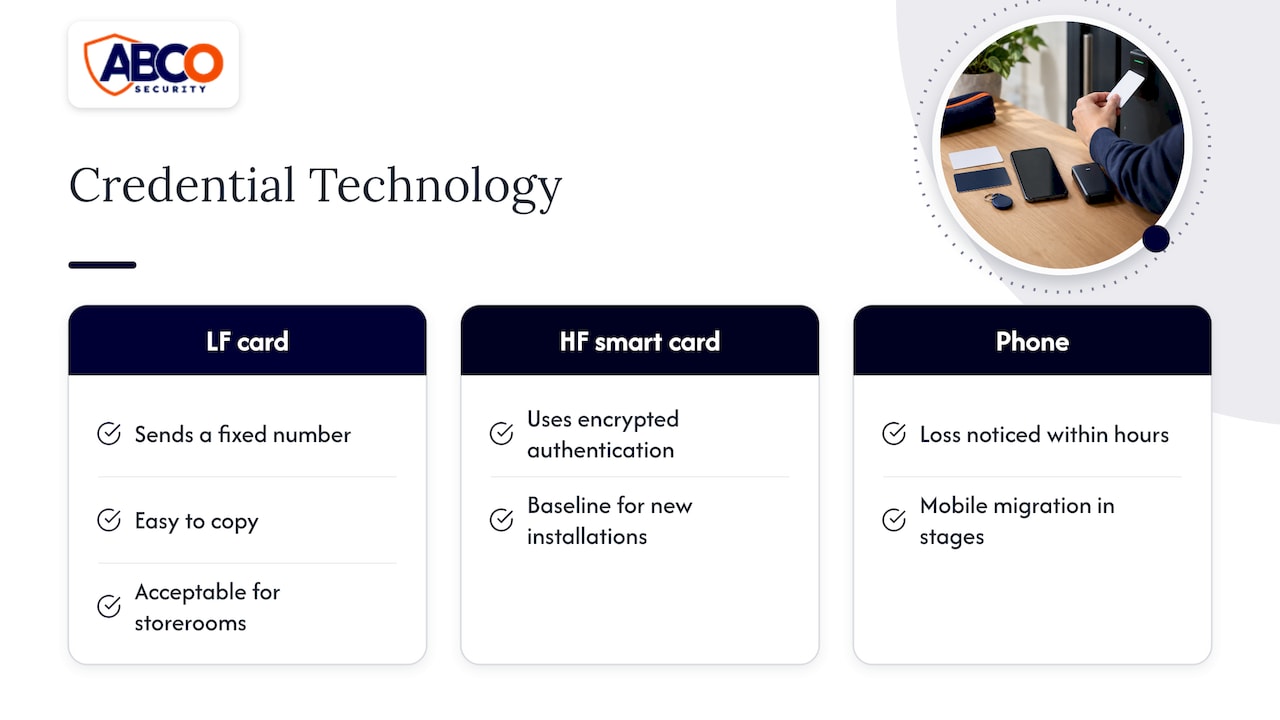
Older low-frequency proximity cards send a fixed number to the reader, which makes them easy to copy. They are acceptable for a low-risk door such as a storeroom but are a poor choice for anywhere you care about. Modern high-frequency smart cards use encrypted authentication, and they are the sensible baseline for new installations. Phone credentials add a further benefit: a lost phone is noticed within hours, a lost card often is not.
Two specification points save money later. First, settle the credential type and how the reader talks to the controller before choosing the reader housing, because those choices decide security and compatibility. Second, check that a reader which supports a secure card is actually configured to use the secure mode. Support on the datasheet is not the same as a secure setup, and the system should not fall back to reading only a card’s basic ID number when authentication fails.
If your site already has cards, ask your installer which technology they are and whether a multi-technology reader lets you move to mobile credentials in stages. Our electronic security solutions team can assess existing readers and recommend what to keep and what to replace.
Standalone, networked and cloud-managed systems
This layer is about where the decision is made and how you manage it.
Standalone. The door device makes the access decision locally. It suits a simple door with few users and little expected growth. The cost is administration: someone has to visit each door to add or remove people, and there is little or no audit trail.
Networked. Doors connect to a controller and management software. This fits sites that need logs, schedules, named users or several coordinated doors, such as a hospital or an office with multiple tenants.
Cloud-managed. Management moves to a hosted platform. IPVM, the security research publisher, reports that cloud was the top trend cited by integrators in 2024, with over 40% naming it the most important market development and more than half offering cloud platforms. It also reports that cloud pricing is typically subscription-based at $5 to $20 per door per month, whereas on-premise software is typically a one-time licence.
Cloud or on-premise: the decision that shapes the project
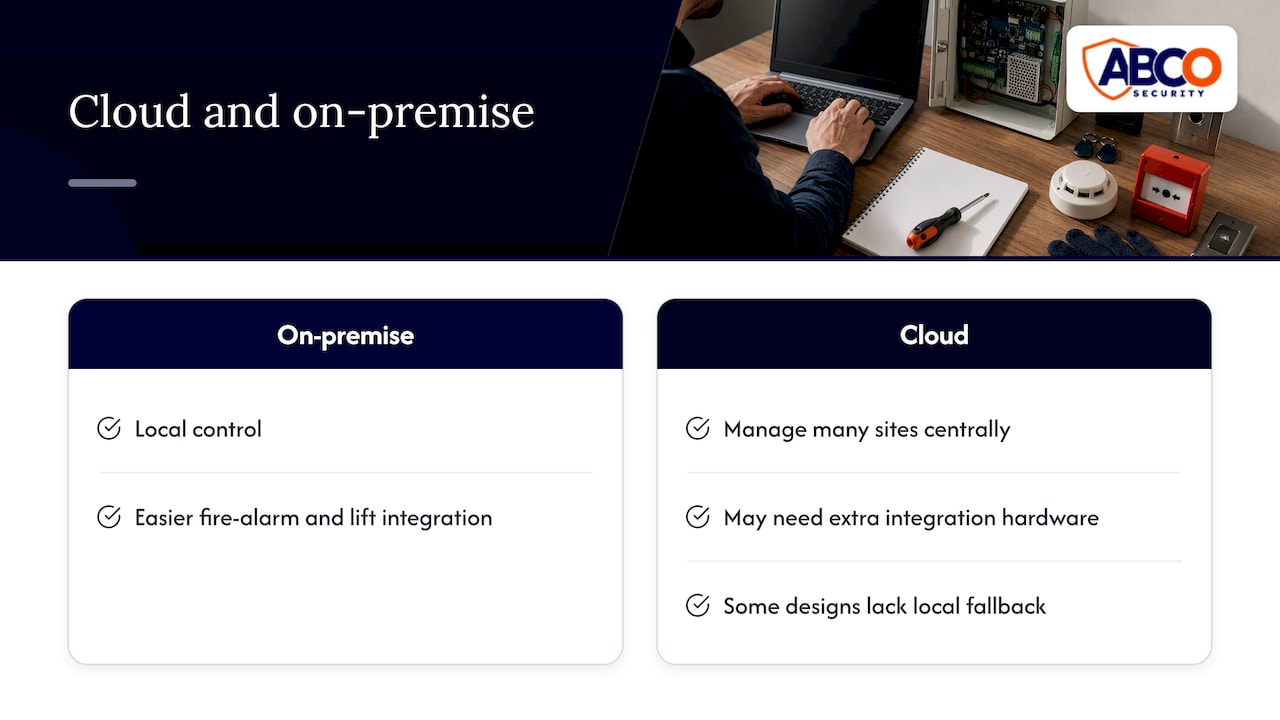
IPVM calls the choice between cloud and on-premise the most consequential management decision. On-premise gives local control and is easier to integrate with fire alarms and lift controls, where cloud may need extra hardware and add delay in time-sensitive relay operations. Cloud wins for managing many sites from one place. IPVM also warns that some cloud designs send every access decision through the cloud with no local fallback, which creates a life-safety exposure, so specify that doors must keep working if the internet drops.
Two practical consequences follow. Write the deployment model into your tender, because IPVM notes that leaving it out can produce bids that cannot be compared. And plan the integrations early. Our technical guide to access control integrations covers how access control links to alarms, cameras and building systems. If your doors will also draw on a staff directory, the choice of identity platform feeds in, and this Okta and Microsoft Entra ID comparison helps with that decision.
Matching the type to your site
Different sites weigh the same options differently.
Construction sites
People and trades change constantly, and temporary fencing, gates and site sheds are the access points. Priorities are fast issue and cancellation of credentials, a record of who is on site (useful for safety and for theft investigations), and gear that tolerates dust, weather and being moved. RBAC by trade and induction status works well. Pair gate control with guarding or patrols so that someone responds when an alert is raised. See our construction site security services and our guide to tool theft prevention with check-in and locked storage.
Healthcare facilities
Patient safety drives the design: controlled wards, medication and records rooms, and after-hours entry, with staff able to move quickly in emergencies. Use RBAC by role and ward, multi-factor on medication stores, and make certain doors fail safe so people can always exit. Networked or on-premise systems with local decision-making at the door suit the time-critical nature of the work.
Corporate offices
Tenants, visitors, cleaners and after-hours staff all need different access. Mobile credentials, lift integration and visitor QR codes fit well, as the Collins Street example shows. Our guide to choosing access control for office buildings goes deeper.
Events
Temporary venues need credentials that can be issued in bulk and expire: wristbands, tickets with QR codes, and staff or contractor passes by zone. Access control works with crowd control, so the people at the gates matter as much as the readers. See our events security offer.
Retail
The focus is back-of-house: stockrooms, offices and loading docks. A card or PIN plus a log of who opened what is usually enough, and it gives you a record when stock goes missing. Our guide to access control for small business covers sizing for smaller premises.
Questions to settle before you ask for quotes
- Which doors matter most? Rank them. Put secure credentials and multi-factor on the top few.
- How often do people change? High turnover (contractors, casuals) points to networked or cloud management and quick credential cancellation.
- Will the system work if the network fails? Doors should keep making decisions locally.
- What must it integrate with? Fire panels, lifts, CCTV and alarms all affect the deployment model.
- Who watches the alerts? A forced door is only useful information if someone acts on it.
- How will you grow? Choose readers that accept more than one credential type so you are not locked into today’s card.
Our complete guide to access control systems in Australia and the business guide to access control systems cover these in more depth.
Our view on access control
We have more than 15 years in security, and our view is that access control works best as part of a whole security plan, not as a box on a wall. A reader that logs an after-hours entry is only valuable if someone sees it and responds.
That is why we treat access control, CCTV, alarm monitoring and licensed guards or patrols as one system. Our work is built around a proactive approach, with 24/7 operations across Australia, so an alert from a door can be matched by a camera and followed by a person.
We work to ISO 9001 and ISO 30000 standards, which shapes how we assess risk before we recommend any equipment. For most of our clients that means starting with role-based access, secure credentials and doors that keep working without the network, then adding mobile credentials and integrations as the site grows.
The right type is the one that fits your doors, your people and your risks, so we begin with a security risk assessment rather than a product list.
Abco
How ABCO Security can help
We design, install and support electronic security for construction sites, healthcare facilities, corporate offices, events and retail businesses across Australia, and we back it with licensed guards, mobile patrols and monitoring. If you want a recommendation on models, credentials and readers for your site, start with our electronic security solutions page.
For sites that want alerts watched around the clock, our CCTV and alarm monitoring pairs with access control so that a forced or held-open door gets a response.
FAQ
What are the main types of access control?
The four permission models are discretionary, mandatory, role-based and attribute-based access control. Most commercial and industrial sites use role-based access, because rights follow job function and are easy to update when people move. You then add a credential type and a system setup on top.
What are the types of card readers?
The common ones are RFID proximity and smart card readers, NFC readers, keypads, QR readers, Bluetooth readers and biometric readers. Multi-technology readers accept several card types and phone credentials in one unit, which makes staged upgrades easier.
Which access control method is most secure?
Security comes from combining a secure credential with a second factor on critical doors, such as an encrypted smart card or phone plus a PIN or fingerprint. Biometrics tie entry to the person, and secure smart cards and mobile credentials resist copying better than older proximity cards.
Is cloud-based access control better than on-premise?
It depends on your sites. Cloud makes multi-site management simpler and is typically priced per door per month, while on-premise gives tighter local control and easier links to fire and lift systems. Whichever you choose, specify that doors keep working if the internet connection is lost.
Sources
- The Basics of Physical Access Control, Security Industry Association (2024)
- What Is Access Control? Microsoft Security
- Future-proofing access: what building managers can learn from 101 Collins, FM Magazine
- Access Control Specification Guide, IPVM
Recommended
about
avada factory
Sempery ultricies nibh at dolor cras urna eleifend nec. Atiam efficitur tempor.