
An access control audit verifies that who has access matches policy, and that lifecycle evidence exists to prove it. If you’re an auditor, security lead, or compliance manager staring down a review cycle, the first action is simple: scope your systems, physical zones, and time period before you touch a single spreadsheet.
TL;DR:
- Scoping the entire system inventory, physical zones, and review period before collecting evidence is crucial to an effective audit.
- Auditors must gather comprehensive proof for each sampled identity, including access requests, approvals, timestamps, and attestations, especially for service accounts.
- Combining role-based and list-based controls requires checking role documentation, ownership, and signs of sprawl or overlapping permissions during the audit.
- Running a three-sample full access lifecycle review early reveals documentation gaps and helps set realistic evidence expectations.
- Shifting to continuous, event-triggered reviews reduces entitlement creep and improves audit outcomes over traditional annual cycles.
Table of Contents
- What is an access control audit, and how do you conduct one?
- What evidence do auditors need to gather, and where do service accounts fit?
- RBAC vs ACL: which governance model should you audit against?
- How should auditors sample and test access records?
- How do you turn audit findings into fixes that actually happen?
- What tools and templates make audits faster without cutting corners?
- ABCO Security’s practitioner resources for auditors
- What auditors keep missing, and the habit that fixes it
- Get audit-ready with Abcosecurity’s on-site verification
- Sources
- FAQ
What is an access control audit, and how do you conduct one?
A professional access control audit follows a defined sequence: scope the review, document the access model, trace joiner‑mover‑leaver events, sample access records, evaluate severity, and formalise a remediation plan with named owners and dates, according to the Western Australia audit office’s better practice guide. That sequence sounds tidy on paper. In practice, most of the value comes from getting the scoping and evidence-gathering stages right, because everything downstream depends on them.
Here’s the checklist we run at Abcosecurity, adapted for any organisation conducting its own internal review or preparing for an external one.
- Define scope. List every system, application, directory service, and physical zone in play, plus the time period under review (usually 12 months, sometimes tied to a compliance cycle).
- Identify stakeholders and data owners. Every system needs a named owner who can speak to who approved what and why.
- Record approvals. Pull the change management or ticketing records that show who signed off on each access grant.
- Collect exports. Gather user lists, role maps, group memberships, and access logs from each in-scope system. Don’t accept a screenshot when a raw export is available.
- Trace joiner‑mover‑leaver lifecycle early. Pick at least three sample identities and follow their entire access history before you do anything else. This surfaces gaps in documentation faster than any other single step.
- Test high-risk categories. Privileged accounts, emergency access (“break glass”) credentials, segregation of duties (SoD) conflicts, and orphaned accounts belonging to departed staff all deserve dedicated attention.
- Classify findings by severity, assign an owner to each, and set a remediation deadline.
A few things trip up even experienced auditors at this stage:
- Treating documented policy as ground truth, when written policy and day-to-day provisioning practice regularly diverge, per the WA audit office’s findings.
- Skipping physical access zones because the audit brief mentions only “systems.”
- Assuming a clean access list means a clean control, when the real test is whether the access was ever properly requested and approved.
Abcosecurity’s own security audit checklist walks through a test-first walkaround structure you can adapt for either a physical site or a hybrid environment. Use it as a starting skeleton, then tailor the scope items to your actual system inventory.
What evidence do auditors need to gather, and where do service accounts fit?
An access grant without a paper trail is functionally unauditable, even if the account itself is configured correctly. Auditors expect a specific evidence pack for every sampled identity, and missing even one piece often converts a control from “passed” to “failed” regardless of what the technical access list shows, according to the WA audit office’s guidance.
Your evidence pack for each sample should include:
- The original access request record
- A documented business justification
- The identity of the approver
- The assignment timestamp
- A periodic attestation or, where relevant, a revocation note
Non-human identities deserve their own line item, not an afterthought. Service accounts, API keys, and automation credentials are frequently excluded from audit scope entirely, and that’s exactly why they’re high-risk. Demand a full inventory of these identities and check whether they use short-lived credentials or just-in-time elevation rather than static, unexpiring keys, a point emphasised in NIST and OWASP guidance on non-human identities.
Pro Tip: Run a three-sample evidence sprint during planning, not execution. Trace three random users’ complete access lifecycle from request to current state before you scope the full audit. It routinely surfaces the documentation gaps that a larger, later sample would miss, and it tells you upfront whether your evidence pack requirements are realistic for this organisation.
Don’t skip the lookback on revoked accounts either. Check whether access was actually removed on the date claimed, and whether any activity occurred on the account after revocation. A termination date on a spreadsheet means nothing if the account was still logging in three weeks later.
RBAC vs ACL: which governance model should you audit against?
Most organisations run a mix of both, and knowing which one governs a given system changes what “good” looks like during testing.
Role-based access control (RBAC) assigns permissions to job roles rather than individuals, and it scales governance because you review a manageable number of roles instead of thousands of individual grants, as IBM’s explanation of RBAC lays out. Access control lists (ACLs) attach permissions directly to specific objects or resources, which makes them useful for narrow exceptions but hard to govern at scale. NIST’s definitions treat RBAC and least-privilege as the default acceptance criteria most auditors test against, and for good reason: role sprawl is easier to spot and easier to fix than a thousand one-off ACL entries.
When auditing an RBAC environment, check:
- Whether role definitions are documented and current
- How role-to-user mapping is maintained and by whom
- Signs of role explosion (dozens of near-identical roles created for one-off exceptions)
- Whether each role has a named business owner
When auditing ACLs, check:
- Individual access control entries (ACEs) on sensitive objects
- How conflicting or overlapping ACEs get resolved
- Whether the sheer volume of entries has made the list effectively unauditable
Access sprawl often traces back to using ACLs where a role should have been created instead. The IT Start team makes a similar case in their piece on RBAC’s role in small and medium business security, noting that role-based structures cut down the administrative overhead that lets exceptions pile up unnoticed.
Physical access controls need their own checklist. Review reader maps against floor plans, trace the credential lifecycle from issue to deactivation, check visitor sign-in workflows against actual entry logs, and reconcile door event logs with rostered site access. The “5 Ds” framework, deny, delay, detect, deter, and design, gives a useful lens for auditing perimeter security, as outlined by Security Magazine. Abcosecurity’s access control policy guide covers what a defensible physical access policy actually looks like for facility managers.

How should auditors sample and test access records?
Sampling strategy determines whether your audit findings hold up under scrutiny or collapse the moment someone asks “how many accounts did you actually check?”
- Run the joiner‑mover‑leaver trace end to end. For each sampled identity, verify the initial request and approval, confirm role changes were re-approved (not just carried over), and confirm access was revoked on or before the actual departure date.
- Choose random sampling for baseline assurance, and risk-weighted sampling when you need to prove controls hold up where it matters most, privileged accounts, financial systems, or anything tied to regulatory scope.
- Script your tests before you start. A privileged access attempt test, an emergency access activation test, and a segregation-of-duties scenario test each need a defined pass/fail criterion written down in advance.
- Corroborate claims with logs. Cross-check assignment records against SIEM exports and system timestamps rather than trusting a spreadsheet in isolation.
The ISACA user access review guide sets out a similar sequence: define scope, collect access data, compare against policy, run stakeholder attestations, and document remediation. The attestation step is where a lot of audits go soft, because a manager clicking “approve” on a list of forty names without reading it isn’t really an attestation. Build a verification question into the process, not just a signature line.
How do you turn audit findings into fixes that actually happen?
An audit that ends with a findings document and no owner is a wasted exercise. Every finding needs a severity rating, a named owner, and a deadline that someone actually tracks.
A workable severity structure looks like this:
- Critical: privileged or emergency access with no approval record, active access for a departed employee, or an orphaned service account with standing credentials. Fix within days, not weeks.
- High: SoD conflicts, stale roles with excessive permissions, or missing attestations on sensitive systems. Fix within 30 days.
- Medium: documentation gaps on lower-risk systems, minor role sprawl. Fix within 90 days.
- Low: process improvements with no immediate exposure. Track for the next review cycle.
Organisations that shift from annual, point-in-time reviews to continuous, event-triggered reviews (on role change, termination, or first access to a high-risk system) tend to catch entitlement creep before it compounds, according to research on continuous versus annual review cycles. That shift alone often reduces the volume of critical findings in the next audit cycle.
Your executive summary should cover four things: the residual risk if nothing changes, the business impact of each critical and high finding, the remediation plan with dates, and the residual risk expected after remediation lands. Boards and executives read the summary, not the appendix, so don’t bury the one finding that matters on page 14.
What tools and templates make audits faster without cutting corners?
Automation speeds up evidence collection and cuts human error, but it isn’t a substitute for manual verification, particularly where system exports are inconsistent or incomplete, as Red Hat’s overview of access control points out.
Useful tool categories include IAM consoles for user and role exports, privileged access management (PAM) platforms for high-risk accounts, SIEM or logging platforms for corroborating timestamps, visitor management exports for physical sites, and HR systems as the source of truth for joiner and leaver dates.
Templates worth building once and reusing every cycle:
- An evidence pack checklist (request, approval, assignment, review)
- A remediation tracker with owner and deadline columns
- A stakeholder attestation form with a genuine verification question
- Sample test scripts for privileged access, emergency access, and SoD scenarios
Abcosecurity’s access control integrations guide covers practical export and validation patterns for teams running mixed on-premises and cloud systems.
ABCO Security’s practitioner resources for auditors
Abcosecurity has spent more than 15 years running security programs across construction, healthcare, and corporate sites, holding ISO 9001 and ISO 30000 accreditation as evidence of a structured, repeatable approach to security management rather than an ad hoc one.
That experience shapes what we build for clients preparing for their own reviews:
- A reusable access control policy template built for facility managers, not just IT teams
- A security audit checklist covering both physical and system-level walkarounds
- A key management policy guide for organisations still relying on physical credential lifecycles
Clients who move from reactive to proactive security management, including structured access reviews, consistently report fewer incidents and better audit outcomes over time. Start with our templates rather than building a checklist from scratch.
What auditors keep missing, and the habit that fixes it
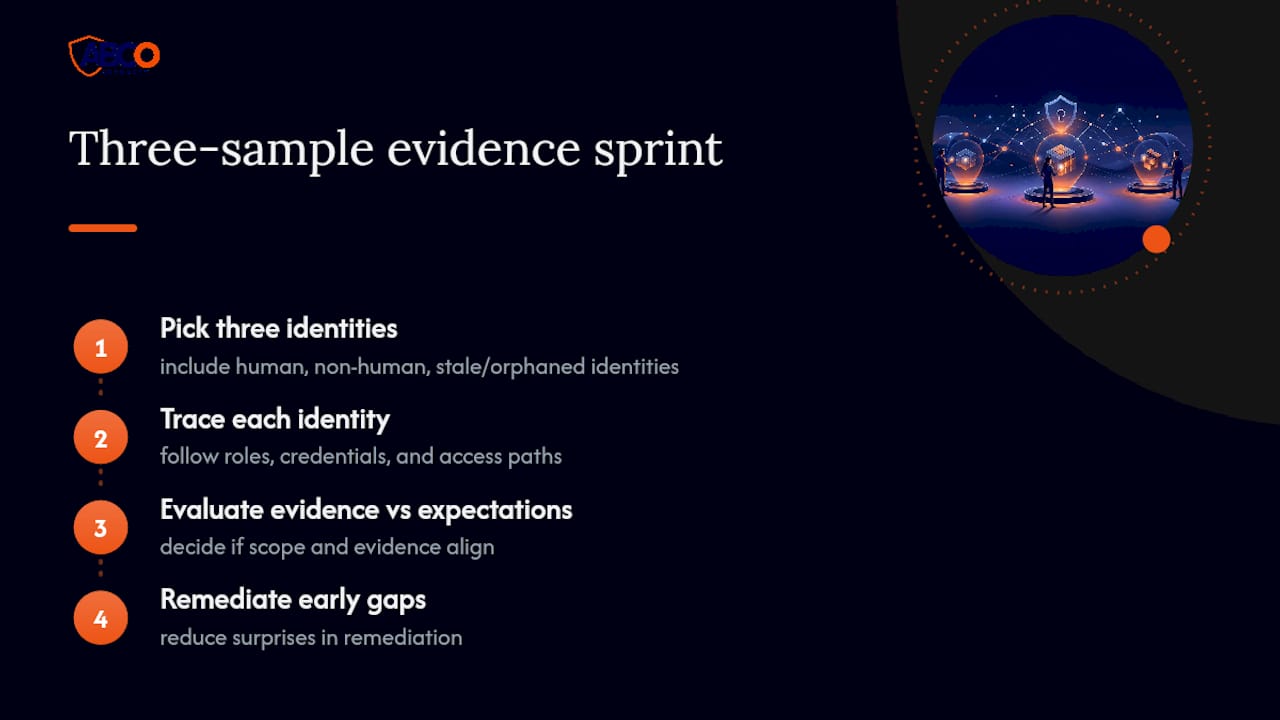
Non-human identities, stale roles nobody’s touched in two years, and orphaned credentials from contractors who left eighteen months ago. These three blind spots show up in nearly every audit we’ve reviewed, and they’re rarely deliberate. They’re just what happens when reviews stay superficial.
The fix isn’t a bigger sample size. It’s the three-sample evidence sprint, run early, before you’ve committed to a scope that can’t flex. Trace three identities completely, and you’ll know within a day whether your evidence expectations match reality. That single habit tends to shrink the surprises found during remediation, because you’ve already found the gaps that matter before the full review even starts.
— Abco
Get audit-ready with Abcosecurity’s on-site verification
Abcosecurity runs the evidence-gathering and remediation-tracking work most internal teams don’t have the hours for, scoping systems and physical zones, pulling and reconciling exports, and verifying credential lifecycles on-site rather than trusting a spreadsheet.
Where an internal-only review often stalls at the documentation stage because nobody owns the follow-through, our licensed teams handle the physical verification, walking site perimeters, checking reader maps against floor plans, and confirming visitor logs match actual entry records, alongside the systems-side evidence work. That combination is hard to replicate with a spreadsheet and good intentions alone. If you manage a construction site, healthcare facility, or corporate campus and want a second set of eyes on your access controls before your next compliance deadline, request a security risk assessment and we’ll scope the review with you.
Sources
- Western Australia audit office — digital identity and access management better practice guide
- IBM — RBAC explanation
- NIST glossary — role-based access control
- ISACA — user access review verification guide (2024)
FAQ
What are the five steps of access control?
Most frameworks describe access control as identification, authentication, authorisation, accountability, and audit, covering how a system confirms who someone is, decides what they can do, and records what actually happened.
What are the seven main categories of access control?
Common categorisations include directive, deterrent, preventive, detective, corrective, compensating, and recovery controls, each describing a different function in preventing or responding to unauthorised access.
What are the five D’s of access control?
The five D’s, deny, delay, detect, deter, and design, are a physical perimeter security framework used to structure how a site layers its defences, from fencing and lighting through to monitored entry points, as described by Security Magazine.
What is the difference between ACL and RBAC?
RBAC assigns permissions to job roles and scales well for governance and reviews, while ACLs attach permissions to individual objects and suit narrow, one-off exceptions, according to IBM’s explanation. Most mature environments use RBAC as the baseline and reserve ACLs for genuine exceptions to keep the whole system auditable.
How often should an organisation run an access control audit?
Annual audits remain common for compliance purposes, but event-driven reviews triggered by role changes, terminations, or first access to high-risk systems catch entitlement creep faster than a once-a-year cycle alone.
Recommended
about
avada factory
Sempery ultricies nibh at dolor cras urna eleifend nec. Atiam efficitur tempor.