

A physical access control policy is a documented set of rules that determines who may enter a building, room or site, how their identity is verified before access is granted, and how every access event is logged and revoked when no longer authorised. For Australian facilities, a defensible policy must reference the Australian Government Protective Security Policy Framework (PSPF), align with AS/NZS IEC 60839.11.1:2019 for electronic access control systems (EACS), and specify SCEC-approved hardware for higher-security zones.
At minimum, your policy must cover:
- Scope: which sites, buildings, rooms and assets are governed
- Security zones: a zone map (Zones 1–5) with controls scaled by assessed business impact
- Credential rules: how credentials are issued, verified, activated and revoked
- EACS audit requirements: what logs are kept, how long, and who reviews them
- Incident response: how access breaches are escalated and contained
Key takeaways
A defensible Australian physical access control policy requires zone-mapped controls, a documented credential lifecycle, EACS aligned to AS/NZS IEC 60839.11.1:2019, and a quarterly audit schedule.
| Point | Details |
|---|---|
| Zone-based controls | Assign Zones 1–5 by assessed business impact; EACS is required for Zones 3–5. |
| Credential lifecycle | Issue, verify (minimum Identity Proofing Level 3 for high-security zones), review quarterly and revoke immediately on role change. |
| EACS standards | Specify AS/NZS IEC 60839.11.1:2019 grade in every procurement contract; include mechanical backup for Zones 3–5. |
| Visitor and contractor rules | Escort is mandatory in Zones 3–5; retain visitor registers for a period consistent with your agency’s records management obligations. |
| Abcosecurity | Provides end-to-end site audit, EACS installation, alarm integration and 24/7 monitoring across Australia. |
Table of Contents
- What do access control policies actually cover?
- Which Australian standards must your policy reference?
- How do security zones shape your physical access rules?
- How should credentials be issued, managed and revoked?
- What must your EACS policy clauses specify?
- How do you manage visitors and contractors safely?
- Protecting ICT rooms and server infrastructure
- Incident response, lockout and audit schedules
- How to implement your policy: checklist and cost drivers
- How Abcosecurity supports access control implementation
- What most managers get wrong about access control
- Ready to assess or implement your access control policy?
- Sources
- FAQ
What do access control policies actually cover?
A physical access control policy applies to every person who enters or attempts to enter a controlled site: permanent staff, contractors, temporary workers, visitors and event attendees. It covers all buildings, rooms, server rooms, storage areas and outdoor perimeters under the organisation’s control.
Responsibility sits with three roles:
- Policy owner (typically the security manager or facility manager): approves the policy, owns the risk register and signs off on zone classifications.
- Facility manager: implements physical controls, manages hardware maintenance and coordinates contractor access.
- ICT manager: controls access to server rooms and network equipment and maintains EACS software and audit logs.
Contractors and suppliers operate under the policy’s visitor and contractor rules. Escalation paths must be documented: who a guard calls when a credential fails, who approves an emergency override, and who notifies senior management after a breach.
The policy’s objectives are straightforward: protect people, information and physical assets; enable safe, uninterrupted operations; and meet regulatory obligations under the PSPF and relevant state protective security frameworks.
Which Australian standards must your policy reference?
Every Australian physical access control policy should cite the following authorities. Omitting them leaves the policy without a defensible baseline.
- PSPF (Protective Security Policy Framework): the federal government’s risk-based framework for physical, personnel and information security. Mandatory for Commonwealth entities; strongly recommended for state agencies and critical infrastructure operators.
- AS/NZS IEC 60839 series: Parts 11.1 and 11.2 specify minimum functionality, performance grades and application guidelines for EACS components and systems.
- SCEC lock and hardware guidance: the Security Construction and Equipment Committee publishes approved product lists for locks, safes and barriers required in Zones 3–5.
- National Identity Proofing Guidelines (minimum Level 3): required when issuing credentials for high-security zones; Level 3 verification involves face-to-face identity confirmation against primary documents.
- Australian Privacy Principles (APPs) under the Privacy Act 1988: access logs contain personal information. Retention periods, storage security and disposal must comply with APP 11.
Key regulatory point: Under PSPF guidance, EACS are required in Zones 3–5 where no other suitable identity verification method exists. SCEC-approved locks are mandatory for the same zones. Visitor registers must be retained for a period consistent with your agency’s records management obligations — check your state or territory archives authority for the applicable schedule.
Privacy compliance is not optional. If your EACS captures biometric data (fingerprint or facial recognition), additional obligations apply under the Privacy Act and, for health information, the relevant state health records legislation.
How do security zones shape your physical access rules?
The PSPF uses a five-zone model to scale controls by assessed business impact. Zone 1 is publicly accessible; Zone 5 is the most restricted. Each zone builds on the last — this is the defence-in-depth principle, where successive layers increase detection time and slow an intruder’s progress.
| Zone | Description | Typical controls |
|---|---|---|
| 1 | Public area (foyer, car park) | Perimeter fencing, CCTV, signage |
| 2 | Reception / general office | Staffed reception, visitor sign-in, swipe access |
| 3 | Restricted (sensitive records, comms rooms) | EACS reader, audit log, SCEC-approved lock |
| 4 | Highly restricted (server rooms, secure storage) | EACS + PIN or biometric, dual authorisation, tamper-evident seals |
| 5 | Top secret / highest restriction | Dual-person rule, SCEC-approved vault, continuous monitoring |
Zone assignment is a risk decision, not a default. A small corporate office may only need Zones 1–3; a government data centre will operate Zones 3–5 for its core spaces. State-level PSPF guidance provides detailed construction requirements for higher zones, including slab-to-slab wall construction and tamper-evident ceiling treatments.
Pro Tip: Never rely on a single reader or door as your only control. Layer perimeter, building and room controls so that a failure at one layer still leaves detection and delay at the next. A tailgating event at the front door should not give unescorted access to a server room.
How should credentials be issued, managed and revoked?
Credential lifecycle management is where most policies fail in practice. The steps below form a repeatable, auditable process.
- Request and approval: the requesting manager submits a written access request stating the zones required and the business justification. A second approver (policy owner or delegate) signs off.
- Identity verification: verify identity to at least National Identity Proofing Level 3 before issuing credentials for Zones 3–5. Record the documents sighted and the verifying officer.
- Credential issuance: assign the minimum access required (least-privilege principle). Record the credential ID, zone permissions, activation date and expiry.
- Activation: credentials are activated only after verification is complete and approval is documented.
- Periodic review: conduct access reviews at least quarterly. Remove permissions that are no longer justified. The ANU physical security policy uses quarterly reviews as its standard cadence — a reasonable baseline for most Australian sites.
- Temporary credentials: issue with a fixed expiry (maximum 30 days). Log separately and audit weekly.
- Revocation: revoke immediately on resignation, termination, role change or credential compromise. Document the revocation date and the officer who actioned it.
- Disposal: physically destroy or electronically wipe decommissioned credentials. Record disposal.
Audit logs must capture every access attempt (successful and failed), the credential used, the reader location and the timestamp. Retain logs for a minimum of 12 months, or longer if required by your records authority.
What must your EACS policy clauses specify?
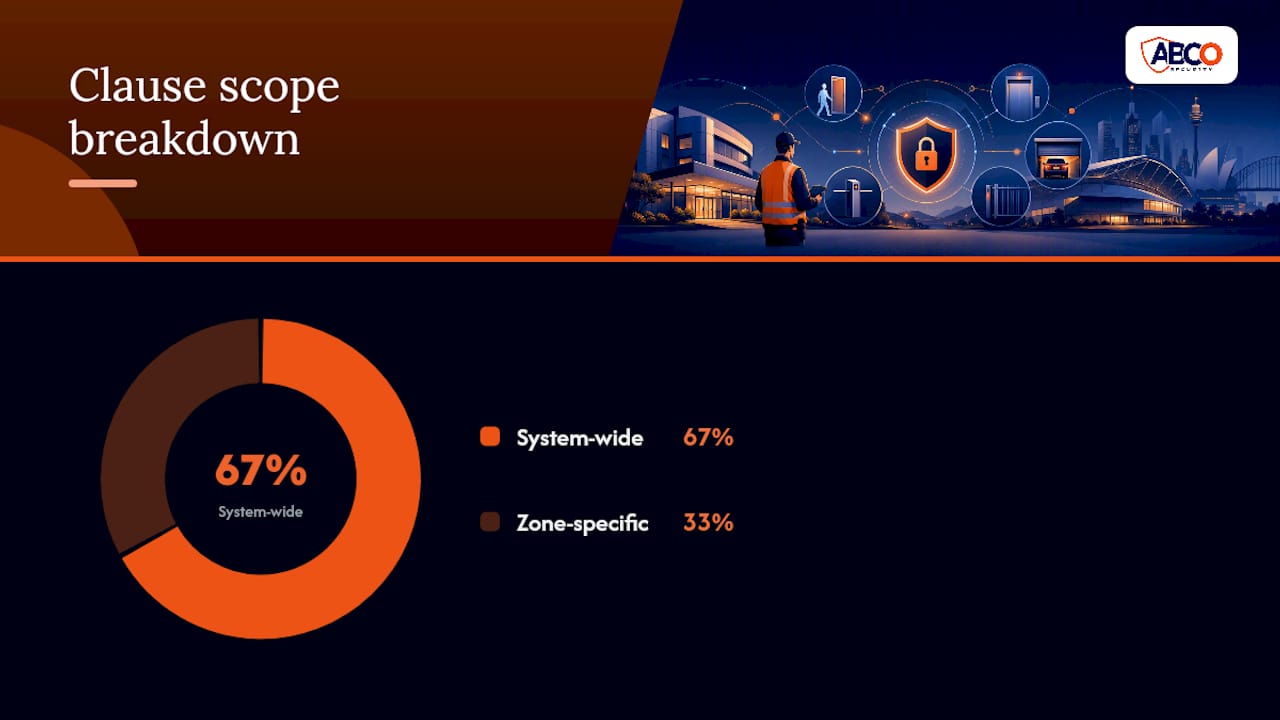
AS/NZS IEC 60839.11.1:2019 defines the performance grades your EACS components must meet. Reference the relevant grade in every procurement contract and vendor agreement.
Your policy should include these operational clauses:
- Alarm integration: the EACS must interoperate with the site alarm system per AS/NZS 2201.5 requirements. The alarm system must not be disableable via the EACS interface alone.
- Fail-safe behaviour: on power failure or system fault, doors in Zones 3–5 default to locked (fail-secure). Zones 1–2 may default to open for life-safety compliance, subject to a fire engineer’s advice.
- Mechanical backup: every EACS-controlled door in Zones 3–5 must have a SCEC-approved mechanical lock as a backup. Keys are held in a key register with documented custody.
- Privileged user accounts: EACS administrator accounts require two-factor authentication. Administrator actions are logged separately and reviewed monthly.
- Maintenance schedule: test all readers, controllers and door hardware at least annually. Document results and corrective actions.
- Vendor access: any vendor accessing the EACS for maintenance must be supervised, credentialled as a contractor and logged.
Pro Tip: Specify the AS/NZS IEC 60839 grade in your tender documents, not just “commercial grade.” A Grade 3 reader has significantly different tamper resistance to a Grade 1 reader, and the difference matters in Zones 3–5.
How do you manage visitors and contractors safely?
Visitor and contractor access is the most common gap in site policies. A visitor register must capture: full name, organisation, host name, purpose of visit, and entry and exit times.
| Zone | Visitor escort required? | Pass type | Access limit |
|---|---|---|---|
| 1–2 | No (reception area only) | Visitor badge | Public areas only |
| 3 | Yes, at all times | Escorted pass | Specific room, specific time |
| 4–5 | Yes, dual escort | Escorted pass | Named room, named purpose only |
Contractors must present photo ID and complete a site induction before receiving a temporary credential; consider deploying smart locker systems to improve secure storage and contractor tool control. Their access is limited to the areas required for the specific job. All tools and equipment brought on site are logged. Credentials and tools are returned and signed off at the end of each shift. For events, event-specific risk assessment should inform zone assignments and crowd control requirements before the event date.

Protecting ICT rooms and server infrastructure
Server rooms and network equipment rooms are treated as Zone 4 or 5 regardless of where they sit in the building. Physical controls for ICT spaces include:
- A separate EACS-controlled entry with an audit log independent of the general building system
- Tamper-evident seals on server cabinets and network equipment; seals are inspected and logged at each access
- Console ports on network devices in public or shared areas must be enclosed in locked cabinets
- A key register for server-room mechanical backup keys, reviewed monthly
Equipment movement follows a documented process: approval, escort, logging of serial numbers and return confirmation. Decommissioned equipment is wiped and disposed of under a documented chain-of-custody procedure.
Numbered steps for access verification:
- Credential presented at EACS reader; access logged automatically.
- Officer or camera confirms the person matches the credential photo.
- Tamper-evident seal on the target cabinet is inspected before and after work.
- Work is recorded in the server-room access register (paper or digital).
- Seal is replaced and photographed after the session closes.
Incident response, lockout and audit schedules
When an access control breach occurs, the response sequence matters as much as the controls that failed.
- Detection: EACS alert, guard report or alarm trigger identifies the incident.
- Containment: the security manager or duty officer initiates an electronic lockout of the affected zone. Mechanical backup locks are engaged if the EACS is compromised.
- Evidence preservation: do not reset or overwrite EACS logs. Export and secure the relevant log segment immediately.
- Escalation: notify the policy owner, ICT manager (if server rooms are involved) and, for government sites, the relevant protective security adviser.
- Investigation: review logs, CCTV and physical evidence. Document findings.
- Corrective action: revoke compromised credentials, patch vulnerabilities and update the risk register.
- Post-incident review: complete within five business days. Update the policy if a gap is identified.
Audit schedule:
- Monthly: review privileged EACS accounts and server-room access logs.
- Quarterly: full access review across all zones; remove stale permissions.
- Annually: physical inspection of all readers, locks and hardware; penetration test of EACS where risk warrants it.
How to implement your policy: checklist and cost drivers
A phased approach keeps the project manageable.
- Risk assessment (weeks 1–2): map zones, identify assets and assess business impact. Use a structured risk assessment process to document findings.
- Policy design (weeks 3–4): draft zone assignments, credential rules, visitor procedures and audit schedules.
- Procurement (weeks 5–8): specify EACS grade per AS/NZS IEC 60839.11.1:2019, SCEC-approved locks and alarm integration requirements.
- Installation (weeks 9–14): install hardware, configure EACS, integrate with alarm system and test fail-safe behaviour.
- Testing and handover (weeks 15–16): conduct full functional test, train staff and hand over documentation.
- Ongoing support: schedule quarterly reviews and annual audits.
Key cost drivers (indicative factors, not fixed quotes):
- EACS hardware grade: Grade 3–4 readers cost significantly more than Grade 1–2
- SCEC-approved locks: premium over standard commercial hardware
- Cabling and containment: older buildings often require significant remediation
- EACS software licensing and integration with existing alarm platforms
- Labour for installation, commissioning and staff training
For office buildings, a phased rollout starting with the highest-risk zones first keeps costs manageable while delivering immediate risk reduction.
How Abcosecurity supports access control implementation
Abcosecurity delivers end-to-end support for facility managers implementing or upgrading physical access control: site risk assessments, EACS design and installation, SCEC-approved lock hardware supply, alarm integration, staff training and 24/7 monitoring.
The process Abcosecurity follows:
- Site audit: assess current controls, map zones and identify gaps against PSPF and AS/NZS IEC 60839 requirements.
- Design: produce a zone map, credential matrix and EACS specification aligned to the client’s risk profile.
- Installation: deploy hardware, configure EACS and integrate with existing alarm systems.
- Testing: verify fail-safe behaviour, audit trail function and alarm interoperability.
- Handover: deliver documentation, train staff and hand over the key register.
- Ongoing support: scheduled maintenance, quarterly access reviews and 24/7 monitoring.
Pro Tip: Ask your provider to demonstrate the fail-secure behaviour of every Zone 3–5 door before handover. A door that defaults to open on a power failure is a policy breach waiting to happen.
What most managers get wrong about access control
The credential lifecycle is consistently under-resourced. Managers invest in hardware and then neglect the quarterly review cycle. Within 18 months, a typical site accumulates credentials held by staff who have changed roles, contractors who finished months ago, and temporary passes that were never returned. That accumulation is a larger risk than a hardware gap.
Visitor processes are the second common failure. A sign-in book at reception with no escort rule for Zone 3 is not a visitor policy — it is a record of who walked past the front desk. The escort requirement is what makes the register meaningful.
Maintenance budgets are routinely cut after installation. Readers fail, seals are not replaced, and audit logs fill up and stop recording without anyone noticing. Build maintenance into the contract from day one, not as an afterthought.
When budgets are constrained, prioritise in this order: revoke stale credentials first (zero cost, immediate risk reduction), then fix Zone 4–5 hardware gaps, then address visitor escort gaps. A security risk assessment will confirm the priority order for your specific site.
Ready to assess or implement your access control policy?
Abcosecurity’s licensed security professionals conduct site audits, design zone-mapped access control policies and install EACS systems that meet PSPF and AS/NZS IEC 60839 requirements across Australia. The difference from a generic installer: Abcosecurity integrates physical access with alarm monitoring and 24/7 response, so a credential failure at 2 AM triggers a real response, not just a log entry.
For facility managers who need a starting point, Abcosecurity’s integrated security solutions guide covers the full scope of a compliant implementation. To begin with a free site review, contact Abcosecurity directly or download the security risk assessment template to map your current gaps before the first conversation.
Sources
- Cyber
- PHYSEC1 Physical security
- Alarm and electronic security systems, Part 11.1: Electronic access control systems – System and components requirements standard by Standards Australia / Standards New Zealand, 12/20/2019
- Electronic Security Standards
FAQ
What is the minimum standard for EACS in Australian facilities?
AS/NZS IEC 60839.11.1:2019 sets the minimum functionality and performance grades for electronic access control systems in Australia. PSPF guidance requires EACS in Zones 3–5 where no other suitable identity verification method exists.
How often should access permissions be reviewed?
Quarterly is the recommended cadence for most Australian sites, consistent with operational best practice. Privileged EACS administrator accounts should be reviewed monthly.
When are SCEC-approved locks required?
SCEC-approved locks are required for Zones 3–5 under PSPF and state protective security frameworks. They serve as the mandatory mechanical backup when EACS is the primary control.
What must a visitor register include?
A visitor register must capture the visitor’s full name, organisation, host name, purpose of visit, and entry and exit times. Retain records for a minimum of two years, or longer if your records authority requires it.
How does Abcosecurity help with policy implementation?
Abcosecurity conducts site audits, designs zone-mapped access control policies, installs EACS to AS/NZS IEC 60839 standards, and provides 24/7 monitoring and ongoing maintenance across Australia.
Recommended
about
avada factory
Sempery ultricies nibh at dolor cras urna eleifend nec. Atiam efficitur tempor.



