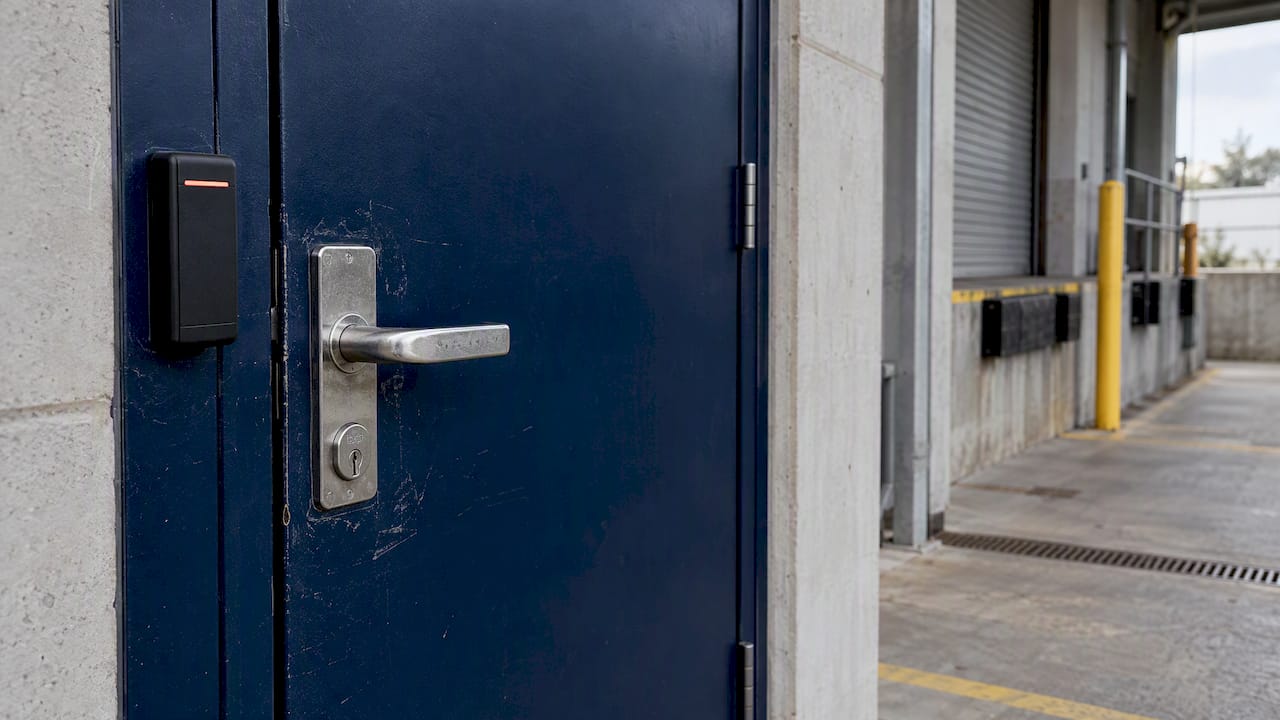
For most commercial sites with more than a handful of doors or staff, electronic access control is the stronger choice. It lets you cancel a lost credential in seconds, set who can enter and when, and keep a record of every entry. Mechanical keys still earn their place on low-traffic doors, plant rooms and as a backup. The best answer is often a mix: electronic control where people and risk are concentrated, and good key control everywhere else.
This guide compares the two on what matters to a facility, site or operations manager: who controls entry, what happens when a credential goes missing, how each behaves in an outage, what the real costs are, and the privacy obligations that come with biometrics.
TL;DR
- Keys prove that someone holds a piece of metal. Access control proves who entered, when, and through which door, and lets you change the rules without touching the hardware.
- A lost key means rekeying or replacing cylinders. A lost card or fob is cancelled in the system, usually within minutes.
- Keys do not depend on power or networks. Electronic locks do, so the failure mode of each door (fail-safe or fail-secure) must be chosen deliberately and checked against egress and fire requirements.
- Keys are cheaper on day one. Electronic systems tend to win on cost once staff turnover, contractors and multiple sites are in the picture.
- Biometric credentials such as facial images are sensitive information under Australian privacy law, so they need consent, a privacy impact assessment and a retention policy.
Table of Contents
- What actually separates keys from access control
- Security and oversight, side by side
- What happens when a credential is lost, copied or needs revoking
- Power cuts, network drops and system failures
- What each approach really costs
- Matching the approach to the site
- Privacy: when the credential is your face or fingerprint
- Our view: control the door, then watch it
- How ABCO can help
- A simple way to decide
- FAQ
- Sources
What actually separates keys from access control
A mechanical key system manages entry through possession. Whoever holds a cut key that matches the cylinder can open the door, regardless of who they are, what time it is or whether they still work for you. An electronic system works differently: a reader checks a credential (a card, a PIN, a phone or a biometric) against an access control list held in a database or controller, then applies pre-configured rules and schedules to decide whether to release the lock. The South Australian Protective Security Framework guidance on physical security describes this distinction, and it is the root of every other difference in this article.
The same framework defines access control as the measures that let authorised people, vehicles and equipment through protective barriers while keeping unauthorised access out. It also treats security guards, mechanical locking devices, electronic access control and even symbolic barriers as forms of access control. That matters because it frames the choice correctly: keys are not the opposite of access control. They are one, quite limited, type of it.
In practice the gap shows up in four questions you can ask of any door:
- Who can open it right now?
- Who opened it last night?
- How fast can you stop a specific person getting in?
- Can you limit entry to certain hours?
With keys, the honest answers are usually “whoever has a copy”, “we don’t know”, “slowly and expensively” and “no”. With electronic access control, each answer is a setting in software.
Security and oversight, side by side
| Factor | Mechanical keys | Electronic access control |
|---|---|---|
| How entry is decided | Physical possession of a matching key | Credential checked against a list, rules and schedules |
| Audit trail | None, unless you add a sign-out register | Time-stamped entry events per person and door |
| Time-based limits | Not possible | Schedules by role, day and hour |
| Cancelling one person’s access | Rekey or replace the cylinder | Disable the credential in the system |
| Copying risk | High, especially on non-restricted keyways | Lower, though cards and fobs can be cloned if the technology is dated |
| Works without power | Yes | Depends on lock type and backup supply |
| Upfront cost | Low | Higher: readers, controllers, locks, cabling, software |
| Ongoing admin | Key register, rekeying, cutting | User management, software updates, maintenance |
The audit trail is the point most buyers underestimate. When stock goes missing from a storeroom or a server cabinet is opened out of hours, a key system can only tell you that the door was opened by someone with a key. A logged system narrows it to a person and a time, which makes investigations short and makes staff less likely to behave carelessly in the first place.
What happens when a credential is lost, copied or needs revoking
This is where the two approaches part ways most sharply, and it is usually the moment a manager realises what their keys have really been costing.
Keys: the loss is permanent until you fix the lock
A lost key cannot be switched off. If the person who lost it is trusted and the key is unmarked, the risk may be low, but you cannot be sure. The usual responses are rekeying the affected cylinders or replacing them. On a master-keyed building, one lost master key can put every door in the suite or floor in question. Copies are the quieter problem: a key duplicated at a hardware store or kiosk leaves no record, and you will not find out until something goes wrong.
If you stay with keys, tighten the process around them:
- Use a restricted keyway so copies can only be cut with authority.
- Keep a register of every key issued, to whom, and when it came back.
- Stamp keys with codes rather than door names, so a found key does not point to the building.
- Hold spares and masters in a locked, logged cabinet.
- Rekey on staff or tenant changes where the key held access to anything valuable.
Electronic credentials: the loss is a software task
When a card, fob or phone credential goes missing, an administrator disables it and issues a new one. The old credential stops working immediately at every reader, and the log shows any attempts to use it afterwards. This is why electronic control suits workplaces with casual staff, contractors, cleaners, couriers and rotating tenants: access can be created for a defined period and expire on its own.
Electronic credentials have their own weak points. Older low-frequency proximity cards can be cloned with inexpensive equipment, PINs get shared, and doors propped open defeat any lock. Modern encrypted credentials and door-held-open alarms address most of this, and a good installer will specify them as standard. The principle from the physical security guidance holds: control entry by policy, not just hardware, including a clear procedure for revoking access when someone leaves.
Power cuts, network drops and system failures
This is the genuine strength of keys, and any sensible comparison should say so. A mechanical lock does not care about the grid. An electronic lock needs a plan.
There are two basic behaviours for an electrified door:
- Fail-secure: the door stays locked when power is lost, but can still be opened from the inside by a mechanical release or lever. This is common on perimeter doors where security comes first.
- Fail-safe: the door unlocks when power is lost. This suits some internal doors, but it leaves them open to anyone during an outage.
Which one belongs on which door is a design decision, not a default. Egress is the controlling constraint: people must be able to leave quickly in an emergency, and electronic locking on fire-isolated or exit doors has to be coordinated with fire systems and the National Construction Code. Door hardware also affects fire ratings, which is why we cover it in our guide to door hardware for access control. Get it wrong and you can compromise either security or life safety.
Practical steps that make an electronic system resilient:
- Put controllers and locks on a battery-backed power supply sized for the outage you want to ride through.
- Choose controllers that store credentials locally, so doors keep working if the network or server drops.
- Keep a mechanical override, such as a keyed cylinder held in a controlled cabinet, on critical doors.
- Test the system, including a deliberate power-off test, at least once a year and after any change to the fire system.
This is also the best argument for the hybrid approach. A keyed override on an electronic door gives you resilience without the daily risks of loose keys, as long as the override keys are few, restricted and logged.
What each approach really costs
Keys look cheap because the costs are spread out and invisible. Electronic systems look expensive because the costs arrive in one invoice. To compare fairly, think over three to five years rather than at handover.
Keys cost you through:
- Rekeying and replacing cylinders after each loss or departure. Locksmith rates vary by state, site and call-out time, so ask for a quote for your actual door count.
- Staff time spent maintaining registers, chasing returns and issuing copies.
- Unquantified exposure: the incident you cannot investigate because nothing was logged.
Electronic access control costs you through:
- Readers, controllers, electric locks and power supplies at each door.
- Cabling and installation, which is heavier on existing buildings than new ones. Our guide on how to wire an access control system explains what that involves.
- Software, support and periodic credential replacement.
The crossover depends on turnover and scale. A single-tenant office of ten people with two doors and stable staff may be served well by keys for years. A site with a rotating workforce, multiple contractors, several buildings, or areas that need restricted entry, such as a server room, will usually pass the break-even point quickly. If you are weighing a smaller setup, our access control guide for small business sets out what to prioritise. For larger premises, see the business guide to access control systems.
Matching the approach to the site
The right mix depends on the kind of premises and the risk behind each door.
Offices and corporate buildings
Multi-tenant and multi-floor offices benefit most from electronic control: lift lockouts, after-hours schedules, visitor passes and per-floor permissions are difficult to achieve with keys. See our notes on choosing access control for office buildings.
Server rooms and sensitive areas
Where you need to prove who went in, keys alone are not enough. State government security standards require that only authorised staff be permitted into areas where servers reside, for example in the South Australian Department for Education’s ICT cyber security standard. Meeting a requirement like that is far easier with logged, credential-based entry. Our page on server room access control covers the options.
Construction sites
Sites change by the week, with trades arriving and leaving, so a key system loses track fast. Credentials that can be issued and cancelled per subcontractor, combined with check-in processes and locked storage, cut down on the tool theft that keys cannot trace. Our tool theft prevention advice goes into this.
Retail, plant rooms and low-traffic doors
Stockrooms and back-of-house doors often justify electronic control where staff turnover is high. Plant rooms, roof hatches and rarely used cupboards are fine on keys, provided those keys are restricted and registered.
Privacy: when the credential is your face or fingerprint
Biometric readers remove the lost-card problem, but they bring legal obligations. The Office of the Australian Information Commissioner says facial images and other biometric information are sensitive information under the Privacy Act 1988 (Cth), and generally cannot be collected without consent unless an exception applies.
The OAIC’s July 2026 guide to facial recognition advises organisations to carry out a privacy impact assessment at the outset and act on its recommendations. It also says policies for biometric systems should cover staff access controls, training, retention and destruction of biometric data, and procedures for revoking access.
In practical terms: if you want the convenience of biometrics, get written consent from staff, document why a card or PIN is not sufficient, decide how long templates are kept, and talk to your legal adviser or privacy officer before go-live. If you would rather avoid the issue, encrypted cards or mobile credentials give most of the benefit with a lighter privacy burden.
Our view: control the door, then watch it
We have worked in security for more than 15 years, across construction, healthcare and corporate environments, and the same pattern turns up on site after site. Keys are issued in good faith, copied in good faith, and eventually nobody can say who holds what. The cost of that uncertainty only becomes visible after an incident.

Our position is that access control should be part of a layered approach rather than a standalone product. Electronic control decides who may enter. Licensed guards and mobile patrols deal with what a reader cannot: tailgating, a propped door, a person who looks wrong. Monitored CCTV and alarms confirm what happened and bring a response. We design for the whole chain, because a door that logs entry but is never reviewed or backed by a response is only half a solution.
We also work to international quality standards, including ISO 9001, and that shapes how we approach this: assess the risk at each door, choose the lightest control that is adequate, document it, and review it. That sometimes means recommending keys for a door that does not need more. More often it means moving the doors that matter onto a system you can audit and change in minutes.
— Abco
How ABCO can help
If you are replacing keys, adding doors or reviewing a mixed system, our electronic security solutions cover access control installation and support, and we pair them with CCTV and alarm monitoring and licensed security guarding so entry points are watched as well as locked.
For sites that need cover while a system is being installed or between shifts, our Night Owl Service starts from $5.45 per day, with details on the Night Owl page. To talk through your premises, start from the ABCO Security home page.
A simple way to decide
Walk your premises door by door and score each one on three points: how valuable is what is behind it, how many different people need to pass through, and how often do those people change. Then act on the result.
- High value, many people, high turnover: electronic access control with logging, schedules and a mechanical override.
- High value, few stable people: electronic control or a restricted-keyway key system with strict registers, depending on how much audit detail you need.
- Low value, few people, stable: keys, restricted and registered.
- Exit and fire-isolated doors: design them with egress and fire requirements first, then add security within those limits.
Then make a rule for each door on what happens if power fails, and write down who is responsible for removing access when someone leaves. Most of the value of either system comes from that discipline, not from the hardware.
FAQ
Is electronic access control more secure than keys?
Generally yes, because it can be changed instantly, restricted by time and person, and logged. Keys can be copied without a record and cannot be switched off once lost. Security still depends on the credential technology chosen and on staff following the procedures.
Do electronic locks work in a power outage?
That depends on how each door is configured. Fail-secure locks stay locked and can be opened from the inside, while fail-safe locks release. Battery backup, locally stored credentials and a mechanical override keep critical doors working, and the configuration must be checked against egress and fire requirements.
Can I use both keys and access control?
Yes, and many sites do. Electronic control handles the main entries, tenancies and sensitive rooms, while a small number of restricted, logged keys serve as overrides or cover low-risk doors. The aim is fewer keys in circulation, not zero keys.
Is a fingerprint or face reader allowed in an Australian workplace?
It can be, but biometric information is sensitive information under the Privacy Act 1988 (Cth) and generally needs consent. The OAIC recommends a privacy impact assessment and clear retention and revocation policies. Seek advice from a privacy professional before installing one.
Sources
- PHYSEC1 Physical security, South Australian Protective Security Framework
- Bunnings determination fact sheet, OAIC
- Facial Recognition Technology: a guide to assessing the privacy risks, OAIC, July 2026
- ICT cyber security standard, South Australian Department for Education
Recommended
about
avada factory
Sempery ultricies nibh at dolor cras urna eleifend nec. Atiam efficitur tempor.