A cyber alert at 2 am doesn't care that your IT person starts at 9. It also doesn't care that your gatehouse is staffed, your cameras are recording, or your centre manager will read emails on Monday. 24/7 cybersecurity monitoring exists to close that gap, but only if it ends with a person who can verify, contain, and, where needed, get someone on site. A dashboard nobody watches overnight isn't a watch at all.
Why Australian Sites Need an Overnight Cyber Watch
One cybercrime report every six minutes is the pace you're planning against. In financial year 2024-25, the Australian Signals Directorate's Australian Cyber Security Centre factsheet for businesses and organisations recorded more than 84,700 cybercrime reports, an average of one report every six minutes. It also responded to over 1,200 cyber security incidents, up 11 per cent, and received more than 42,500 calls to its Cyber Security Hotline, up 16 per cent year on year.
Those three measures count reported activity, not every attempt. Plenty of incidents stay undetected or unreported, so the table below is a floor, not a ceiling.
Australian Cyber Reports That Do Not Keep Office Hours
| Measure | FY2024-25 figure | Change |
|---|---|---|
| Cybercrime reports received | More than 84,700 | About one every six minutes |
| Cyber security incidents responded to | Over 1,200 | Up 11 per cent |
| Calls to the Cyber Security Hotline | More than 42,500 | Up 16 per cent |
Read that table against your own hours. An office tower in Melbourne may empty at 6 pm, but its access control, email, and cloud files don't. A warehouse in western Sydney, a shopping centre in Brisbane, a construction compound near Perth, and sites in surrounding cities within about 200 kilometres all keep systems live after internal IT has gone home.
That's where confusion often starts. Managers see guards, patrols, and a camera wall and assume someone would notice a cyber problem. A guard can see a person at a fence. A camera can show an empty dock. Neither shows a stolen password being used from another state, a server copying files at midnight, or ransomware beginning to encrypt a dispatch folder.
Cameras show a door. Logs show who is inside the network.
The job of 24/7 cybersecurity monitoring is plain. It spots suspicious logins, malware, ransomware, unusual network behaviour, and service disruption early enough for a person to escalate. Earlier escalation gives you a chance to end a session, isolate a machine, warn a building manager, or hold vehicle movements before a technical event becomes an operational one.
Think of a logistics yard at night. If dispatch screens freeze and files start renaming themselves, you don't just need an IT ticket. You need someone to confirm it's real, call the operations lead, and tell the gate not to wave trucks through on guesswork. That's why monitoring design should include network intrusion detection and response alongside the physical controls already on site.
The Gap Attackers Use
Attackers don't need your building to be busy. They need it to be unattended.
- Nights and weekends: Fewer staff notice odd logins or slow systems.
- Public holidays: Escalation contacts change, and rosters thin out.
- Shift changes: Alerts can sit between one team leaving and another starting.
Delayed detection extends access. The longer a compromised account stays active, the more time an intruder gets to find shared drives, create another account, copy data, or prepare encryption. Continuous monitoring doesn't stop every attempt, and it shouldn't be sold that way. It shortens the quiet period between first suspicious activity and a checked, named response.
For a Security Company Melbourne client, or an operator in Sydney, Brisbane, or Perth, that distinction matters. You're not buying more alerts. You're buying awake judgement at the hours your own team can't cover, tied to the buildings, people, and systems that keep trading after dark.
How 24/7 Cybersecurity Monitoring Works Overnight
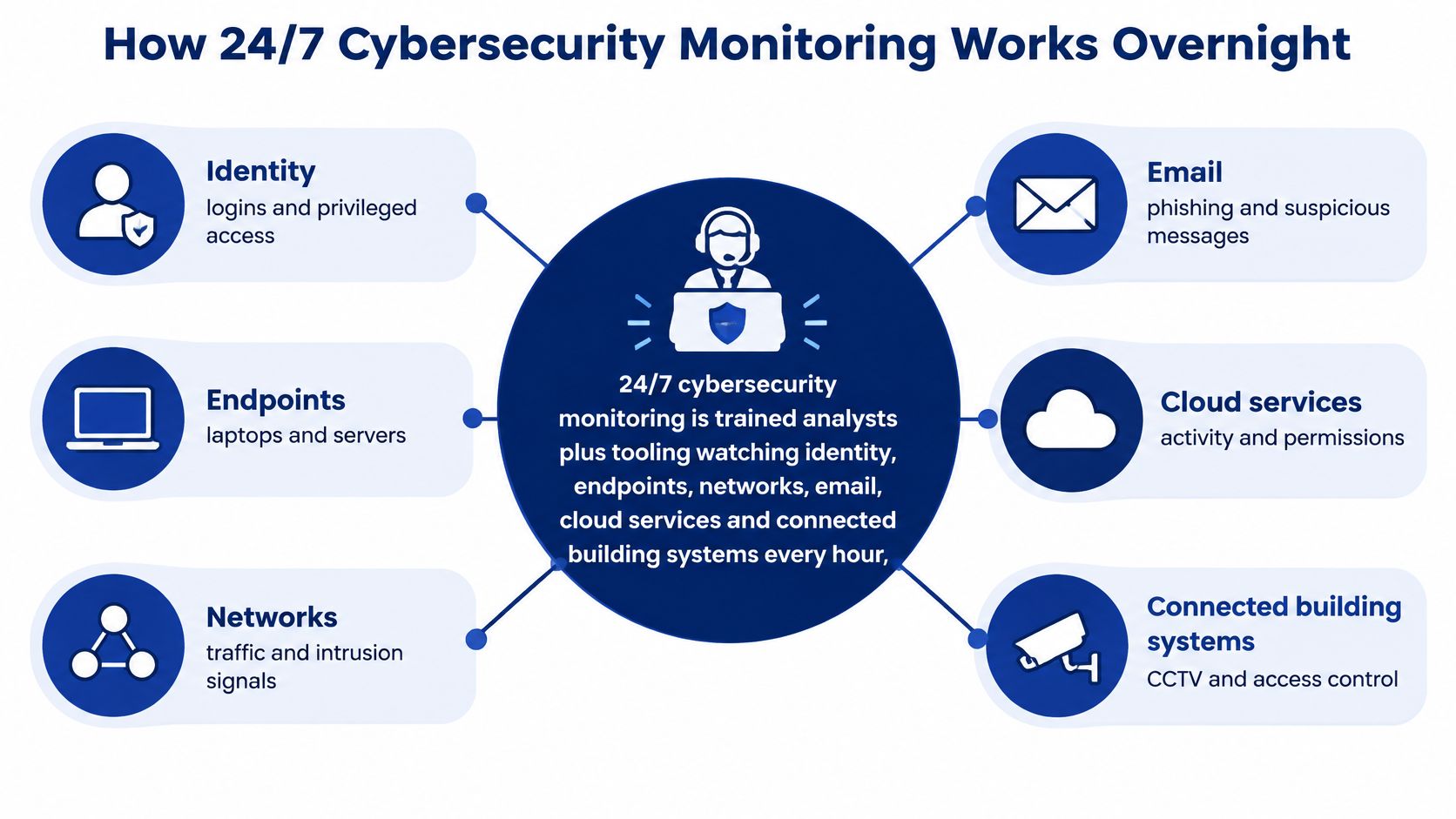
24/7 cybersecurity monitoring means trained analysts and monitoring tools watch identity, endpoints, networks, email, cloud services and connected building systems through nights, weekends and public holidays. Endpoints are laptops, desktops and servers. Identity monitoring tracks who logs in, from where and with what access.
A weekday-only gatehouse misses the midnight truck. An online watch with the same gaps can miss a suspicious login while the site is quiet. Monitoring works best when relevant system records reach one place, so analysts can connect events rather than chase separate inboxes.
One Overnight Alert in Seven Steps
Suppose an administrator account fails multi-factor authentication several times, then signs in successfully at 1.40 am and opens a file server. A capable overnight watch follows a sequence like this:
- Collect logs centrally. Access, authentication and server records arrive with aligned clocks, making it possible to put a cloud login and an on-premises file copy in the right order.
- Add context. The analyst can see the asset's importance, the user's role, the business owner and relevant Australian Privacy Act notification considerations, rather than a raw warning alone.
- Connect related events. The login is checked against signals such as an unusual location, a burst of MFA failures, a new privileged account, unexpected mailbox forwarding, mass file access, abnormal encryption or transfers outside the usual baseline.
- Triage by severity. A routine scan should not be treated like a likely account takeover, or take its place in the queue.
- Check the situation with a person. The analyst confirms the source, account privileges, affected systems and whether anyone is expected to be working at the site.
- Contain with approval. For a high-impact action, the analyst seeks approval before disabling a session or isolating an endpoint, unless that action has been pre-authorised.
- Notify and activate the response plan. Once the incident is confirmed, the analyst contacts the chief information security officer or delegate, and the incident response plan begins.
That sequence makes the handover clear: tools collect and correlate signals, while people assess what they mean and what can safely be shut down. A security operations centre model should define who reviews alerts, who approves containment and who is contacted when the usual decision-maker is unavailable.
Why Identity and Ransomware Rank First
Set priorities by potential harm, not by alert volume. The Office of the Australian Information Commissioner's notifiable data breach statistics for January to June 2025 recorded 532 data-breach notifications. Malicious or criminal attacks accounted for 59 per cent, and cyber incidents affected just over 10,000 individuals on average.
A failed password alone may be routine. Add an unfamiliar location, a privilege change, unexpected mailbox forwarding and large-scale file access, and the pattern deserves closer attention. Correlation helps an analyst distinguish background noise from a possible compromise.
When comparing tools with managed watch services, separate the cost of the platform from analyst cover, data retention and response work. This general explanation of what security monitoring includes can help clarify what is being compared. A tool-only quote and a staffed service do different jobs.
Monitoring supports prevention; it does not replace it. The Australian Cyber Security Centre's Essential Eight maturity model FAQ lists patching applications and operating systems, using multi-factor authentication, restricting administrative privileges, application control, restricting Microsoft Office macros, user application hardening and regular backups. It grades maturity from Level 0 to Level 3. Monitoring can help teams spot issues around these controls, while securely retained backups and tested disaster recovery exercises help prepare for restoration.
Where Cyber Alerts Meet Guards Patrols and Cameras
A cyber alert often needs a physical fact. Is the manager in the building? Has the recorder failed, or has someone unplugged it? Is the queue surge real, or is access control misreading cards? Licensed guards, patrols, and camera operators can answer those questions, but they can't replace log analysis.
Cyber Signal and On-Site Response by Setting
| Setting | Cyber signal | On-site response |
|---|---|---|
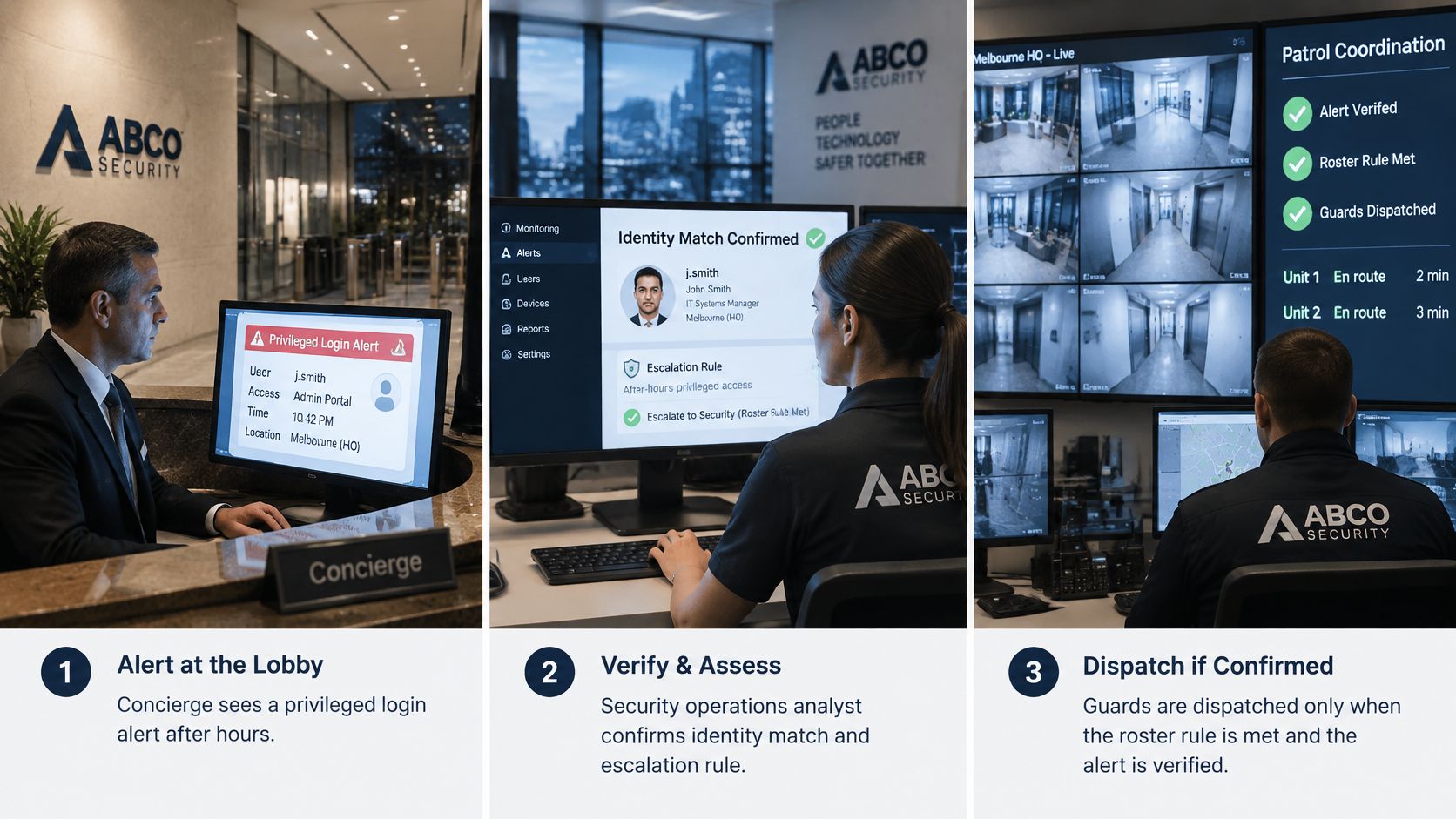
| Corporate lobby, Melbourne or Sydney | Privileged login after hours | Concierge security checks who is on site |
| Shopping centre | POS or CCTV recorder outage | Retail security confirms with centre management |
| Construction site | Exposed remote access on the site network | Gatehouse security holds entry and walks the compound |
| Event or venue | Access-control or ticketing surge | Event security posts verify the queue and doors |
| Gated residential or strata site | Tampered alarm or intercom | Mobile patrols attend and report |
| Warehouse or logistics yard | Ransomware on dispatch systems | Patrol plus operations lead stop blind vehicle moves |
Each row protects something different. Retail and shopping centre security protect trade and card data. Construction security and gatehouse security protect plant, site access, and programme timing. Event security protects entry revenue and crowd safety, corporate offices protect client data and staff access, and warehouses protect dispatch continuity and freight flow.
CCTV and alarm monitoring add eyes. They don't explain a failed administrator login. Put signals together, though, and severity changes fast. A dark camera alone may be a fault. A dark camera, a forced comms room door, and a privileged login in the same ten minutes is an incident until proven otherwise.
Practical rule: Treat a cyber alert and a physical anomaly at the same site and time as one incident, with one incident number and one escalation owner.
That join-up needs clear communication protocols for alarms and escalation so analysts, guards, and site managers aren't inventing call order at 3 am. The analyst should know which guard post to call, what that guard may check, and what they must not touch. A guard should never be told to log in, reboot a server, or unplug network gear unless a named technical lead directs it and the action is recorded.
The short video below is useful for seeing how monitoring, verification, and dispatch fit together as a workflow rather than separate services.
The Roster Rule That Makes Response Real
A response promise fails if the roster can't lawfully deliver it. The Fair Work Commission Security Services Industry Award 2020 states that the maximum number of ordinary hours an employee may be rostered to work on a shift is 10 hours, and an employer must not require an employee to work more than 14 hours in a 24-hour period, including paid and unpaid meal and rest breaks. It sets minimum ordinary shift lengths of 7.6 hours for a full-time employee, four hours for a casual employee, and for part-time staff the greater of four hours or 20 per cent of agreed weekly ordinary hours.
So overnight cover needs planned handovers, relief staff, and documented patrol times. It can't rely on a fatigued double shift because someone called in sick. That applies across security guarding, mobile patrols, retail security, construction security, concierge security, and gatehouse security in Melbourne, Sydney, Brisbane, Perth, and surrounding areas.
The award is a compliance baseline, not the whole test. State or territory licensing and a site-specific risk assessment sit on top of it. Check both before deployment, and ask who covers the post when the guard leaves to investigate the very alert you've just escalated.
How to Set Up Monitoring Before You Sign
Don't start with a product demo. Start with an asset list and a call sheet. If a vendor can't name what they'll watch, which logs they'll receive, and who they'll phone after hours, you're not ready to compare price.
Eight Checks to Take to a Vendor
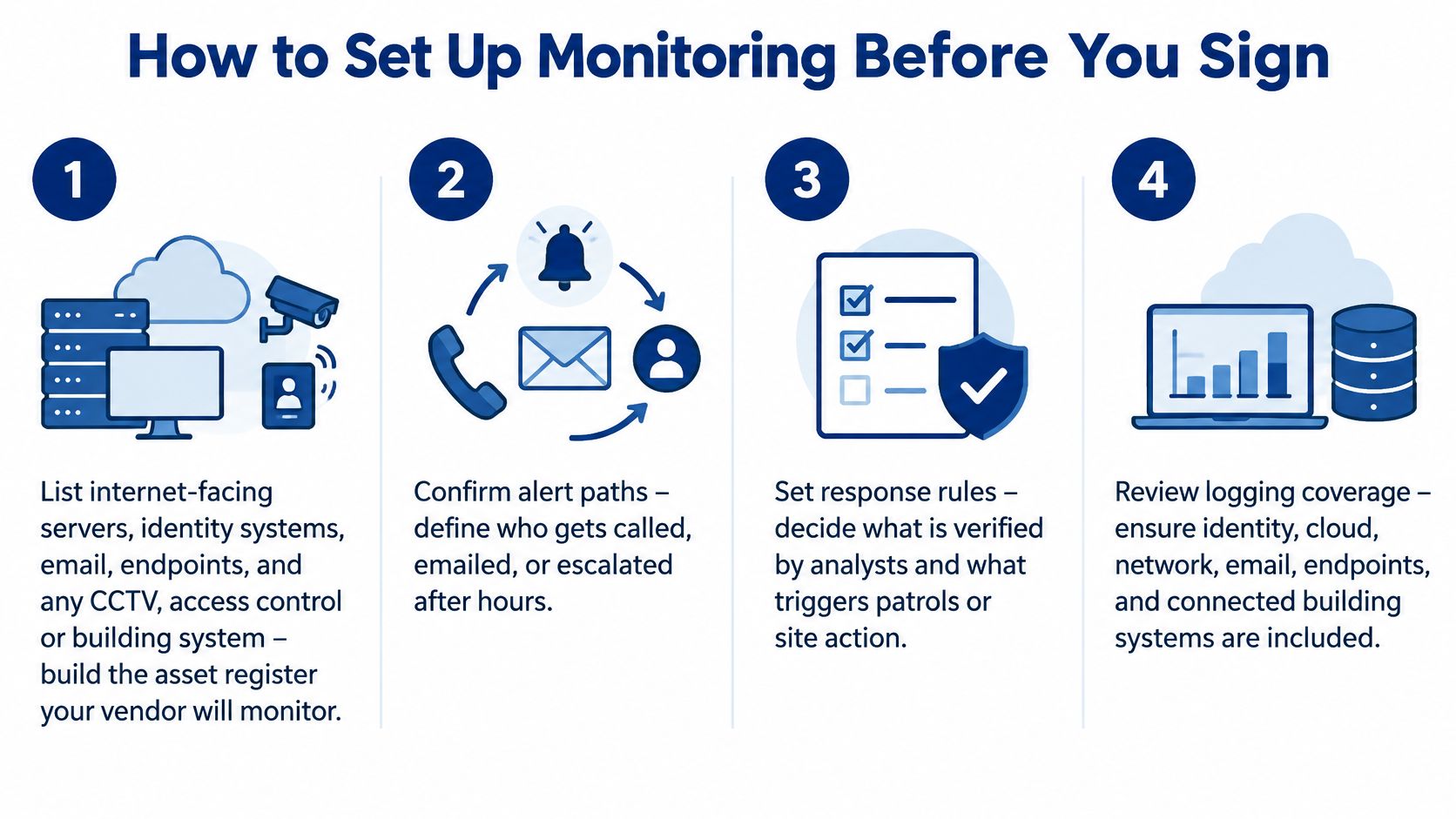
- List what's in scope. Record internet-facing servers, identity systems, email, endpoints, and any CCTV, access control, or building system sharing the network. Include owner, location, and business criticality for each item.
- Require timely log analysis. The vendor should analyse event logs to detect events, then analyse events to identify incidents, rather than forwarding raw alerts for you to sort out.
- Set retention and clock rules. Keep logs long enough to rebuild a path across cloud, identity, and on-premises systems, with synchronised clocks across every source.
- Write severity rules. Define playbooks for privileged use, ransomware signs, lateral movement, exposed remote access, and denial-of-service traffic before go-live.
- Name the delegate. Record who is told as soon as an incident is confirmed, plus the after-hours phone that answers and a backup contact.
- Set authority limits. Decide which actions an analyst may take alone, such as ending a session, and which need your approval, such as isolating a production server.
- Prove recovery works. Ask for evidence of tested backups and a restore point, because monitoring can't decrypt data that was never copied.
- Check licences and the shared sheet. Confirm state or territory licences for any guard who will attend, and make cyber and physical teams work from one escalation sheet.
What Good Looks Like in Practice
The Australian Cyber Security Centre Essential Eight maturity model requires event logs from internet-facing servers to be analysed in a timely manner to detect cybersecurity events and identify incidents. At higher maturity levels, successful and unsuccessful multi-factor authentication events must be centrally logged, and incidents reported to the chief information security officer or delegate as soon as possible after discovery, followed by activation of the incident response plan.
Use a concrete test when you interview vendors. Say repeated failed administrator logins are followed by a successful login at 2 am. Ask what the analyst checks first, what evidence they preserve, when they call you, and whether site security gets a task. A vague answer about artificial intelligence isn't a playbook.
- Log sources named: Identity, server, endpoint, email, cloud, and relevant building systems.
- Human hours stated: Who is awake, where they're based, and how handovers work.
- Report timing fixed: When incident notes and monthly summaries arrive, and in what format.
- Site contact agreed: One named person speaks to guards, centre management, or strata contacts.
A Security Company Melbourne engagement should show local escalation for a Melbourne site, not a mailbox read next morning. Apply the same test in Sydney, Brisbane, and Perth. Local means the provider knows your site type, your guard posts, and the travel reality for patrols attending after an alarm, a recorder outage, or a confirmed compromise.
Keep the contract commercial and specific. It should name systems, log sources, severity definitions, authority limits, escalation contacts, reporting, and review meetings. If a term matters during an incident, it shouldn't live only in a salesperson's email.
Service Levels That Show the Watch Is Real
Cost is why minutes matter. The ASD's ACSC Annual Cyber Threat Report 2024-25 factsheet for critical infrastructure reported that the average self-reported cost of cybercrime per business report rose 50 per cent to approximately AUD 80,850 in 2024-25. For large businesses, the average cost rose 219 per cent to AUD 202,700. The ACSC also responded to more than 200 denial-of-service incidents, up more than 280 per cent, while ransomware was included in 11 per cent of incidents it handled.
Those figures don't set your service levels, but they explain why acknowledgement and confirmation times matter more than a thick monthly PDF. Damage grows while an alert waits. A denial-of-service flood, a compromised account, and ransomware all reward fast verification and containment.
Service Levels to Negotiate for Continuous Monitoring
Treat the targets below as procurement negotiation points, not ACSC rules. Adjust them for risk, but write the agreed numbers into the schedule.
| Measure | Target to negotiate | When it applies |
|---|---|---|
| Critical alert acknowledgement | Within 15 minutes | All hours including holidays |
| High-severity triage | Within 30 minutes | All hours |
| Notice of a confirmed incident | Within 15 minutes of confirmation | Named after-hours contact |
| Service report | Within five business days | Monthly, with true positives and tuning |
| Searchable log retention | At least 90 days, with longer archive | Cloud, identity and on-premises |
| False-positive review | Agreed rate with a named owner | Monthly tuning backlog |
Ask when each clock starts. Acknowledgement should start at log or alert timestamp, not when an analyst happens to open a queue. Confirmation notice should start when the analyst confirms an incident, not at the next business hour. Tight definitions stop a provider meeting the target on paper while your site waits.
Two quality checks sit outside the table. First, test time synchronisation after any system change, because mismatched clocks make a timeline unreliable. Second, run a short exercise that walks one ransomware alert through to a patrol, building manager, or gatehouse post. You'll find missing phone numbers and unclear authority in an exercise far more cheaply than during encryption.
Two KPIs Worth Reviewing Monthly
Track mean time to detect, measured from log timestamp to acknowledgement. Track mean time to respond, measured from acknowledgement to containment. Report both with the true-positive rate, so speed doesn't hide poor judgement.
- Mean time to detect: Shows whether collection and triage are keeping pace overnight.
- Mean time to respond: Shows whether approval and containment steps work after hours.
- True-positive rate: Shows whether tuning is reducing noise without hiding real incidents.
Failure has a recognisable shape. A dashboard with no acknowledgement clock is not evidence of a watch. A report that arrives only on weekdays is business-hours review with a 24/7 label. Alerts forwarded without analyst notes push the work back to your team at the worst possible time.
Put remedies in writing too. If targets are missed, require a cause, a tuning or staffing fix, and a date. Your service delivery standards and reporting should let a property manager, operations lead, or IT manager see the same facts without translating vendor jargon. Clear service levels protect both sides because expectations are settled before pressure arrives.
Choose a Provider That Escalates On Site
Test any provider on four points in one conversation. Can they show analysts awake at all hours? Do they take logs from identity and servers as well as alarms and cameras? Will you name one client-side decision maker for after-hours approval? Can licensed guards attend in Melbourne, Sydney, Brisbane, Perth, Adelaide, and nearby cities when a cyber alert needs eyes on a door, plant room, or dock?
If any answer is vague, keep asking. You're testing a chain, and the chain breaks at its weakest handover.
Four Selection Tests
- Awake analysts: Ask for the overnight roster model and handover process, not just a statement that monitoring is continuous.
- Useful logs: Confirm identity, endpoint, server, email, cloud, and connected building systems feed the same incident record.
- Named escalation: Check that your delegate, backup contact, and approval limits are printed on one sheet both teams use.
- Licensed attendance: Ask for current licence numbers, certification evidence, patrol coverage, and realistic attendance arrangements for each site.
Prefer a firm that already runs security guarding, mobile patrols, and electronic monitoring together where your risk needs that join-up. Then a failed login and a forced door can be handled as one incident, with analysts preserving logs while guards check access points and keep people out of a comms room.
ABCO Security Services Australia is one option for organisations wanting that model. It states it has operated for more than 15 years and combines licensed personnel with CCTV and alarm monitoring, access control, and video analytics. Its stated cover includes event security, retail security, construction security, concierge security, and gatehouse security, plus the Night Owl plan for homes needing unlimited CCTV monitoring with coordinated patrols.
Don't take any provider's summary, including that one, as proof for your site. Ask for a sample escalation sheet, a sample monthly report, licence evidence, and a walkthrough using your own building systems. A provider that welcomes those checks is showing you how it'll behave during an incident.
Use a security incident response plan template to turn the conversation into named contacts, severity rules, containment authority, and site tasks before you sign. Match the service to your site type first, then compare price. The cheapest watch is expensive if nobody can act on what it sees.
If your buildings already rely on guards, patrols, CCTV, or alarms after hours, scope 24/7 cybersecurity monitoring so those teams and your cyber analysts escalate as one service. Visit ABCO Security Services Australia to discuss your Melbourne, Sydney, Brisbane, Perth, or Adelaide sites, confirm licensing and monitoring arrangements, and map the first alert from log detection through to on-site response.
about
avada factory
Sempery ultricies nibh at dolor cras urna eleifend nec. Atiam efficitur tempor.