99% of Australian businesses with an internet connection reported having broadband in 2013–14, according to the Australian Bureau of Statistics. That historical baseline puts today's security challenge in perspective: connecting equipment isn't the same as making sure an alarm reaches someone who can act.
Communication protocols are the shared rules behind that handoff. For a property manager, the useful question isn't whether cameras, doors and alarms are online. It's whether they can coordinate people when power, Wi-Fi, a carrier or the cloud fails.
Why Site Systems Fail Without Shared Rules
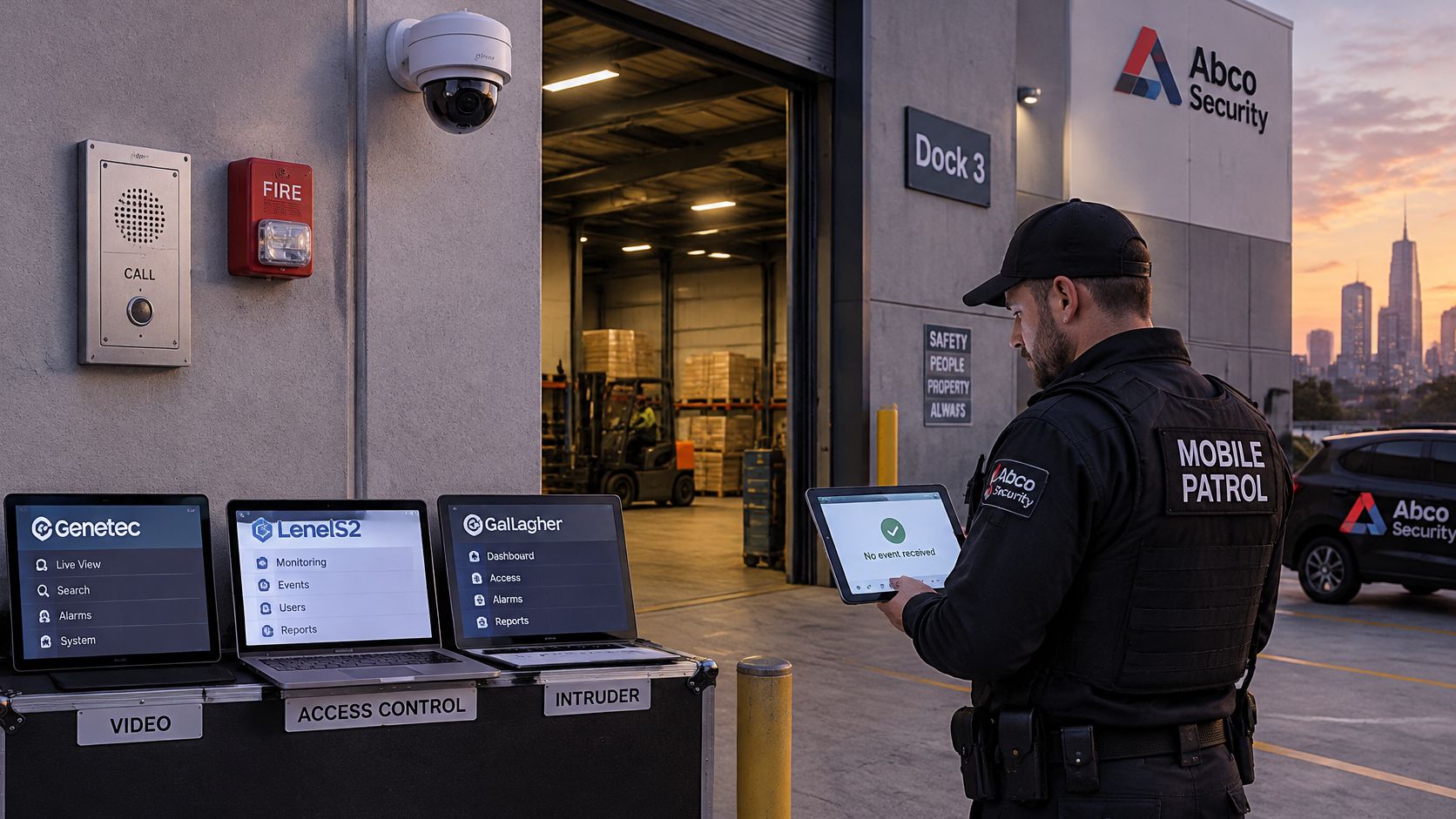
At a Melbourne loading dock, the intercom works, the alarm panel reports healthy and the camera records. Yet the officer conducting Mobile Patrols never receives the forced-door event. Each vendor's equipment works separately, but nobody has agreed how to address, format and acknowledge the message.
Australia's networks have also changed quickly: the Australian Communications and Media Authority records consumer availability of 5G in 2018, with approximately 48% of all mobile services using 5G by 2024. Equipment must remain interoperable as access technologies change.
Think of a protocol as a radio procedure
A radio net needs call signs, an order of speaking and confirmation that a message landed. A network protocol establishes comparable rules for devices.
Modern security systems commonly exchange Internet Protocol packets. A camera stream or alarm event can travel across fibre, fixed broadband or mobile networks, provided the equipment and intervening networks support the required communication.
The physical connection is only part of the design, as this site example illustrates.
For commercial property, construction, logistics and government operators, reliability requires:
- Interoperability and addressing: Devices must understand the message and know its destination.
- Authentication and encryption: Equipment must establish identity and protect traffic.
- Routing and priority: Networks must carry urgent events without unnecessary delay.
Before buying another panel: Map the message, its acknowledgement and its fallback, not just the equipment.
A useful protocol map connects CCTV, doors, alarms and sensors to encryption controls, commissioning checks and fault diagnosis. Start with the Role column below before adding another integration.
Security Protocols and What Each One Carries
| Protocol | Role | Typical security use | Transport and security note |
|---|---|---|---|
| TCP/IP | Network and transport foundation | Addressing and delivery between cameras, panels and servers | IPv4 or IPv6; TCP for reliable delivery; UDP where late video is worse than loss |
| RTSP | Media session control | Live and recorded CCTV streams | Commonly TCP port 554 for control; confirm media transport and protected authentication |
| ONVIF | Interoperability profiles | Multi-vendor cameras, PTZ, events and recording | Profiles S, T, G and M; HTTP or HTTPS services; not a replacement for RTSP |
| MQTT | Publish and subscribe messaging | Sensors, alarm events and device status | Commonly port 1883 without TLS or 8883 with TLS; delivery QoS 0, 1 or 2 |
| SNMP | Network and device management | Switch, NVR and UPS health | Use v3 authPriv; retire v1 and v2c community strings |
| SIP | Call signalling | Intercoms, gatehouse and help points | Sets up calls; audio travels separately using RTP or SRTP |
| Modbus | Industrial register access | Gates, plant alarms and BMS points | Modbus TCP commonly uses port 502; isolate or tunnel conventional unencrypted traffic |
| HTTPS | Secure web application | Camera portals, cloud alarm APIs and dashboards | Redirect HTTP to HTTPS; don't leave portals on clear text |
| TLS | Cryptographic session layer | Encrypts HTTPS, MQTT and supported media or signalling | Specify the approved version, cipher settings and trusted certificates during procurement |
Communication protocols used in physical security: Scan the Role column first. These protocols aren't interchangeable, and an installation may need several to complete the same operator workflow.
Separate delivery from the device's job
IP handles addressing and routing. TCP provides ordered delivery and retransmission, but it can't guarantee delivery through a failed connection or prove that an operator acted. UDP suits applications where waiting for an old video frame would be less useful than receiving the next one.
RTSP controls media sessions. Check the stream path, supported codec and authentication method rather than assuming a reachable camera will produce usable video. Don't permit credentials to cross an unprotected connection.
ONVIF defines interoperability profiles, not a separate cable or a guarantee that every feature works across brands. Confirm the exact profile and supported functions for discovery, pan-tilt-zoom control, recording and events. HTTPS services and security tokens still need compatible implementations and configuration.
MQTT routes published messages through a broker to authorised subscribers. Its delivery settings govern protocol-level handling, not whether a monitoring operator has acknowledged an alarm. Specify topic permissions and application acknowledgements separately.
Separate monitoring, calling and encryption
Use SNMP to observe equipment health, not to carry the primary intrusion workflow. With SIP, a successful call setup doesn't prove that its separate audio path works.
Treat conventional Modbus as a constrained plant interface. Permit only the required register access from approved hosts, rather than exposing it throughout the organisation.
HTTPS is the web application connection; TLS provides its cryptographic protection. A secure portal still needs appropriate user permissions and a working response procedure.
The same distinction between jobs appears in email. Nerds 2 You Edmonton's explanation helps readers compare IMAP, POP3 and SMTP without confusing message retrieval with sending.
For security platforms, PSIM versus VMS is another useful distinction: displaying video isn't the same as coordinating an incident. Skipping an available standard can leave the owner paying for proprietary integration and replacement work later.
How Cameras Alarms and Doors Share a Network
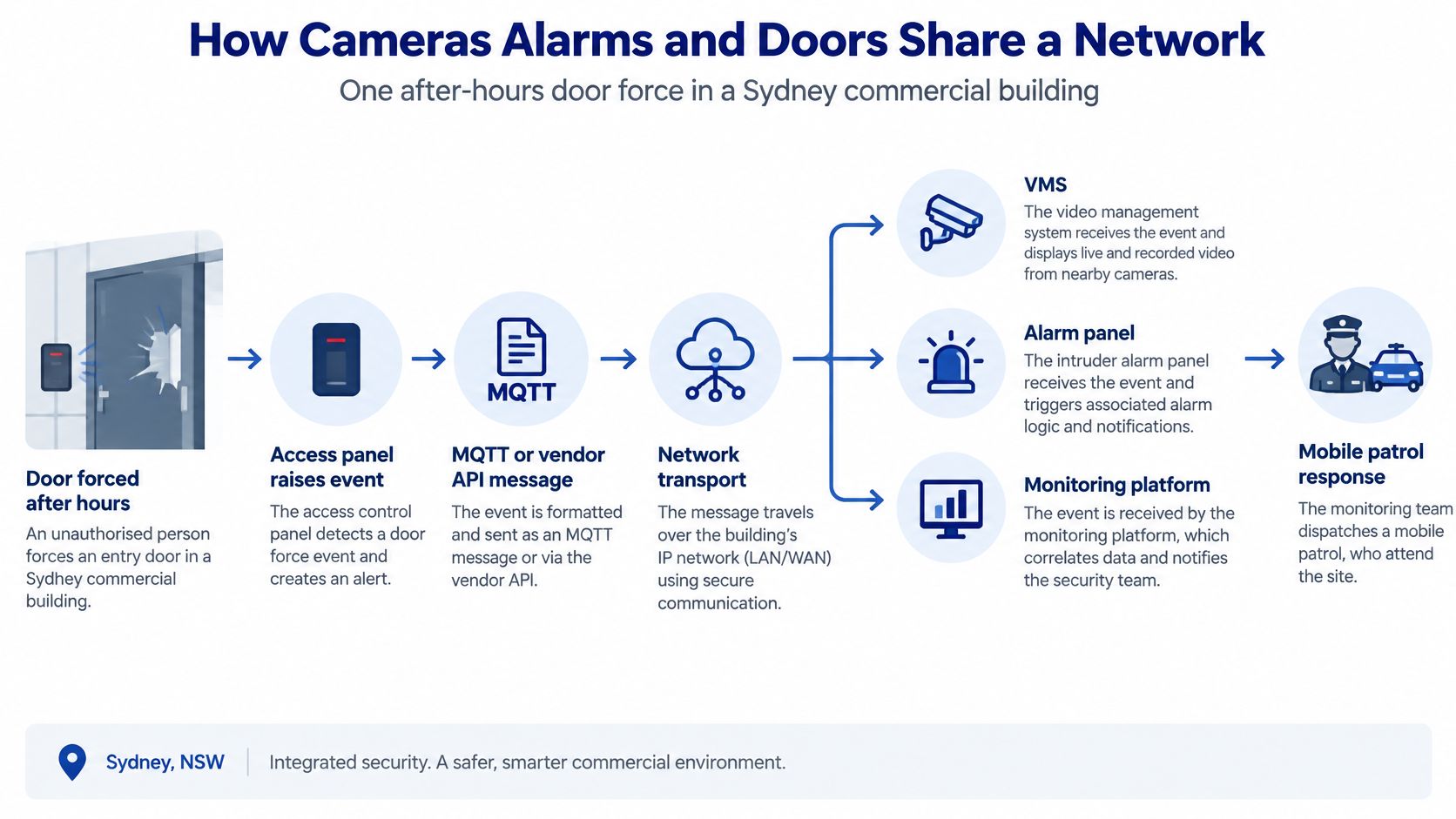
Say an after-hours door is forced in a Sydney commercial building. The access controller raises the event, and an MQTT message or vendor API passes its identity and location to the monitoring platform.
The operator's video management system, or VMS, uses the camera association established during commissioning to request the relevant stream. ONVIF can support discovery and configuration; RTSP controls the media session. The operator acknowledges the incident through an HTTPS dashboard protected by TLS.
This diagram shows the message path and the eventual human response.
Keep the sequence intact
At a Brisbane construction gate, the path might look different. A Modbus register indicates that the boom remains open, SIP connects the gatehouse intercom, and SNMP reports that the cabinet's switch is running on backup power.
These messages need shared device names and consistent timestamps. If the access event and video recording disagree about time, an investigator may select the wrong clip even though every connection worked.
Use these design checks:
- Separate device groups: Put cameras, controllers, alarm gateways and office devices into controlled network segments.
- Control admission: Combine dedicated VLANs with supported device authentication, rather than trusting possession of a Wi-Fi password.
- Prioritise live traffic: Give intercom audio and operational video appropriate quality of service ahead of bulk firmware downloads.
Review CCTV bandwidth requirements against the actual stream configuration and network path. Priority settings can manage contention; they can't manufacture missing capacity.
Make the alternative path actionable
The national Triple Zero review submission identifies emergency arrangements still centred on voice, with limited accommodation for SMS, Wi-Fi Calling, VoIP, satellite-enabled services and wearables. It also highlights interoperability and testing outside metropolitan conditions.
For site operators, adding channels isn't enough. Record who switches to radio, who checks the local panel and who contacts emergency services if the primary IP path disappears.
A backup channel is useful only when someone knows when to use it, whom to contact and how to confirm receipt.
Before adding another integration, sketch the complete path for a representative alarm. Include coverage, power, authentication, acknowledgement and escalation at each handoff.
Use the accompanying video alongside that exercise, then compare its concepts with your site's actual configuration.
Encryption Identity and Australian Controls
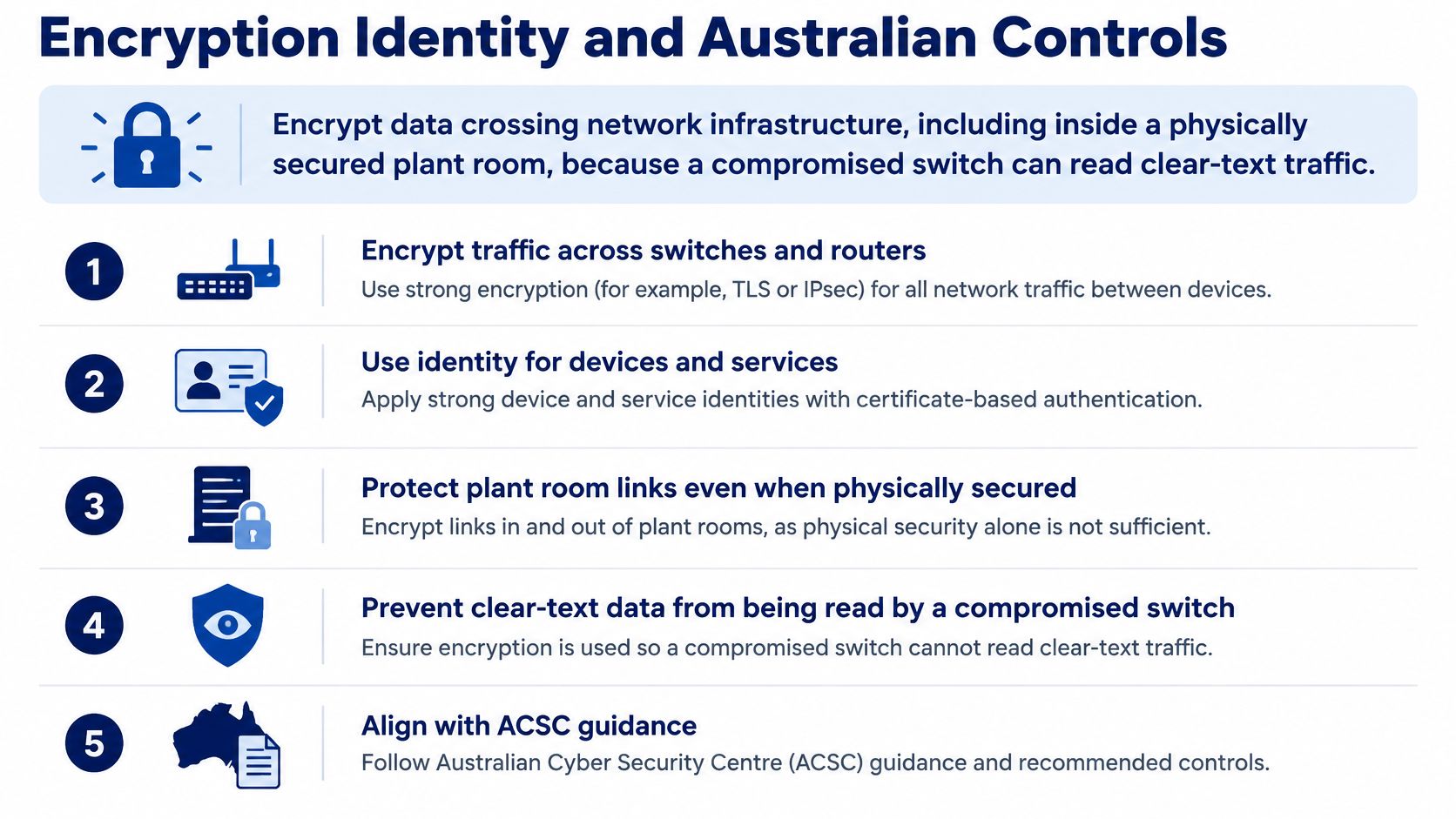
The Australian Cyber Security Centre's networking guidelines recommend encrypting data communicated across network infrastructure, including inside physically secured facilities, because compromised network equipment can expose unencrypted traffic. A locked plant room doesn't make clear-text camera or alarm traffic safe.
Apply that principle to camera streams, access events, alarm APIs, intercom signalling and patrol tablets. Check the actual protected path, including gateways and service-to-service connections, rather than relying on an encryption label in a brochure.
Authenticate equipment as well as users
For wireless networks, prefer WPA3. Where equipment supports 802.1X, prefer EAP-TLS, using X.509 certificates and public-key infrastructure to authenticate devices through a RADIUS server.
Each camera, panel or patrol device should have an identifiable admission credential rather than depending on a shared passphrase. Plan how certificates are issued, revoked and replaced when equipment changes.
Segmentation limits where a compromised device can reach; encryption prevents a listener on an allowed path from reading protected traffic. Neither control substitutes for the other.
The checklist below summarises the protection required across internal network links.
Remove avoidable exposure
During a configuration review, identify and remove:
- Legacy SNMP community strings: Replace unsupported management configurations with authenticated, private management.
- Unrestricted Modbus access: Constrain plant interfaces to authorised integration hosts and protected paths.
- Clear-text camera portals: Require protected administrative and operator access.
- Default vendor passwords: Establish unique credentials and controlled recovery arrangements.
Use cryptography approved by the Australian Signals Directorate where the applicable security requirements call for it. Replace protocols lacking encrypted equivalents where feasible; otherwise assess isolation or tunnelling and document the residual risk.
A network firewall security review should inspect permitted flows between segments, not just internet-facing rules. An unnecessarily broad internal rule can undermine carefully separated device groups.
Encryption protects confidentiality. It doesn't, by itself, establish authorised device identity, confirm operator receipt or keep a local panel operating without the cloud.
Keep compliance responsibilities distinct. ACSC guidance informs technical controls, while contractual and regulatory obligations determine what a particular organisation must implement.
When people provide the response, relevant state or territory licensing obligations still apply, and the Fair Work Security Award summary identifies covered security-services work including guarding, electronic monitoring and crowd control. Assign responsibility for both the technical controls and the personnel who act on their messages.
How to Choose and Deploy a Protocol Stack
Specify the message before the equipment
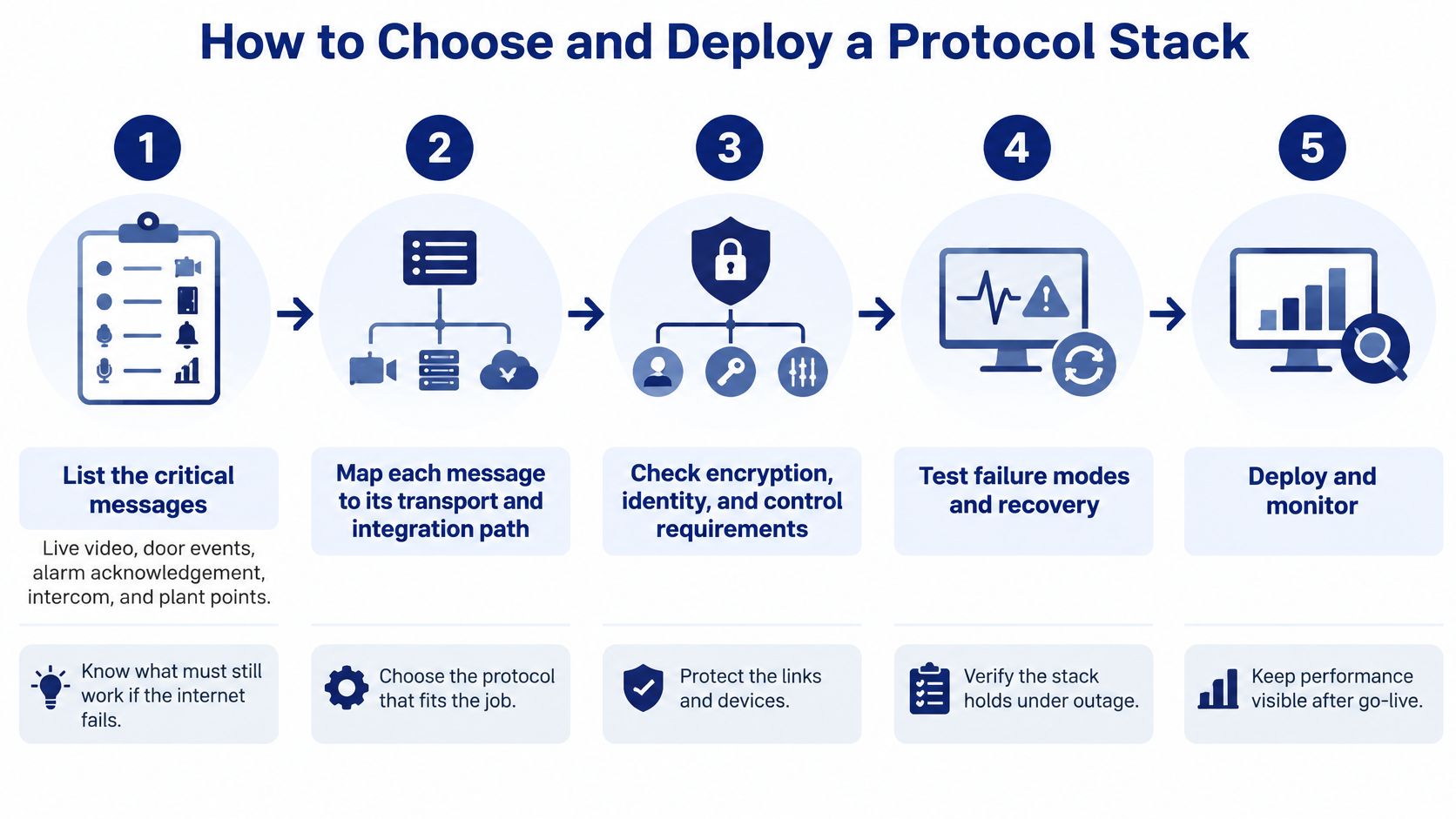
Start with the messages the site must deliver, then decide how each one should travel. A protocol stack is a continuity plan as well as a set of technical choices: each critical function needs a tested handoff if power, carrier, Wi-Fi or cloud services fail.
List the critical messages. Include live video, door events, alarm acknowledgement, intercom calls and plant points. Mark which functions must continue without internet access so the procurement specification reflects operational needs.
Prefer an established standard over a proprietary software development kit when it meets the requirement. Record the exact capability, such as ONVIF Profile T or MQTT over TLS. A protocol name alone does not define what the device can do.
Build a protocol inventory. For each integration, record its source, destination, port, transport, VLAN, authentication method, certificate owner and operational purpose. This gives the technician a connection map, not just a collection of vendor manuals.
Check cryptographic support before purchase. The ACSC cryptography guidelines favour current TLS versions such as TLS 1.3. Confirm the approved TLS version and cipher settings for each device, along with certificate and configuration requirements.
Prevent silent certificate failures. Disable legacy TLS where the connection is terminated or inspected, redirect HTTP to HTTPS and assign renewal responsibility. A gateway that only passes encrypted traffic through cannot necessarily control the TLS version negotiated by the endpoints.
Commission for interruption and recovery
Admit and separate devices. Use EAP-TLS where supported and assign cameras, doors and alarms to controlled VLANs. For unsupported hardware, document compensating controls rather than weakening admission across the entire site.
Tunnel or isolate clear-text industrial traffic. Permit only the integration hosts and functions that are needed, so a plant interface does not become an unrestricted route into operational equipment.
Set traffic priorities. Configure quality of service for SIP media and operational live video ahead of backups. Test under realistic load, including the uplink, where competing traffic can delay messages.
Run a scripted acceptance test with authorised personnel. Simulate a forced door, confirm the correct event and clip, obtain operator acknowledgement and inspect the audit record. Agree on safe test arrangements before affecting occupied areas or operational doors.
Write and exercise the fallback. Name the local panel function, radio channel and escalation contact to use when the cloud broker or carrier is unavailable. Restore service and check that queued events do not create duplicate or misleading responses.
Use this acceptance script to assess access control integrations, including local controller behaviour during disconnection. A normal demonstration does not show whether the integration will keep working during an outage.
A regional site without reliable mobile coverage still needs workable local controls. At a strata site, assign certificate ownership in the maintenance contract so responsibility remains clear when volunteers or managing agents change.
A stack is ready for operational acceptance only after its normal operation and fallback have both passed testing.
Faults to Check Before You Call It Offline
| Symptom | Likely cause | First check |
|---|---|---|
| Camera pings but no live view | RTSP URL, codec, TLS mode or clock skew | Confirm ONVIF profile, RTSP path, TLS setting and time sync |
| Intercom rings then silence | SIP signalling works but RTP or SRTP is blocked | Check negotiated media addresses and permitted audio flows |
| Door shows online but events never arrive | MQTT authentication, QoS or VLAN configuration | Inspect broker logs, topic permissions, subscriptions and routing |
| NVR, switch or UPS alerts missing | SNMP version or trap target is wrong | Use v3 authPriv and confirm the trap receiver |
| Monitoring portal shows a certificate warning | Expired, mismatched or self-signed TLS certificate | Check hostname, trust chain, renewal and approved TLS configuration |
| Gate or plant points fail after segmentation | Previous integration relied on unrestricted flat-network access | Allow only the authorised integrator host and tunnel the segment |
| Patrol device cannot join the site | Wi-Fi admission or carrier failure | Test EAP-TLS and mobile connectivity, then confirm the local panel still alarms |
Security protocol faults, causes and fixes: Match the symptom before replacing hardware. These are diagnostic starting points, not proof of the fault.
Don't confuse partial connection with service
A ping response proves limited network reachability, not working video. An online panel may have a healthy management session while its event subscription has failed.
Likewise, an intercom can ring while audio is blocked elsewhere. For related voice-service diagnosis, SnapDial's guide to resolve desk phone ringing problems helps distinguish call-delivery symptoms from other faults; security intercom testing must also include the media path.
Don't bypass certificate warnings to restore operations informally. Check the device clock, certificate hostname and trust chain, then repair the underlying condition through the approved maintenance process.
Check continuity beyond encryption
The Australian Government's critical-infrastructure annual risk review announcement identifies communications among interconnected critical sectors. At site level, a shared communications failure can affect access, evacuation coordination, monitoring and dispatch together.
Record answers to these operational questions:
- Essential messages: Which alerts must remain available during an outage?
- Local operation: Which controllers continue safely without cloud services?
- Credential recovery: Who can restore certificates and administrative access?
- Acknowledgement: How does the responsible person confirm receipt?
- Incident records: Where are events preserved while the broker is unavailable?
Schedule an annual outage drill as a site-management practice, including regional or after-hours conditions rather than relying only on a CBD weekday test. Use controlled simulations and agreed safety precautions; don't disrupt live emergency services to test a fallback.
After restoration, compare the event sequence with operator actions. Investigate missing timestamps, duplicated alerts and escalation gaps, and incorporate useful changes into false alarm reduction procedures.
Recovery test: Confirm that people received the right instruction and that the incident record survived, not merely that the dashboard turned green.
If the symptoms don't match a known fault, stop making speculative configuration changes. Give the integrator the protocol inventory, relevant logs, change history and observed failure sequence.
Match the Stack to the Site Then Act
Commercial property and construction
In commercial buildings in Melbourne or Sydney, specify interoperable cameras, protected monitoring portals and an intercom path for concierge and reception coverage. Define how mobile patrol response is requested, and record who acknowledges the call and takes responsibility for attendance. A forwarded notification alone does not confirm that anyone has read it.
Procurement documents should name the certificate owner, after-hours contact and authorised maintenance party. For retail and shopping-centre systems, agree who receives incidents affecting tenancies, loading areas and common property.
At construction sites in Perth, Brisbane and regional locations, account for changing power arrangements, relocated cabinets and inconsistent carrier coverage. Keep gate or plant functions local where they need to operate during a connection loss. Use protected messaging for remote status when available, with a tested radio or intercom handoff if the network fails.
Events and residential communities
For events, coordinate crowd and incident communication before doors open. Test radio coverage, mobile data and the alarm path, then give licensed security personnel a written escalation procedure they can use during network loss.
Name the person who takes over if the control-room application becomes unavailable. Match equipment labels and radio call signs to the location names staff use, including temporary gates and emergency access routes.
For strata and gated communities, favour supported interoperability and protected portals over dependence on an undocumented app. Record who owns recordings, system accounts and certificates, who can access them, and who is responsible for maintenance.
Across these settings, keep acceptance records that show how the system is meant to work and what happens when a connection fails:
- Message inventory: Critical events, destinations and acknowledgement requirements.
- Configuration ownership: Approved connections, certificates and responsible parties.
- Failure evidence: A drill record showing the alternative communication path and recovery.
- Human response: Named roles for escalation, attendance and incident documentation.
The right protocol combination is the one that lets the right person act safely when the normal connection fails. Encryption helps protect communications, while a tested handoff keeps alarms, doors and people coordinated through an outage.
For operators comparing integrated security options, ABCO Security Services Australia offers licensed personnel, mobile patrol response, A1 Grade CCTV and alarm monitoring, and electronic security integration. Contact ABCO Security Services Australia to discuss your site's escalation and monitoring needs, including the roles and communication paths involved.
about
avada factory
Sempery ultricies nibh at dolor cras urna eleifend nec. Atiam efficitur tempor.