You're checking the cameras after a late-night alarm. The yard looks bright on screen, but the person near the fence is a blur and the vehicle's number plate is a white rectangle. The camera recorded the incident, yet it hasn't captured the detail you need.
Choosing night vision cameras starts with that distinction. A useful system must deliver the right detail at the right location, protect the footage it collects, and give someone a clear action when an alarm occurs. The longest infrared range isn't automatically the safest or most effective choice.
Night Vision Technologies Compared
A night camera isn't one product. For practical purchasing, there are four main technology families, and the right choice starts with the light already available and the detail you must confirm.
Night vision technologies by how they see and where they work
| Technology | How it sees | Works in total darkness | Best use | Main limitation |
|---|---|---|---|---|
| Infrared (IR) illumination | Built-in IR LEDs light the scene; the sensor reads reflected light in black and white | Yes, within rated IR distance | Perimeters, car parks, entrances and dark driveways | Close objects bloom white; usable range changes with lens and mounting height |
| Starlight or low-light digital | A sensitive sensor and wide aperture capture ambient light, often in colour | No; needs moonlight, street lighting or floodlights | Lit yards, loading docks and colour identification | Unlit scenes become grainy and lose detail |
| Thermal | Detects heat emitted by people, vehicles and machinery | Yes, including through some smoke or haze | Large unlit perimeters, mining sites and presence detection | Shows presence well but rarely facial detail; higher equipment cost |
| Image intensifier | Amplifies available light through a tube | No; needs some available light | Legacy defence and policing equipment | Less suitable for modern integrated CCTV than digital low-light or thermal systems |
Australia's transition from specialist optics to integrated surveillance helps explain the available choices. Bonafide Research's Australian night-vision camera market overview describes earlier reliance on analogue image intensifiers and increasing adoption of thermal imaging and digital low-light cameras as capability improved and costs declined.
That progression doesn't mean every site needs thermal imaging. It means site managers can separate finding an intruder from identifying that person, rather than expecting a single wide-angle camera to do both.
Choose for the available light
Consider a Brisbane warehouse yard with dependable floodlighting. A low-light colour camera at the gate can help an operator distinguish clothing and vehicle colour, provided the lighting remains on throughout the required monitoring period.
Test the same view with the floodlights switched off. If the image becomes unusable, the installation needs an alternative operating mode or independent illumination. A colour label on the carton doesn't guarantee colour evidence during a lighting failure.
A rural boundary outside Perth presents a different problem. Thermal detection can alert an operator to a person crossing an unlit fence line, while an IR camera at the access gate captures conventional identifying detail.
Separate detection from identification
Detection establishes that something is present. Recognition helps distinguish the type of subject or recognise someone familiar. Identification requires sufficient detail to establish who the person is.
Those tasks demand different framing. A broad perimeter view may be excellent for detection but unsuitable for facial evidence.
Practical rule: Measure the light after dark, name the task, and test the chosen technology at the actual target distance.
Where mixed technology is justified, assign each camera a clear role. Don't pay for thermal coverage at a well-lit reception entrance, or expect an identification camera at a gate to watch an entire remote boundary.
Specifications That Predict Night Performance
Measured sensitivity, exposure settings and usable subject detail tell you more than megapixels alone. An impressive still image can conceal motion blur, aggressive noise reduction or an illumination pattern that leaves the important part of the scene dark. Higher resolution also generates larger files, so a sharper sensor can raise storage and bandwidth costs without adding usable evidence.
South Australia's imaging-equipment specification specifies monochrome sensitivity of 0.005 lux at 30 IRE, f/1.2 and 1/15-second shutter speed, with 0.0005 lux at 30 IRE, f/1.5 and 1/30-second shutter speed for motorways or unlit roads. Its road-camera requirements also include adaptive IR reaching up to 200 metres.
Specification reference values and what to ask for
| Specification | Reference value | What it tells you | Ask the vendor for |
|---|---|---|---|
| Monochrome sensitivity | 0.005 lux at 30 IRE, f/1.2, 1/15 s | Low-light capability at stated settings | A test report using those settings |
| Unlit road or motorway sensitivity | 0.0005 lux at 30 IRE, f/1.5, 1/30 s | Performance in demanding dark scenes | Night footage at your target distance |
| Adaptive IR reach | Up to 200 m in the road specification | Illumination ceiling; recognition range must be proven separately | Proven recognition distance at the proposed mounting height |
| Wide dynamic range (WDR) | Recommended where bright and dark areas share the frame | Treatment of bright and dark areas together | Footage under vehicle headlights |
| Electronic image stabilisation | Recommended for pole-mounted cameras | Control of movement affecting image detail | A test on the proposed pole |
| Day/night switching | Mechanical IR-cut filter | Colour accuracy by day and near-infrared sensitivity at night | Demonstration through dusk |
These values describe a road surveillance use case. A short driveway or courtyard needs far less reach, and powerful IR in a small reflective scene tends to produce glare instead of usable detail.
Read lux figures with their conditions
Lux describes illumination. The associated 30 IRE states the video signal level used to judge the image, while aperture and shutter speed describe how the camera collected the light.
A longer exposure can brighten a stationary yard while smearing a moving vehicle. Opening the aperture admits more light but reduces depth of field, potentially leaving subjects outside the focused area soft. Two lux ratings measured at different shutter speeds and apertures are not directly comparable.
Ask each bidder to state sensitivity at the same IRE, aperture and shutter speed. A quote that leaves those conditions unstated cannot be compared.
Demand evidence rather than a range claim
Treat advertised IR reach as an illumination ceiling. Recognition at that distance still has to be demonstrated. Reflective signs, wet pavement and retroreflective clothing can create hotspots that obscure nearby detail, so the strongest illuminator on the spec sheet can sometimes produce worse evidence in a confined scene.
Plan security camera lighting alongside lens selection. Require a night trial at the proposed angle and distance, with a walking person, a moving vehicle and headlights in the scene.
Check recorded exports. The live display shows the camera's clean output; the export shows what the recorder and compression preserved. The acceptance question is whether someone can reliably interpret the saved evidence.
Matching Cameras to Sector and Environment
Start with the task at the location: detect, recognise or identify. A camera that works at a controlled entrance may fail on a moving construction boundary or an exposed industrial pole.
Camera approach by setting and main task
| Setting | Main task | Camera approach | Recording approach |
|---|---|---|---|
| Construction sites | Detect intrusion across large unlit areas | Thermal or IR towers with motion alerts; solar power where mains is absent | Event-triggered clips plus live monitoring |
| Retail and shopping centre loading docks | Identify vehicles and monitor restricted doors | IR with WDR for headlights | Continuous recording with policy-based retention |
| Event security car parks and perimeters | Track crowd and vehicle flow | Starlight where lighting is dependable; IR elsewhere | Live monitoring with incident clips |
| Gatehouse and strata driveways | Read plates and faces at entry | Stabilised IR with controlled illumination | Retained footage on a short, stated schedule |
| Warehouse and logistics yards | Detect at the perimeter and identify at gates | Thermal along fence lines, IR at gates | Gate recording and live perimeter monitoring |
| Industrial and mining sites | Detect presence and relevant heat anomalies | Thermal for detection, IR for identification | Alarm-triggered recording with logged access |
| Concierge and reception areas | Identify people at entrances | Controlled IR, excluding private areas | Limited recording with visible signage |
The Department of Home Affairs CCTV requirements recommend optimised IR for external fixed cameras and rooms where lighting is intermittently switched off, require WDR, and recommend electronic stabilisation where pole-mounted cameras may shake.
Entrances need controlled detail
For Retail Security and Shopping Centre Security, the loading dock often combines headlights, dark recesses and restricted doors. Frame the door and vehicle stopping point deliberately rather than choosing the widest possible view.
Gatehouse Security needs similar discipline. Plate capture and facial capture may require separate views because a driver's face and a reflective plate present different exposure problems.
For Concierge Security, preserve a useful entrance image when reception lighting changes after hours. Keep the view away from staff amenities and other private spaces.
Open areas need dependable detection
Construction Security changes as fencing, stockpiles and buildings move. A solar-powered tower can solve a power-supply problem, but the design still needs an energy budget, suitable positioning and a clear alarm response.
At events, separate general crowd-flow observation from identification at controlled entry points. Event Security teams need views that support decisions about queues, vehicle movement and perimeter breaches, not merely attractive overview footage.
Industrial operators should also distinguish security thermal cameras from equipment intended for temperature measurement. If overheating detection is required, specify that function and its alarm criteria explicitly.
A heat image alone isn't a maintenance diagnosis. Use Mobility Foresights' Australian infrared-imaging overview for context on industrial inspection and security applications, then validate the particular operational task.
Security Guarding or Mobile Patrols teams in Melbourne, Sydney, Brisbane and Perth need clear camera names and access instructions to act on alerts. Put the setting, task and response requirement into the installer's scope before selecting equipment.
Privacy Rules for Night-Time Footage
The strongest camera isn't necessarily the right purchase. Extending coverage into neighbouring homes or staff areas can collect identifying information that has no useful connection to the security purpose.
For organisations covered by the Privacy Act, the Office of the Australian Information Commissioner's security-camera guidance says people must be notified before recording, captured personal information must be secured, and information must be destroyed or de-identified when no longer required.
That creates a practical procurement question: what information does each camera need to collect? Broad perimeter detection and close entrance identification shouldn't automatically use the same recording or access settings.
Turn the purpose into installation limits
Apply a necessity test to camera quality, location and recording. Consider whether live observation could achieve the purpose without retaining footage, rather than treating continuous recording as the default.
- Map the night view: Check neighbouring windows, balconies and staff spaces after the camera changes to night mode.
- Control illumination: Adjust the aim and IR output so useful coverage doesn't become unnecessary spill beyond the monitored area.
- Mask unrelated areas: Apply privacy masking and confirm that it remains effective in recorded exports.
- Set retention by purpose: Document why each zone needs its retention period and configure deletion accordingly.
- Restrict access: Use named accounts, appropriate permissions and access logs rather than a shared viewing password.
Say a strata car park camera captures a neighbour's balcony once its night view activates. Re-aim the camera, narrow the view or mask the balcony. Keeping the unwanted view because it might be useful later isn't a sound purpose-based approach.
Notification needs more than a sign
Australian Government guidance on installing video surveillance recommends clearly visible cameras, signs at every entrance and written notification to employees and new starters. It also says cameras shouldn't be installed in fitting rooms, showers, toilets or change rooms.
Use the Australian CCTV laws guide to identify the legal questions relevant to your installation. Workplace surveillance, audio recording and residential settings need particular care because applicable obligations can differ.
For teams documenting access, retention and incident handling, Vigil Security's privacy guidance for security and compliance teams provides an additional governance resource. Use it alongside the applicable Australian requirements, not as a substitute for them.
More identifying detail is only useful when you have a legitimate reason to collect it and a controlled way to handle it.
Before specifying illumination, assign each camera a purpose, privacy boundary and risk level. That makes privacy a design decision rather than a complaint-management exercise.
Securing Night Cameras Against Network Threats
A better camera can become a more valuable target when its footage is remotely accessible. A compromised camera or recorder can expose private video and, where network controls are weak, provide a route towards other business systems.
Cyber Daily's reporting on connected-camera risk identifies recurring weaknesses including default or shared passwords, missing multifactor authentication, unencrypted information, delayed patching and exposed interfaces.
Ask questions that require evidence
Where will the cameras sit? Put them on a separate VLAN from office traffic, with firewall rules limiting permitted connections. A VLAN without access restrictions isn't sufficient isolation.
Who owns updates? Name the person or contractor responsible for firmware assessment, testing and installation. Require a support-life statement so an apparently inexpensive camera doesn't become an unsupported device.
Who can watch remotely? Document contractor and cloud-provider access, including account ownership, approval and revocation. Use named roles and retain logs of administrative actions.
What happens during an internet outage? Demonstrate local recording, subsequent retrieval and any interruption to alerts. Don't assume a cloud viewing application proves that recording continues offline.
A camera placed on a flat office network illustrates the problem. If an attacker compromises it, permissive internal access could give them a path towards systems holding payroll information. Segmentation should prevent that connection, not merely make it less convenient.
Score the vendor before purchase
Use this grid for each proposal. Mark every control yes, partial or no, then record the evidence supporting the score.
| Control | Evidence to request |
|---|---|
| Encryption in transit and at rest | Supported modes and configuration demonstration |
| Multifactor authentication | Demonstration for remote and administrative access |
| Role-based permissions | Separate viewing, export and administration roles |
| Patch support | Update process, support lifetime and responsible party |
| Network segmentation | Network diagram and permitted connection list |
| Audit logs | Sample access, export and configuration records |
| Offline recording | Demonstrated internet-loss recovery |
| Vendor transparency | Hosting, subcontractor access and disclosure arrangements |
Include remote-viewing security camera controls in the commissioning scope, rather than adding remote access informally after installation.
For the IT team planning authorised checks, My Cyber Guard's vulnerability scanning guide is a useful starting point for discussing scan scope and remediation. Test carefully so security checks don't disrupt recording or alarms.
A partial answer needs an owner and a remedy. Don't accept an unresolved access-control weakness just because the night footage looks clear.
How to Install and Test Night Cameras
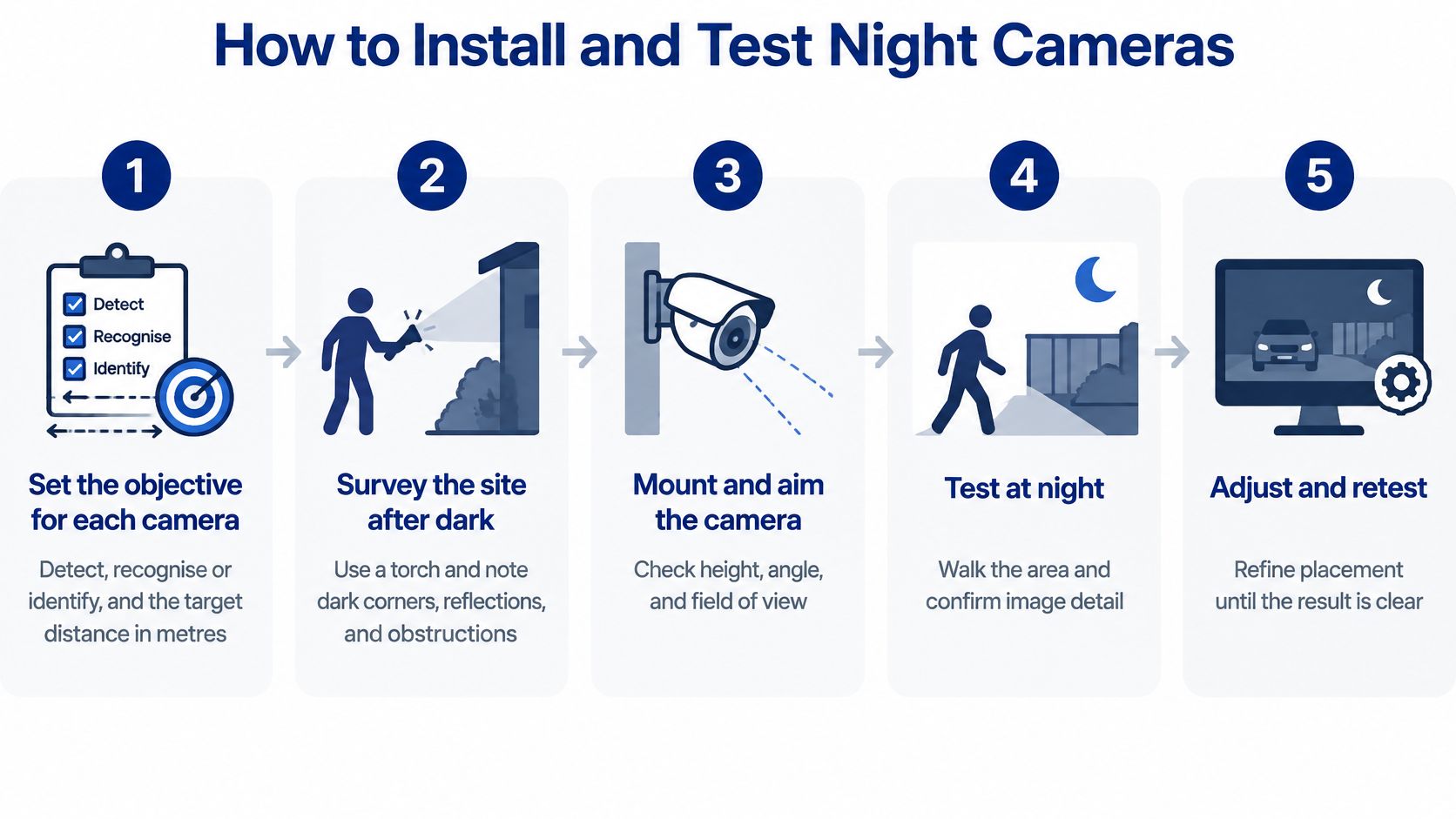
Set the objective for each camera. Record whether it must detect, recognise or identify, together with the target distance in metres and the subject's expected direction of travel.
Survey the site after dark. Take a torch, phone and site plan, and note dark corners, obstructions, reflective signs and likely clothing reflections; a phone photograph is a site note, not a calibrated light measurement.
Choose the mounting height and angle. Match framing to the lens and subject position, avoid direct glare where practical, and don't mount so high that every person appears as the top of a head.
Confirm the power budget. Check the camera's maximum demand with IR operating, the PoE switch's available output and the proposed cable route rather than relying on daytime power consumption.
Configure the image deliberately. Set WDR, IR intensity, exposure and day/night switching for the scene, reducing IR where close subjects lose detail.
Secure the mounting and cabling. Stabilise exposed poles and restrain cables so wind movement doesn't disturb connections or shift the view.
Run and document the acceptance test. Use a moving person and vehicle, introduce headlights, and capture wet-weather footage when conditions allow before signing off the affected views.
Use this process graphic as a field reminder.
Test the recording that someone will use
The CCTV placement guide can support the positioning discussion, but final acceptance needs recorded evidence from your installation. Export the clips and inspect them on the equipment used for incident review.
Have the test subject approach, move across and leave the target area. A person standing still directly beneath a camera is an easy demonstration that may hide problems with normal movement.
Check that recording begins early enough to show the approach and continues through the event. Confirm camera names, timestamps and export procedures so a reviewer can establish where and when an incident occurred.
For a plate-reading task, test the intended vehicle stopping or travel position. Don't reject or accept the entire system based on a plate captured outside the agreed operating conditions.
Maintain the accepted standard
I recommend a monthly lens and dome inspection and clean for dusty or coastal sites, with more frequent attention where contamination is visible. Use the manufacturer's cleaning method and avoid abrasive wiping.
Schedule a quarterly functional check of IR illumination and day/night switching as a maintenance starting point. These are proposed operating intervals, not statutory requirements; adjust them to the environment and equipment instructions.
Test firmware changes before wider deployment, and verify recording and alerts afterwards. Repeat affected acceptance checks whenever construction, landscaping or lighting changes the scene.
Sign-off standard: The test log should contain readable face and number-plate evidence at the agreed positions on a dark night, wherever those are the camera's assigned tasks.
Monitoring, Response and Budget Trade-offs
Once the cameras work, the next question is who watches the feed and what happens after an alert. Recording, verification and physical attendance are different services, and each needs a defined owner.
A monitoring workstation supports the operator's decision, but the response procedure determines what follows.
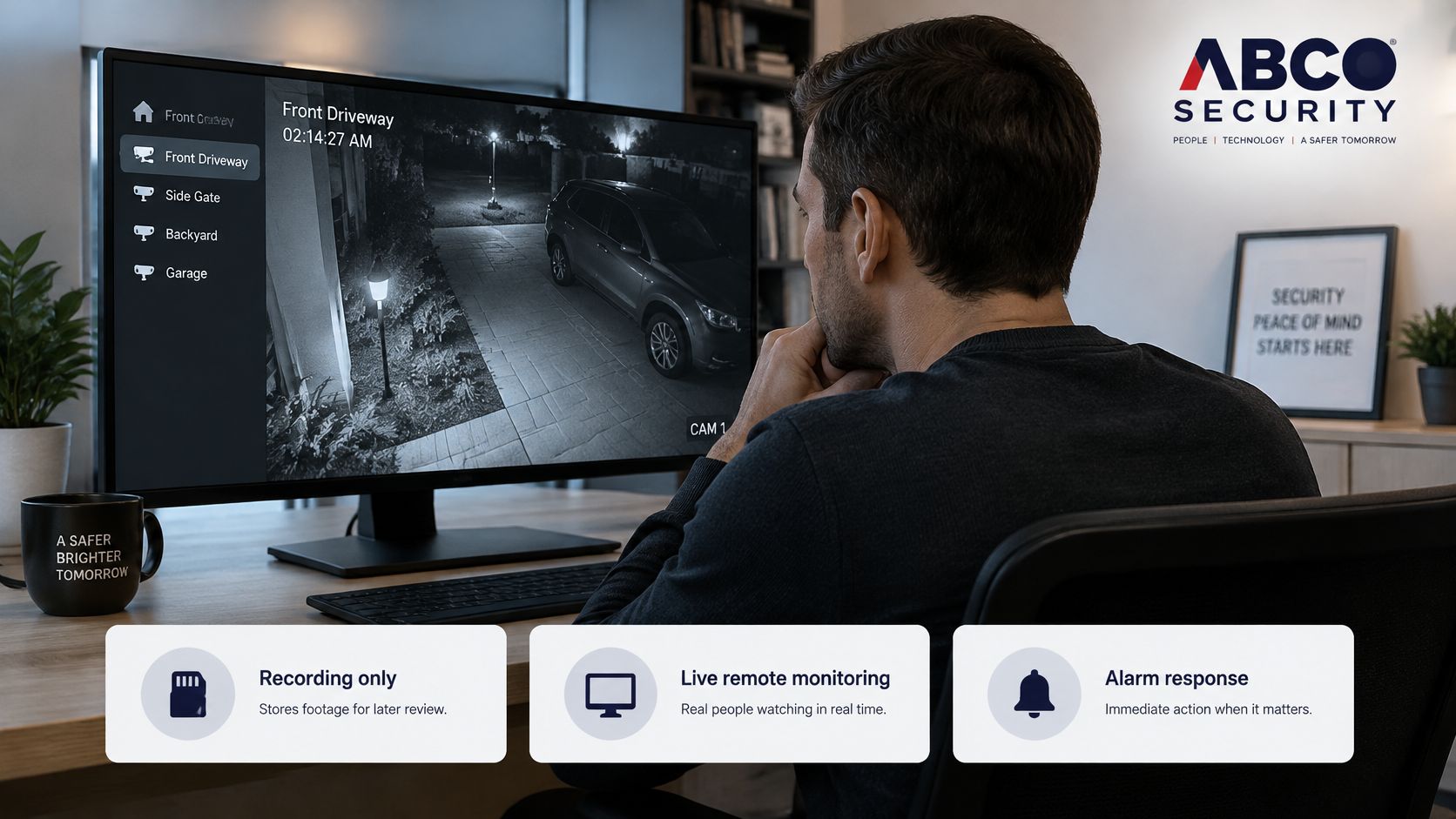
Compare the operating models
- Recording only: Someone reviews footage after an incident. This supports investigation but doesn't provide active intervention while the event unfolds.
- Live remote monitoring: An operator checks alerts against the video and follows an escalation plan. Verification helps distinguish an intrusion from an irrelevant activation before dispatch.
- Monitoring with attendance: Verified alerts can trigger a guard or patrol response. This needs access arrangements, safe attendance instructions and clear escalation limits.
Victoria Police's private-security licence activity guidance includes protecting property through CCTV monitoring and in-person patrols, and explains that sub-activities require relevant qualifications and authorisation. Check the actual duties against each worker's licence rather than assuming every security licence covers every assignment.
Complete equivalent checks for Sydney, Brisbane, Perth and other jurisdictions. When comparing a Security Company Melbourne proposal, include the control-room and attending-worker arrangements, not just the installer's credentials.
Compare whole-zone costs
Budget for camera count, lenses, thermal equipment, cabling, power, solar infrastructure, monitoring hours, storage and maintenance visits. Include replacement and support obligations so a low initial equipment price doesn't conceal ongoing work.
As an illustrative design option, a thermal camera watching a long fence might replace several IR views and their cabling. That doesn't automatically reduce monitoring hours, and entrance identification may still need separate cameras.
Use a common three-year comparison period as a budgeting exercise, not a prediction of equipment life. Price each zone under the same operating assumptions, with exclusions stated clearly.
The CCTV monitoring service price guide can help organise the commercial questions. Obtain a zone-based scope rather than comparing unexplained monthly totals.
Use the video as a discussion aid when agreeing how monitoring connects to response.
The useful purchasing question is what happens after a credible alert, including who receives it, who authorises attendance and how the incident is closed.
Book a Night Site Survey Before You Buy
Book a night site survey before ordering cameras. The purchase should follow a tested design, not force the installer to make unsuitable equipment fit the site.
Bring the people who understand after-hours operations, IT access and privacy responsibilities. A facilities manager can explain a recurring gate problem, while an IT administrator can identify restrictions that affect remote viewing and recording.
Use the survey preparation graphic to organise the visit.
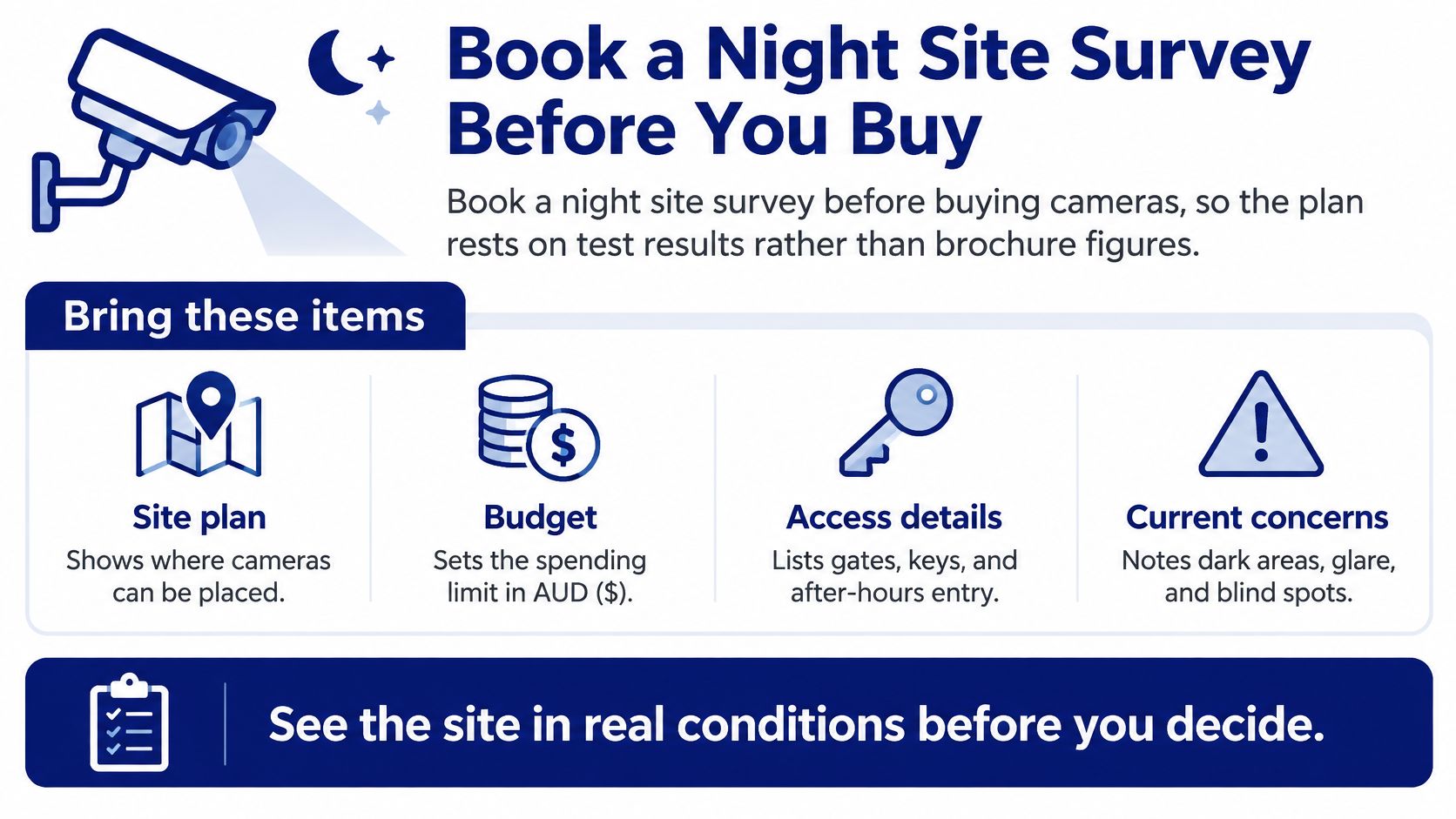
Bring the information that changes the design
- Site plan: Mark boundaries, gates, restricted doors, available power and proposed equipment locations.
- Zone objectives: State the subject and task for each view, rather than writing general coverage.
- Privacy boundaries: Identify neighbouring properties, staff areas and spaces that must remain outside surveillance.
- Operating hours: Explain when the site is unattended and when cleaners, deliveries or authorised contractors arrive.
- Access details: Bring gate arrangements and emergency contacts so attendance can be planned safely.
- Budget and constraints: Identify spending limits, connectivity restrictions and changes expected during the installation's life.
Ask for a deliverable that records proposed views, operating assumptions, privacy exclusions and acceptance tests. It should be clear which functions have been demonstrated and which remain conditional.
Match the survey to the response service
Our construction CCTV monitoring uses solar-powered camera towers, motion detection alerts and remote video access for site managers; our monitoring centre can dispatch patrols or security officers within minutes. We also provide CCTV and alarm monitoring, with the response arrangement selected to suit the site's operating needs.
Our mobile patrol incident reports include photo evidence. Each patrol vehicle is GPS-tracked and uses digital reporting systems to record every site visit, giving managers a record of attendance rather than relying on a verbal update.
We operate from offices in Melbourne, Sydney, Adelaide, Perth and Brisbane, with service planning across surrounding cities within a 200 km radius. Our quality management follows ISO 9001, supporting consistent documentation and service processes.
For an outlying site, settle access, communications and attendance arrangements during the survey. An office location alone doesn't establish the response conditions at a remote property.
The final purchasing document should distinguish camera performance from service commitments. Require a night trial report before purchase approval, and record any remaining conditions, such as wet-weather testing or a pending network change.
ABCO Security Services Australia offers integrated camera systems, CCTV and alarm monitoring, and coordinated guard or patrol response. Visit ABCO Security Services Australia to request a night site survey, and ask for a trial report covering image detail, privacy boundaries, network controls and the response plan before you buy.
about
avada factory
Sempery ultricies nibh at dolor cras urna eleifend nec. Atiam efficitur tempor.