Four armed men allegedly entered a Labrador house at approximately 2:00 a.m. on 3 January 2024, according to Queensland Police. That incident doesn't establish the likelihood of a break-in at your address, but it illustrates why recording an intruder isn't the same as protecting occupants.
When comparing home security systems on the Gold Coast, look beyond camera resolution and app features. The practical question is whether detection, verification, response and usable evidence connect for your property, including when you're asleep, away or unable to answer your phone.
Home Security System Types Compared
Think of security equipment as a team. Alarm sensors are the tripwire, cameras are the witness, access control manages admission, and monitoring provides someone to answer the call. Buying more of one component won't necessarily cover a missing role.
The comparison below shows how those roles fit together.
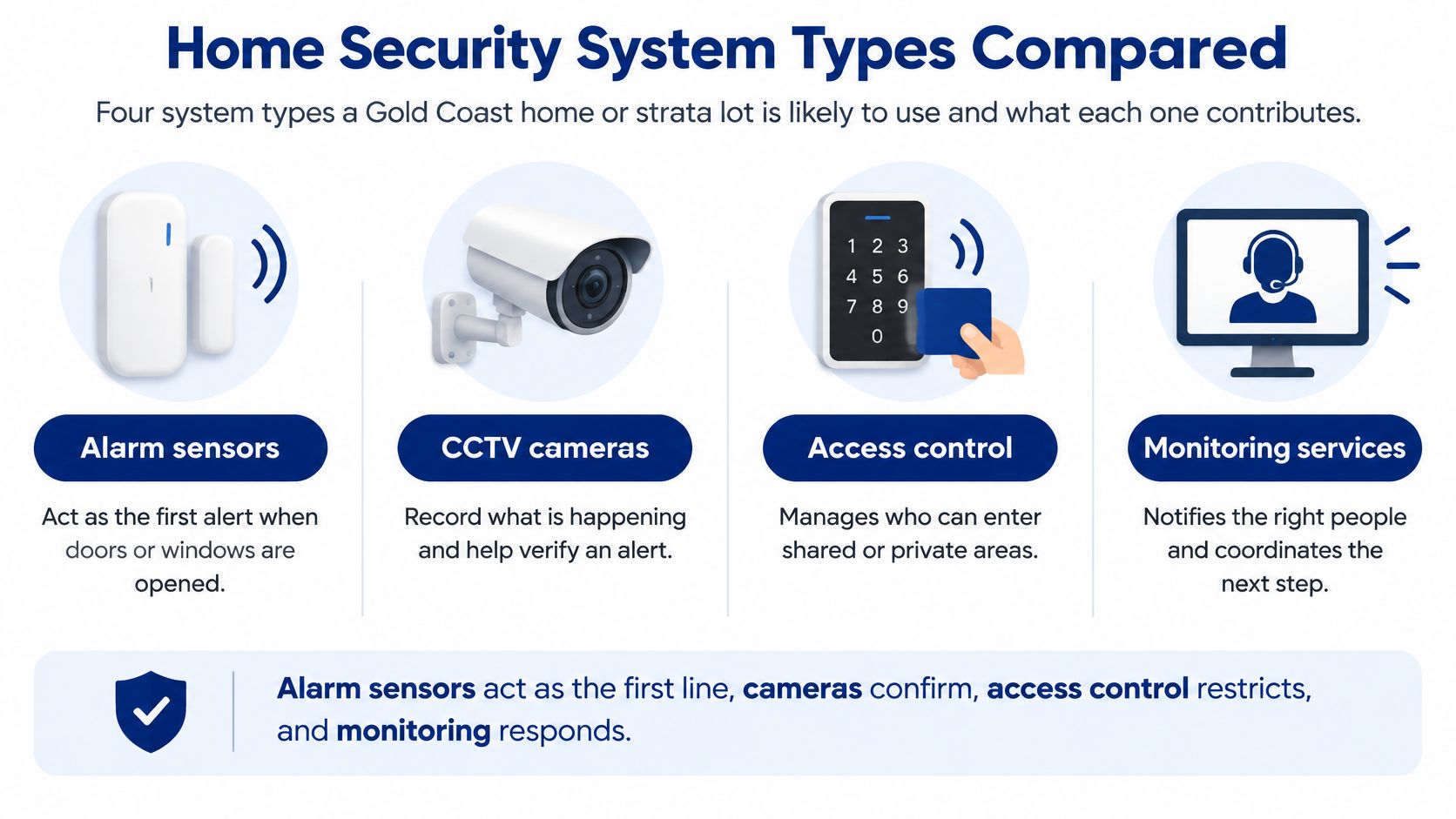
System types and what each one covers
| System type | Protects against | Main limitation alone | Best fit |
|---|---|---|---|
| CCTV cameras | Observed entry, evidence capture, deterrence | Records events but doesn't respond without monitoring | Detached homes with driveways and side access |
| Monitored alarm | Door and window intrusion, after-hours entry | Unverified alerts can cause false calls | Homes with multiple entry points and no staff on site |
| Access control | Unauthorised entry to gates, doors and common areas | Doesn't detect intruders entering through open paths | Strata complexes, gated communities and shared buildings |
| Video doorbell and smart lock | Front-door approach, logged entry, remote unlocking | Limited coverage beyond the entry point | Townhouses, units and rental properties |
A useful sequence starts when a door sensor activates. A linked camera lets an operator check whether a person is present, then the agreed response plan directs a call to a keyholder or a patrol dispatch.
That integration needs deliberate configuration. An alarm and camera can share an app without the monitoring operator receiving the relevant video when an alarm activates.
Match equipment to the missing function
A camera may deter someone, but it can't physically stop entry. An alarm without verification can produce repeated false calls, while a smart lock won't protect an unsecured rear window.
Video doorbells and smart locks are useful entry-point devices, not whole-property systems. Their remote functions also rely on dependable connectivity and secure accounts.
Use the home security camera installation guide to consider placement before choosing a camera package.
Practical rule: Buy the component that closes your largest security gap, not the package with the most devices.
Before spending, answer:
- Entry: Where could someone get inside?
- Visibility: What would show that entry clearly?
- Action: Who would act, and what could they safely do?
Reading Gold Coast Burglary Data Before You Buy
The Gold Coast City Council area recorded 1,918 residential break-ins in 2025, down 12.6% from 2,195 the previous year, with a 17.7% reduction over five years and a reported rate of 306.8 per 100,000 residents, according to Security Wholesalers' Gold Coast crime statistics.
Those are police-recorded incidents, not every attempt, quiet trespass or unreported entry. The fall is useful context. It does not prove that your side gate, detached garage or rear courtyard would produce a verified alert and a usable response.
Use the crime map without overstating risk
The Queensland Police Service maps and statistics service provides an online crime map covering the previous five years, searchable by suburb, postcode, offence type and date range, with daily updates; its broader Queensland figures record 40,088 burglary victims in 2025, down 12%, with 64% of burglaries occurring at residential dwellings.
Use that information methodically:
- Search your suburb. Select residential burglary or the relevant unlawful-entry category over the available historical period.
- Read the trend. Look for sustained movement rather than treating an isolated increase as a forecast.
- Separate offences. Burglary, vehicle theft and trespass need different controls. A driveway camera will not replace securing vehicle keys inside.
- Test the chain. For each likely entry point, ask what detects it, what verifies a person rather than a pet or branch, who responds after verification, and what evidence remains readable if lighting, Wi-Fi or power is poor.
A camera is only the first link. Detection has to trigger verification, verification has to reach someone who can act, and the recording has to be clear enough to support the next decision.
Turn the findings into a proportionate decision
For a broader property-assessment perspective, Edinhart Realty and Property Management explains ways to check crime trends in a neighborhood. Use that as a supplementary checklist, while relying on QPS for Queensland offence information.
A quiet street with good visibility and secure openings may need targeted improvements rather than an extensive surveillance installation. A concealed side entrance and frequent absences create a different assessment, even in the same suburb.
Falling burglary figures are not a reason to ignore security. They are a reason to choose controls proportionately instead of buying through fear.
The useful question is what protection suits this suburb and this property, then whether each alert can travel from sensor to verified view to response without breaking.
Choosing Controls by Property Type
Start at the boundary and work inward. The Queensland Police home security guide recommends combining physical security, lighting, alarms and surveillance, including monitoring entry and exit points, driveways and street frontage during daytime and nighttime.
Secure doors and windows first. Then arrange detection so movement can trigger lighting and a notification, while cameras preserve a useful view rather than an overexposed silhouette.
Priority controls by property type
| Property type | Main exposure | Priority controls |
|---|---|---|
| Detached house with driveway | Exposed driveway, street frontage, detached garage | Driveway and street-frontage camera, motion lighting, monitored door alarms |
| Townhouse or unit | Shared paths, side and rear doors, neighbour access | Door and window sensors, video doorbell, common-gate access control |
| Strata complex or gated community | Multiple entries, contractors, remote viewing | Logged access permissions, centrally monitored CCTV, written user register |
| Holiday or vacant home | Long unoccupied periods, nobody nearby to notice | Verified monitored alarm, timer lighting, neighbour contact list |
| Rental property | Tenant turnover, shared keys | Logged smart-lock access, door alarms, exit-point cameras where appropriately authorised |
This is a starting specification, not an instruction to install everything. Count entry points, check street visibility and consider how often someone occupies the property.
For rentals, obtain the appropriate permissions before changing locks or mounting cameras. Keep surveillance away from private living areas, and resolve shared-area placement with the relevant owner or body corporate.
Test identification rather than coverage alone
Specify overlapping views of the front approach, side access, rear door, garage and concealed paths. During commissioning, have someone walk each route after dark and confirm whether the recording identifies them at the distance that matters.
A broad image showing the whole yard may still provide too little facial detail. Adjust camera position, lens selection and lighting rather than assuming a higher advertised resolution will fix the problem.
For holiday accommodation, Global's guide to top smart locks for Airbnb rentals can help frame questions about guest access. Prioritise expiring permissions, reliable local operation and a controlled backup-entry method over app convenience.
The remote-viewing security camera guide provides further context for managing off-site visibility.
Before handover, test backup power, communications failover, synchronised recording times and footage export. QPS advises supplying relevant CCTV with an incident report, so demonstrate that exported footage opens correctly outside the recorder's own app.
Monitoring Options and What Happens After an Alert
A camera notification isn't proof of a crime. A delivery driver, moving vegetation or an authorised contractor may trigger it, so monitoring is valuable when someone can interpret the signal and follow a defined response.
The following diagram separates notification from review, action and resolution.
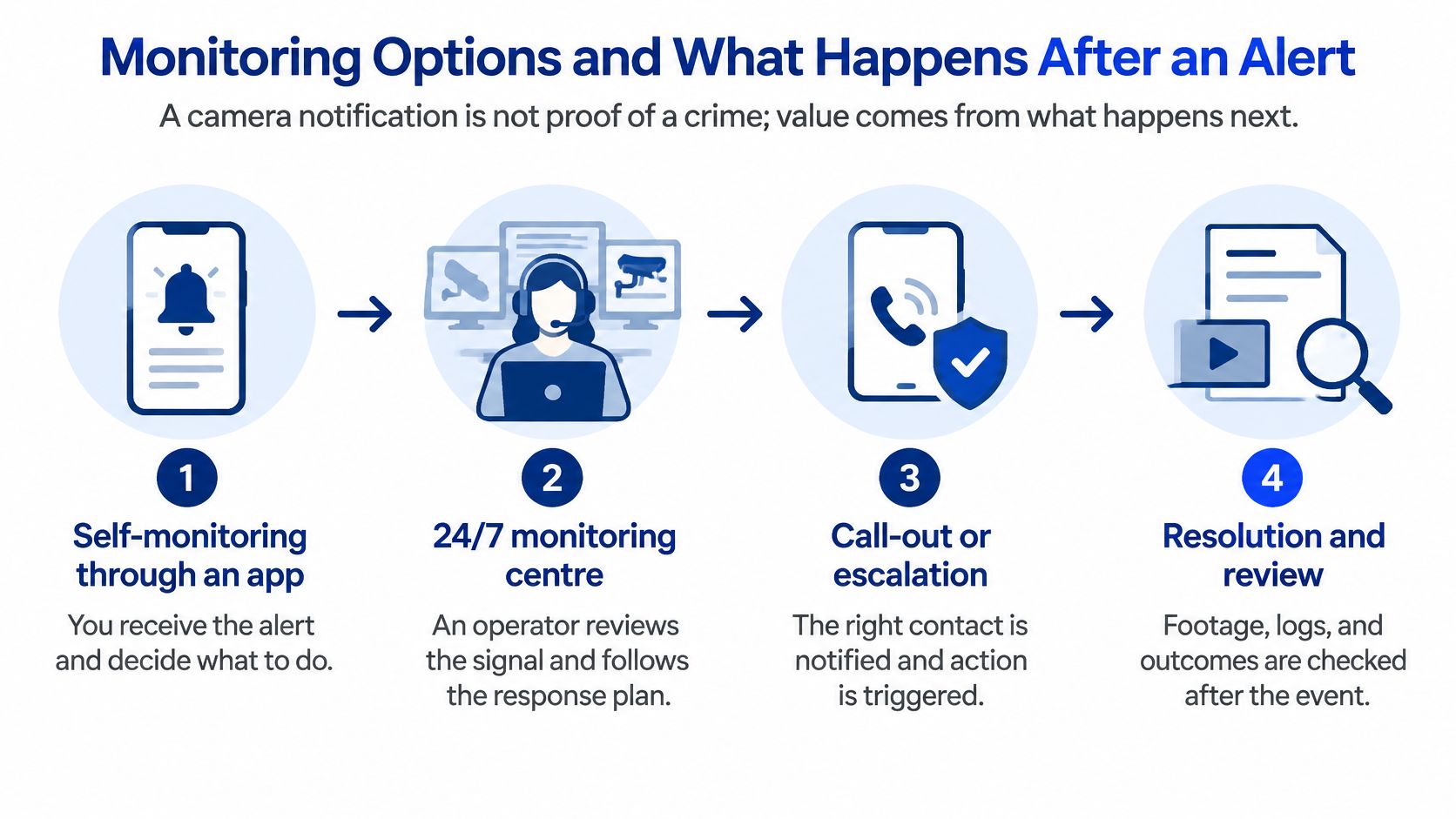
Monitoring options compared
| Option | Who watches | Response method | Main trade-off |
|---|---|---|---|
| Self-monitoring by app | Homeowner or tenant | Personal decision to call police or a keyholder | Requires an available person who notices the alert |
| Professional CCTV monitoring | Monitoring-centre operators | Verification, then agreed police or keyholder escalation | Operator needs enough information to assess the event |
| Monitored alarm with keyholder response | Monitoring centre and named keyholders | Keyholder call, then escalation if unanswered | Relies on keyholder availability |
| Monitoring with mobile patrol response | Monitoring centre and patrol officers | Patrol attendance following a verified alert | Attendance is subject to coverage and location |
Follow an alert through to resolution
Say a rear-door alarm activates while the owner is away. The operator checks the associated camera, sees an unfamiliar person testing the door and follows the escalation instructions, rather than forwarding another app notification.
Mobile Patrols can provide an attendance option when no suitable keyholder is nearby. The written instructions should identify access arrangements, safe inspection boundaries and when the operator should contact emergency services.
The Insurance Council of Australia reported that Queensland home theft and burglary claims fell 14.8% in 2025–26, according to a Queensland Government statement. That claims trend doesn't establish how any particular alarm will be handled.
Occupants shouldn't confront intruders. In Queensland Police's Arundel incident report, three alleged offenders entered a unit on 3 November 2024, followed by an altercation with a 25-year-old occupant.
For another explanation of monitoring arrangements, use the monitored versus self-monitored comparison. The deciding factor is whether the response remains workable when your usual contact isn't available.
This video provides additional context for reviewing the alert-to-response process.
Don't assume guaranteed police attendance or a fixed patrol arrival time. Record coverage assumptions, escalation conditions and limitations in writing.
After an incident:
- Preserve records: Review event logs and export relevant footage.
- Check permissions: Investigate unexpected access or account activity.
- Document outcomes: Record calls, attendance and observed damage.
- Contact the insurer: Follow its reporting and evidence requirements.
Installing, Maintaining and Securing Your System
Connected devices require cyber security as well as sound installation. The Australian Computer Society's explanation of the Cyber Security (Security Standards for Smart Devices) Rules 2025 describes requirements for eligible devices covering default-password protections, unique random passwords, vulnerability reporting and disclosure of security-update support periods.
A reused password or unpatched camera can expose live feeds, recordings or access credentials. Choose equipment with documented firmware support, encrypted communications and account controls that suit the people using it.
Secure app access matters as much as the physical position of the camera.
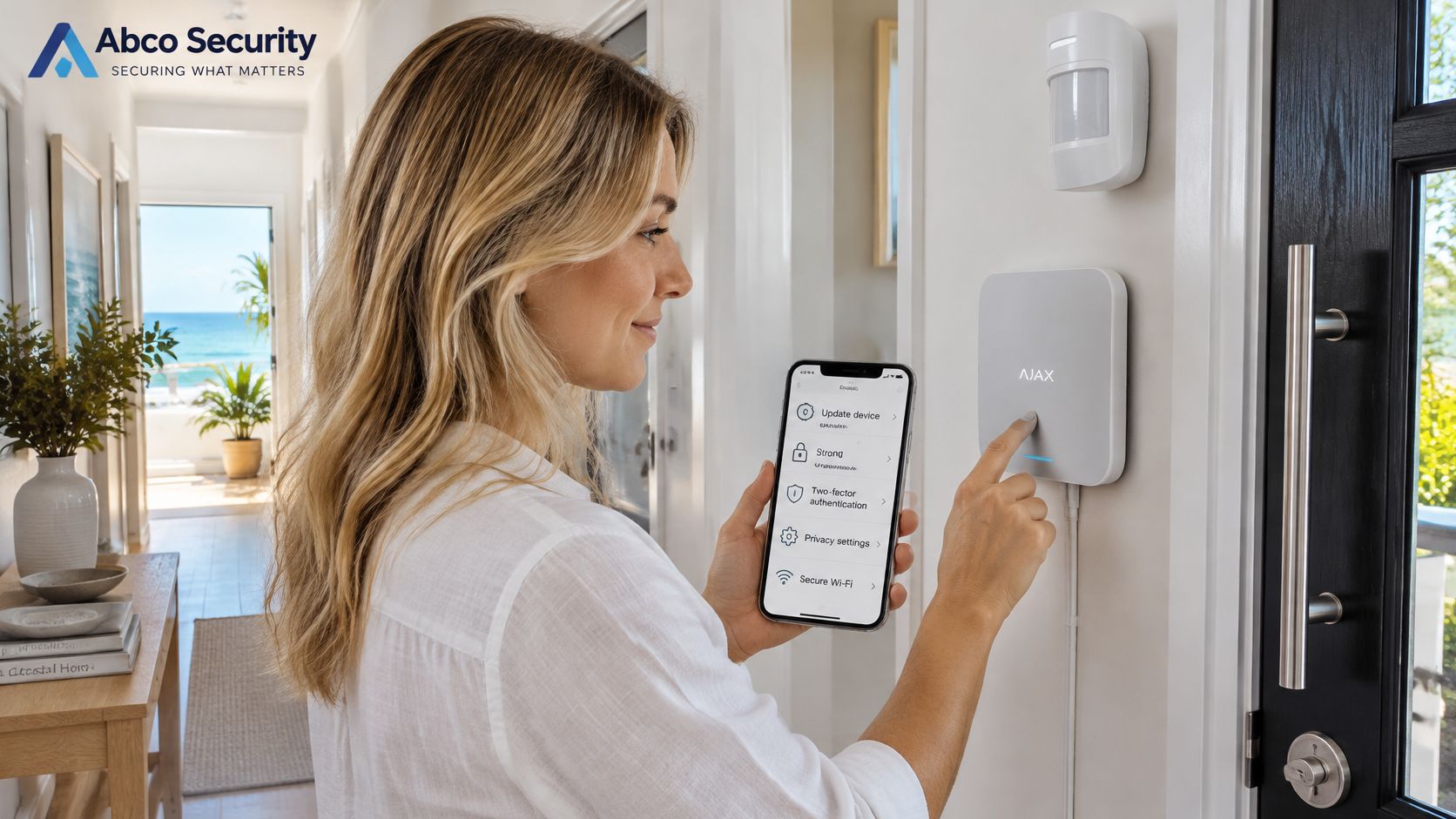
Set up ownership and access correctly
At handover, complete these checks:
- Replace installer credentials: Create owner-controlled accounts and test account recovery.
- Separate the network: Put cameras and hubs on a dedicated network or VLAN, isolated from personal files, workstations and payment devices.
- Reduce exposure: Disable unused services, including universal plug-and-play where feasible.
- Protect accounts: Enable multi-factor authentication and give each user only the permissions they need.
- Control recordings: Confirm who can view, export and delete footage, and review remote-access logs.
Don't accept a shared administrator login as the everyday arrangement for residents, contractors and strata managers. Separate accounts make access removal and incident investigation more manageable.
Maintenance schedule for home security systems
The following is a practical starting schedule, not a statutory servicing interval. Follow manufacturer instructions and increase checks where operating conditions require it.
| Task | Frequency | Why it matters |
|---|---|---|
| Test alarm sensors and siren | Monthly | Confirms detection works before an event |
| Check camera recording and time stamps | Monthly | Confirms footage exists and is correctly dated |
| Review app users and remove former occupants or contractors | Quarterly | Stops old credentials granting access |
| Check firmware and update-support end date | Quarterly | Identifies updates and approaching loss of support |
| Test footage export to USB or cloud | Annually and after any change | Confirms usable footage can be produced |
| Replace batteries as required and test backup power and internet | Annually, or sooner under manufacturer instructions | Checks outage resilience and battery condition |
Arrange a test window with the monitoring centre before activating sensors or sirens. Otherwise, maintenance can trigger an unnecessary response.
Use the home security system battery replacement guide to plan battery work without overlooking compatibility or safe isolation.
Residential and strata installations can have a broad attack surface because residents, contractors and managers access the same system. Access reviews deserve particular attention whenever those people change.
Costs and What Drives Your Quote
A security quote reflects equipment, installation and ongoing response obligations. Compare the scope line by line, because a low upfront price may exclude recording storage, monitoring configuration or work needed to eliminate blind spots.
A useful home security company cost comparison starts with the same property requirements for every quotation.
Separate the cost drivers
- Equipment. List cameras, door and window sensors, hubs, storage, smart locks and backup-power components.
- Installation. Identify cabling routes, mounting access, lighting connections and any work involving existing wiring.
- Monitoring. Distinguish app-only alerts from professional video review, keyholder escalation and patrol attendance.
- Contract conditions. Record the term, cancellation provisions and charges for later changes.
For example, a detached home specified with four cameras, opening sensors and motion lighting would have a hardware-and-installation component, plus an ongoing fee if monitoring is selected. A strata scheme with shared access control needs a different breakdown, including door hardware, access administration and central monitoring.
Our Night Owl Special Service starts from $167.25 per month and includes unlimited 24/7 CCTV monitoring, patrol response and emergency response. Use that benchmark to examine inclusions, not to assume every property has identical installation requirements.
Compare the cost of a working response arrangement, not just the price of installed hardware.
Keep future changes visible
The itemised quote should show hardware, labour, recurring fees and the charge basis for adding another camera. Clarify whether recording storage, app subscriptions, equipment replacement and call-outs sit inside or outside the quoted amount.
Keep warranty, equipment ownership and firmware-support terms with the quote. Those documents matter when an apparently economical system becomes difficult to maintain or transfer.
Comparing Providers on What Matters
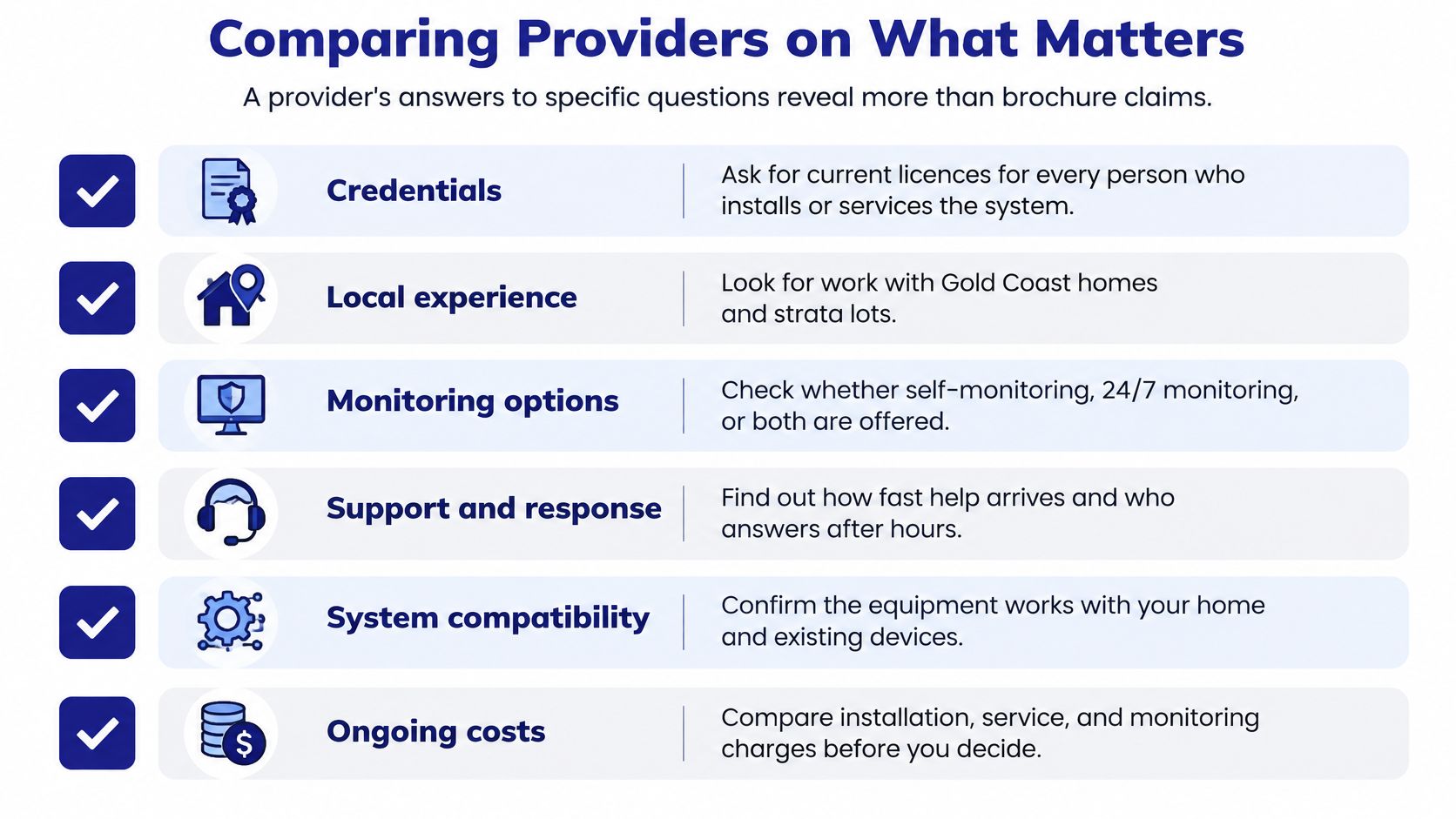
Specific answers reveal more than brochure claims. A provider should be able to describe who handles an overnight event, what information that person receives and how the outcome is documented.
Use the checklist as a record of answers, not a list of promises.
Check credentials and operational responsibility
- Credentials: Verify current, relevant licences for the work each attending person performs. Our security guards are fully licensed under relevant Australian state regulations and receive ongoing training in conflict resolution, first aid, OH&S, customer service and emergency response.
- Monitoring: Record the centre's location, overnight staffing, verification procedure and escalation contacts. A vague statement that someone is always watching doesn't answer those operational questions.
- Response: Obtain written commitments, their conditions and exclusions. Distinguish the time to review a signal from the time required for someone to reach the property.
A provider who can't explain overnight operator coverage hasn't adequately answered the monitoring question. Likewise, a guard licence shouldn't be treated as evidence of competence for every electronic installation task.
Check the equipment and agreement
- Equipment and cyber practice: Confirm ownership, warranty coverage, firmware-support duration and compatibility with existing devices. Include account handover and secure remote access in acceptance testing.
- Contract: Review the term, cancellation procedure, subscription dependencies and whether installation changes attract additional fees.
- Comparable work: Seek references relevant to your dwelling or strata layout, rather than relying on unrelated commercial projects.
Our Brisbane office is at 80 Ann Street, Brisbane QLD 4000. A regional office provides a contact point, but site-specific coverage and service arrangements still belong in the written assessment.
A company's Security Guarding, Event Security or Construction Security capability doesn't automatically establish residential system suitability. Equally, Retail Security, Concierge Security, Gatehouse Security and Shopping Centre Security involve different access patterns and operating responsibilities.
For properties across Melbourne, Sydney, Brisbane, Perth and surrounding cities, confirm the actual local service area rather than assuming a uniform travel radius. Local expertise should show in the site plan, including concealed approaches, shared entrances and realistic attendance arrangements.
Choose Your Home Security Plan This Week
You don't need to select every device immediately. You need a clear account of the property's exposure and a written description of how the proposed system will handle it.
Complete these steps this week:
- Run the suburb check. Use the crime-map procedure to understand the relevant offence pattern, then note your dwelling type and occupancy arrangements. Keep reported incidents separate from assumptions about your household's individual risk.
- Map the entry points. Mark doors, accessible windows, gates, garages and shared paths on a simple sketch. Match the largest gap to the property-type priorities, and identify any physical repair that should happen before electronics are installed.
- Compare written assessments. Obtain assessments from two or three providers and score their answers against the provider checklist. Look for explicit responsibilities, exclusions and commissioning tests, not just a device list.
Make the handover part of the decision
Keep a copy of the agreed camera views, authorised contacts and acceptance checklist. Name the person responsible for maintaining permissions, receiving service notices and updating emergency contacts.
If we're among the providers you're considering, use the Night Owl benchmark to check the proposed inclusions against your property requirements. We provide 24/7 security operations across Australia, while the assessment should define the arrangements applicable to your address.
Contact ABCO Security on (03) 9001 0024 or info@abcosecurity.com.au to discuss a written site assessment. Have your property sketch, occupancy pattern and existing equipment details ready so the discussion starts with practical requirements.
The right plan is the one whose detection, verification, response and evidence steps connect for your property. A successful demonstration at handover is more useful than reassurance that everything should work.
ABCO Security Services Australia offers integrated electronic security, CCTV and alarm monitoring, and coordinated patrol response for residential and strata properties. Visit ABCO Security Services Australia to request a site assessment and establish which protection and response arrangements suit your Gold Coast property.
about
avada factory
Sempery ultricies nibh at dolor cras urna eleifend nec. Atiam efficitur tempor.