
A single breach affected more than 10 million Australians in January to June 2024, while 63% of reported breaches affected 100 or fewer people, according to the Office of the Australian Information Commissioner's breach report. That contrast matters for security teams: routine mistakes need attention, but a connected system can turn a local failure into widespread exposure.
Effective protection isn't about collecting the most footage or keeping every visitor record. It's about collecting what serves a clear purpose, controlling access and removing information when that purpose ends.
Data Privacy Security Measures You Can Apply Now
Human error deserves attention alongside hostile attacks. In January to June 2025, the OAIC recorded 532 breach notifications, down 10% on the preceding reporting period. Malicious or criminal attacks accounted for 308 notifications, and human error accounted for 193, up from 29% in the previous reporting period.
Health represented 18% of notifications, finance 14%, and Australian Government agencies 13%. These are national reporting categories, not estimates of risk at an individual office, shopping centre or construction site.
Data privacy security measures combine technical controls with clear responsibilities. A firewall can restrict unwanted network access, while approval steps can catch a supervisor about to email an incident report to the wrong recipient. Neither control covers every risk on its own.
Data privacy security measures by exposure
| Exposure | Primary measure | Owner | Goal |
|---|---|---|---|
| Malicious or criminal attack | Multifactor authentication, segmentation, endpoint protection, immutable backups | IT with monitoring centre | Limit spread and restore service |
| Human error | Role limits, export approval, short refresher training | Site or operations manager | Stop accidental disclosure |
| Lost paperwork or storage device | Encryption, asset register, secure disposal | Site supervisor | Keep lost digital media unreadable and paper controlled |
| Misdirected email or missing blind copy | Template controls and a second check on bulk sends | Administration | Prevent mass disclosure |
| Insider or rogue employee | Vetting, least privilege, logged access | Security manager | Detect misuse early |
| Over-retained CCTV or visitor data | Written purpose and scheduled deletion or de-identification | Privacy lead | Reduce data that can be stolen |
Use the owner column to check accountability. An IT supplier might configure encryption, but the site supervisor still needs to know which devices hold information and what to do if one disappears. Paper cannot be encrypted, so use locked storage, control its movement and destroy it securely.
For offices and sites in Melbourne, Sydney, Brisbane, Perth and nearby centres, tick controls you can demonstrate, not merely those listed in a policy. Map the actual locations and systems your team supports, since sites may use different equipment and processes.
Record each gap with a responsible person, a practical completion condition and evidence that someone checked the result. Collecting more footage or records does not, by itself, improve protection. Limit collection and retention to what serves a clear purpose, while keeping access controls and site-security responsibilities auditable.
Reasonable Steps Under the Privacy Act
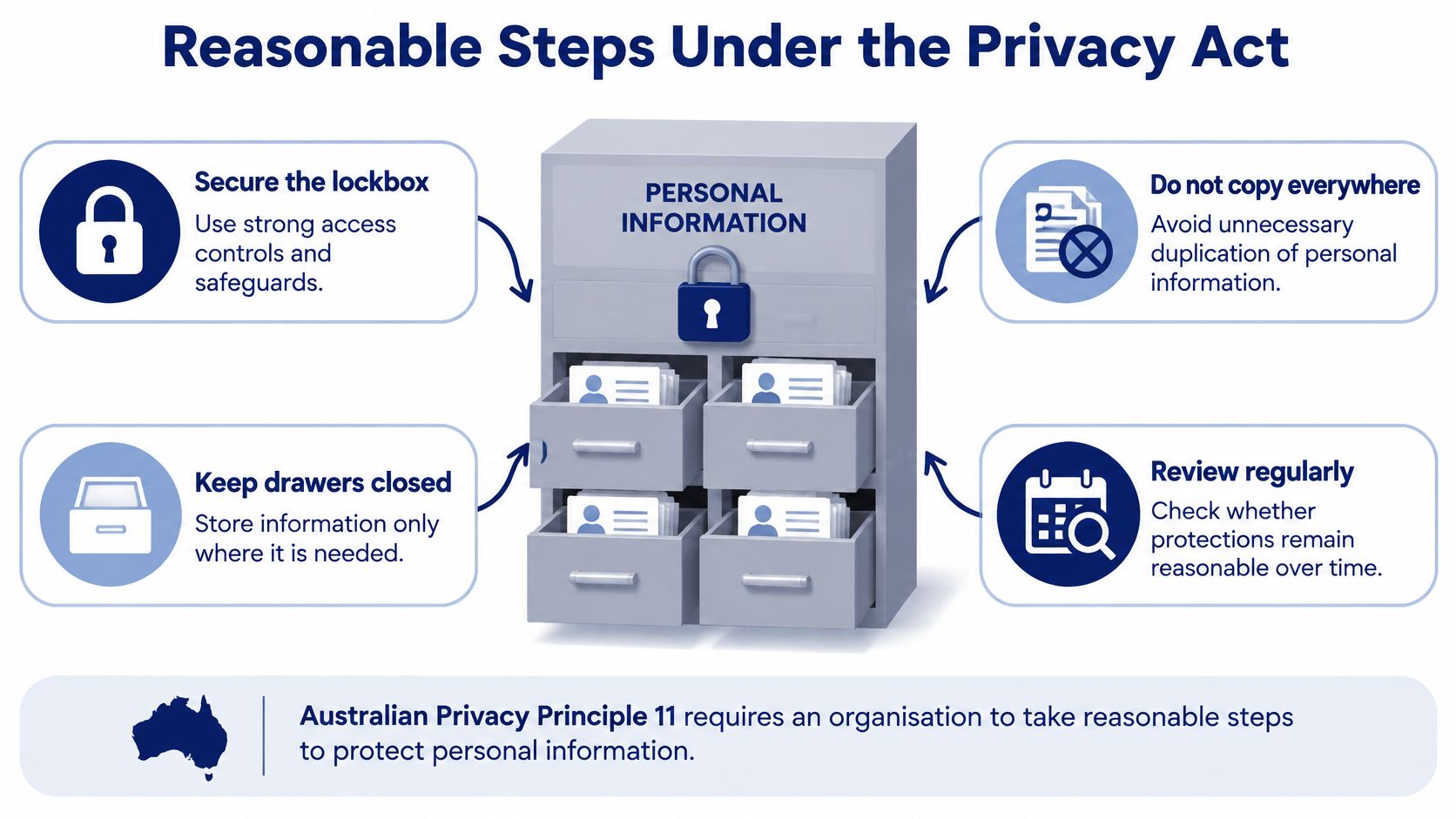
A stronger lockbox helps only if nobody photocopies its contents and leaves copies in every drawer. Privacy protection works the same way: secure storage matters, but unnecessary duplication can undermine it.
Australian Privacy Principle 11, set out in the Privacy Act 1988, requires covered organisations to take reasonable steps to protect personal information from misuse, interference, loss, unauthorised access, modification and disclosure. It also requires destruction or de-identification when information is no longer needed, subject to applicable retention exceptions.
The same duty looks different across sites
At a Melbourne corporate office, visitors provide names and host details at reception. Reasonable protection means the next visitor shouldn't be able to read everyone else's entries. A reception process that reveals previous entries creates exposure before anyone touches a database.
At a shopping centre, an incident report may identify a distressed customer through photographs, descriptions and witness details. The security supervisor might need the complete report, while a maintenance contractor only needs instructions about a damaged door. Giving both people the same document isn't automatically justified.
At a construction gatehouse, contractor records can contain vehicle registrations and licence details. The useful question is whether staff need to inspect identification, record particular details or retain a copy. Those are different activities with different consequences if information escapes.
A control room may combine tenant, visitor and event information from several properties. Its operators need access suited to their assignments, not automatic visibility across every client site.
The lockbox illustration captures the distinction between securing information and spreading it unnecessarily.
Evidence matters more than equipment labels
The obligation is risk-based, not a requirement to buy a particular technology. Sensitivity, volume, potential harm and the operating environment affect what safeguards are reasonable.
Keep a written explanation of why information is collected, who needs it and why the chosen safeguards fit. Review that explanation when a new vendor, reception platform or monitoring arrangement changes how information moves.
More cameras and longer retention aren't automatically more compliant. A defensible safeguard has a purpose, an owner and evidence that it works.
Paper files, reception notes and identifiable surveillance footage deserve the same consideration as formal databases. A folder labelled “operations” doesn't stop its contents being personal information.
For camera deployments, use the Australian CCTV laws overview to frame questions about location and use, then check the relevant legal requirements and OAIC guidance. Privacy obligations and surveillance rules need to be considered together, rather than treating a camera installation as a purely technical purchase.
Technical Controls That Contain a Breach
A CCTV workstation should not provide an unrestricted route into payroll. Separate access and permissions so a compromised device cannot reach every system that holds personal information.
The OAIC's published breach statistics record 1,113 notifications during 2024: 518 from January to June and 595 from July to December. Those figures show why organisations need controls that limit how far an incident can spread.
Separate systems and protect recovery
Place CCTV, access control, alarms and visitor-management platforms in separate network segments from corporate identity and finance systems. Use VLANs and restrictive firewall rules, allowing communication only where a documented operational need exists.
Check traffic between internal systems, often called east–west traffic. VLAN labels alone do not contain an intrusion if firewall rules still permit unrestricted communication between them.
Protect information in transit with current TLS configurations, and encrypt stored information using centrally managed keys. Store administrator credentials and API secrets in a secrets manager, not in application code, handover spreadsheets or an installer's notebook.
Backups need protection from the accounts and attacks that could compromise production systems. Use offline or logically immutable copies, document recovery objectives and test restoration in a safe environment. A successful backup job does not prove that staff can restore a working access-control service.
Set retention jobs to remove or de-identify visitor, employee, tenant and event records when their purpose ends, while respecting justified holds. Keeping less information reduces what an attacker could take. For practical guidance on how to reduce breach exposure through data minimization, see Ciphar's guide.
Put maintenance on an accountable clock
At the relevant maturity level, the Australian Cyber Security Centre's Essential Eight maturity model specifies applying operating-system patches, updates or vendor mitigations within one month of release for workstations, non-internet-facing servers and non-internet-facing network devices.
That scope can include reception computers, access-control workstations, CCTV viewing machines, alarm-monitoring servers and gatehouse network devices. A security contractor's equipment still needs an identified owner and maintenance process.
- Register the asset and owner. Identify who approves maintenance and who performs it.
- Record the release date. Track applicable vendor updates against the equipment register.
- Test operational continuity. Check camera display, credential synchronisation and alarm forwarding where interruptions matter.
- Install and record completion. Capture the installed version and confirm the service still works.
- Escalate exceptions. Document equipment that cannot meet the target. Treat unsupported and internet-facing equipment separately because different or stronger controls may be needed.
A supplier's “managed service” description does not show that these tasks happen. Ask for patch records, exception approvals and restoration results. The network security overview can help teams coordinate electronic security with IT responsibilities. Least privilege, multifactor authentication, logging and tested recovery each limit what a compromised device or account can do.
People Policies Vendors and Training
A patrol officer finds a visitor log in a gatehouse with an open door during a night shift. They want to prove what they found, but photographing every page onto a personal phone would create another uncontrolled copy.
The officer needs a practical instruction: secure the log, contact the nominated supervisor and record the discovery through the approved incident channel. If the process requires a privacy manager who can't be reached after hours, the process needs fixing.
Write rules for the person on duty
Policies should explain what personal information the service collects and what staff may do with it. Security Guarding, Concierge Security and Gatehouse Security teams need clear instructions on viewing live footage, replaying recordings, approving exports and responding to requests from tenants or contractors.
Paper handling needs equal attention. Tell staff where incident reports belong, how to transfer them between shifts and how authorised destruction occurs. State what contractors may take off site, including downloaded files, photographs and handwritten notes.
Vetting should reflect the information a role exposes, such as identification details, vehicle movements, rosters and incident narratives. A current security licence doesn't replace a privacy briefing or demonstrate that someone knows the client's information-handling procedures.
Practical rule: Train the decision staff must make, not just the policy they must acknowledge.
Use a short induction with realistic situations, then refresh it after an incident or system change. In the gatehouse example, ask the Mobile Patrols officer to demonstrate whom they'd call and how they'd report the issue without copying the visitor list.
Manage access through the whole working relationship
Grant access by role, review it when duties change and remove it on departure. Include shared mailboxes, monitoring portals, mobile applications and supplier accounts, not just the main computer login.
Vendor arrangements should identify the system owner, the maintenance obligation and the escalation contact. Require approved, time-limited remote access rather than an unattended connection that remains available indefinitely.
For suppliers maintaining workstations or servers, carry the applicable patch expectation into the agreement. Require immediate reporting of suspected exposure, even if the supplier hasn't finished investigating.
ISO 9001 quality routines and a risk-management system are useful only when staff produce readable records of decisions, exceptions and follow-up. A completed form isn't enough if nobody checks whether an account was disabled.
Use security awareness training to practise credential protection, approved reporting and information handling as connected duties. Staff should finish knowing what to do on their next shift.
CCTV Access Control and Remote Monitoring
A camera can help staff investigate an incident while also recording people who have nothing to do with it. The design decision is how to preserve useful evidence without building an unnecessary archive of everyone's movements.
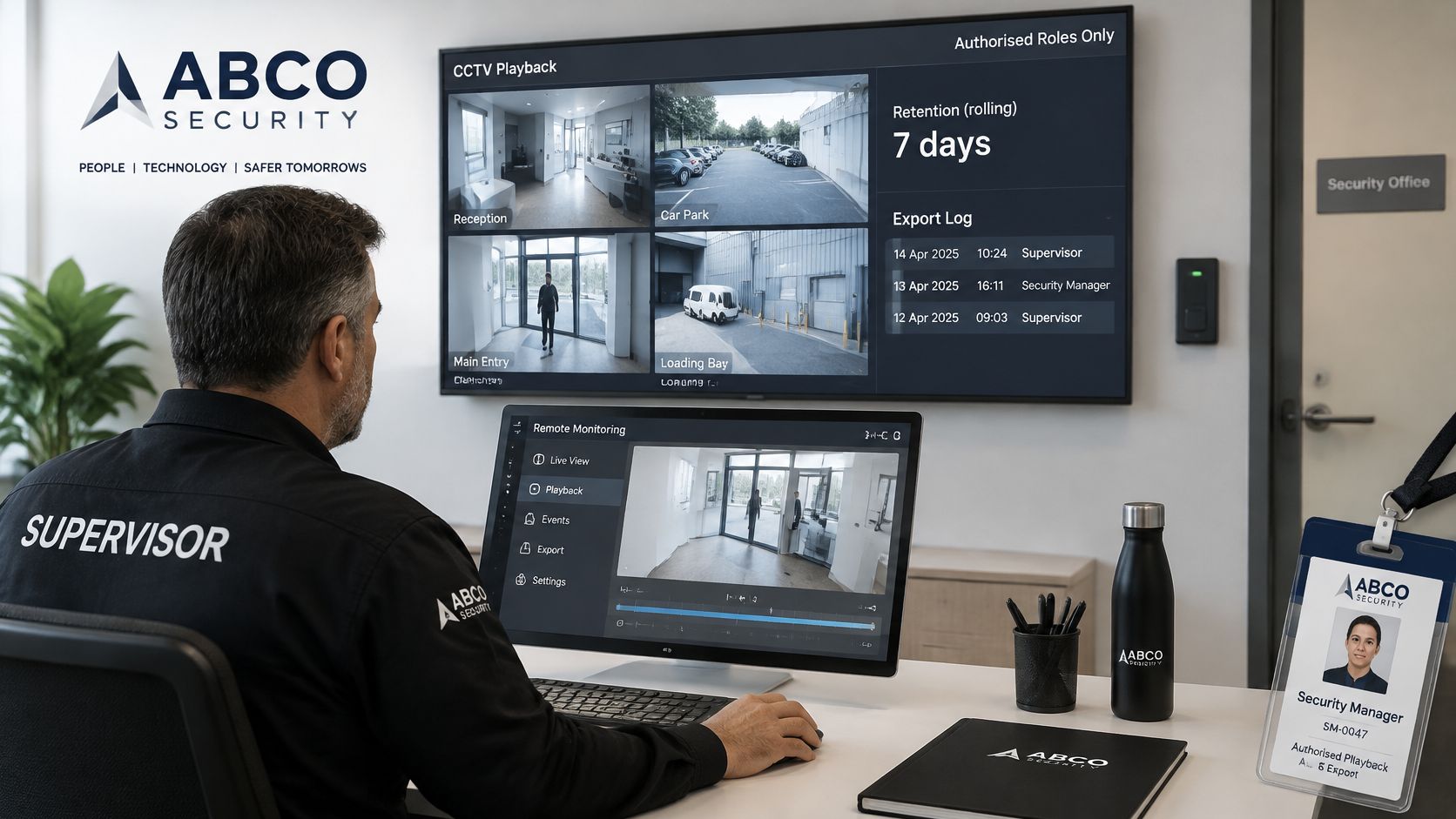
The monitoring workstation is an information-access point, not just a screen.
Defensible handling of security system data
The following are starting positions for a documented retention policy, not universal legal retention periods. Resolve investigation holds, contractual requirements and other applicable duties before scheduling deletion.
| Setting | Retention stance | Who may view | Avoid |
|---|---|---|---|
| Workplace | Short operational window, then delete or de-identify | Named roles, exports logged | Keeping all footage indefinitely |
| Event | Event period plus a documented complaint window | Named event operators only | Shared drives of the whole crowd |
| Retail or shopping centre | Preserve relevant incident clips rather than continuous archives | Loss-prevention staff with a need to know | Facial recognition without an assessment |
| Construction project | Project-linked retention, then de-identify when no longer needed | Authorised gatehouse and patrol roles | Personal phones as the archive |
| Remote monitoring | Live view only while the contract justifies it | Authorised operators using multifactor authentication and audited sessions | Standing vendor access |
For Event Security, define who closes the complaint window and authorises disposal. For Retail Security and Shopping Centre Security, preserve relevant incident footage without automatically retaining unrelated recordings.
Construction Security records need finer decisions than “keep everything until handover”. Gatehouse number plates and driver names may lose their purpose before the project ends. Set appropriate periods by record type rather than using the project completion date as a reason to retain everything.
Make remote access explainable
Consider a Security Company Melbourne control room reviewing a share link used across client sites within a few hours of the city. The supervisor discovers that several recipients no longer work on those properties.
The useful response is to revoke the broad link, establish named access and check whether recordings were downloaded. Apply the same decision process in Sydney, Brisbane and Perth, rather than allowing local workarounds to become permanent arrangements.
For another monitoring reference, the video is provided below.
Document each camera's purpose and review analytics false positives. Don't enable facial recognition or broader video analytics merely because the licence includes them.
The OAIC's guidance on data breaches and the Privacy Act supports treating security information as a governance responsibility. Use the CCTV storage requirements guide to structure a retention discussion, then record the reasons for the site's chosen settings.
Privacy-by-design leaves less information available to steal while keeping targeted cameras, alarms and access logs auditable.
How to Assess and Notify a Breach
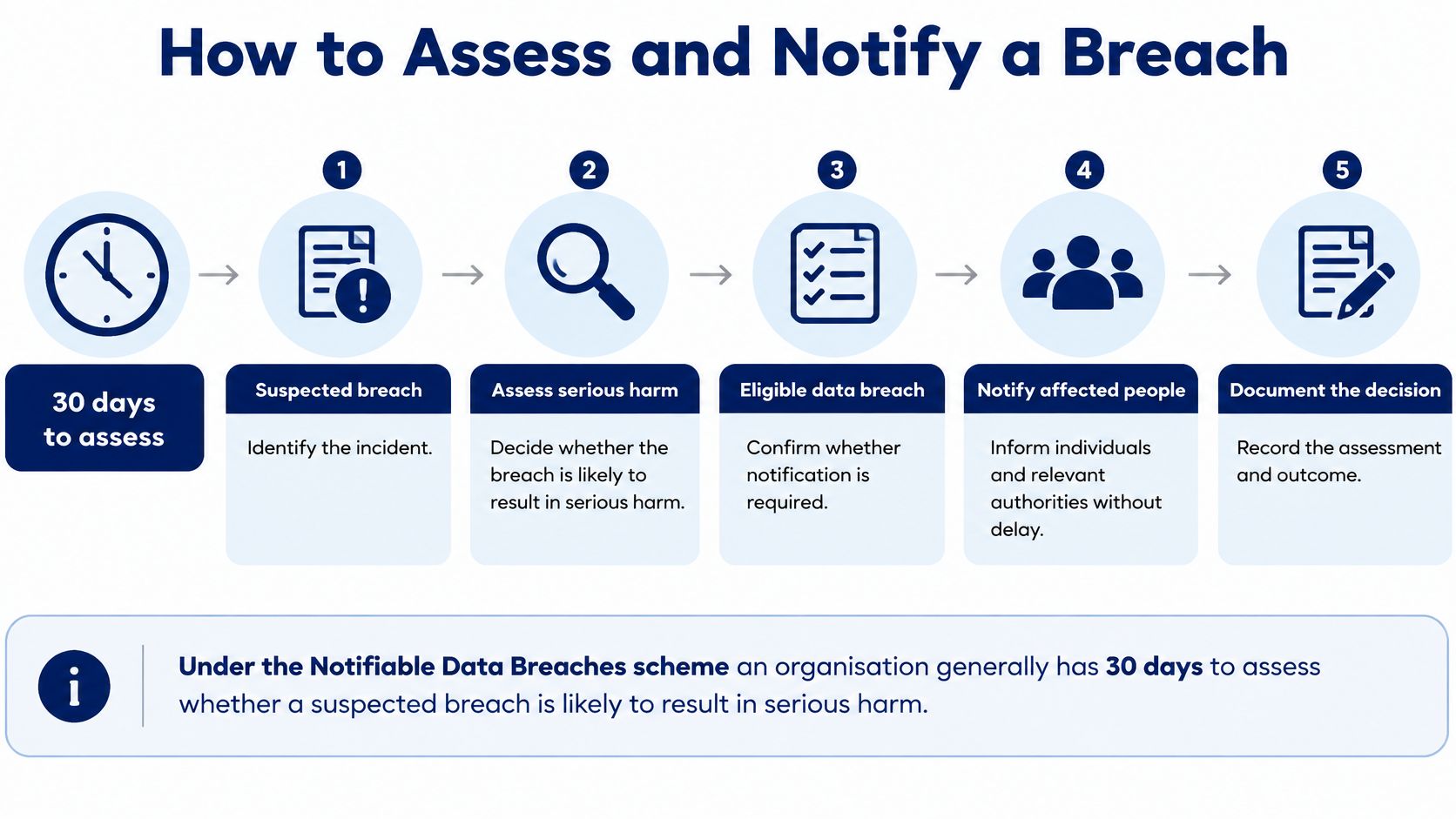
Under the Notifiable Data Breaches scheme, an organisation generally has 30 days to assess whether a suspected breach is likely to result in serious harm, according to the OAIC's explanation of a notifiable data breach. If an eligible breach is identified, affected individuals and the Australian Information Commissioner must be notified.
That assessment period isn't permission to postpone containment or notification once the notification obligation is established. Serious harm can include identity theft, fraud-related financial loss, physical harm, serious psychological harm or serious reputational damage.
Give the supervisor an actionable response
- Contain the exposure. Isolate the affected account, device or camera export path without unnecessarily destroying evidence.
- Preserve evidence. Secure relevant logs and the exposed material in an authorised investigation location.
- Identify the scope. List the information involved and the people affected.
- Assess serious harm promptly. Escalate to privacy and legal decision-makers within the assessment period.
- Evaluate remedial action. If it prevents the likelihood of serious harm, document the evidence supporting a decision not to notify.
- Notify when required. Inform the Commissioner and affected individuals promptly, using verified facts and practical protective advice.
- Close the control gap. Record corrective actions, approvals and the assessment outcome.
The assessment workflow should be available to supervisors before an incident occurs.
Test incidents that don't look like hacking
Say a guard roster is stolen from a vehicle. The assessment should establish whether it includes contact details, work locations or patterns that could expose staff to harm, rather than dismissing it as an administrative document.
For a shared CCTV link, disabling the link is containment, not proof that exposure never occurred. Check access logs, downloads, identifiable people and the sensitivity of the recorded activity before concluding that remedial action removed the likelihood of serious harm.
A lost access-control register or misdirected incident report can also require assessment. The deciding issue isn't whether someone hacked a database, but what happened to personal information and what harm could follow.
Centralise reporting across Melbourne, Sydney, Brisbane, Perth and surrounding cities so a patrol officer, concierge, monitoring operator or site supervisor reaches the same assessment process. Give after-hours staff an escalation contact with a backup.
Use Cloudvara's guide to breach response as a supplementary planning resource, while retaining the OAIC as the authority for Australian notification duties. Adapt a security incident response plan template with actual contacts, evidence locations and decision authority, rather than leaving generic role descriptions.
Confirm Your 90 Day Privacy Security Plan
Use the coming quarter as an implementation schedule, not a promise that every risk will disappear. Start with information ownership, then fix exposure, establish workable routines and test decisions.
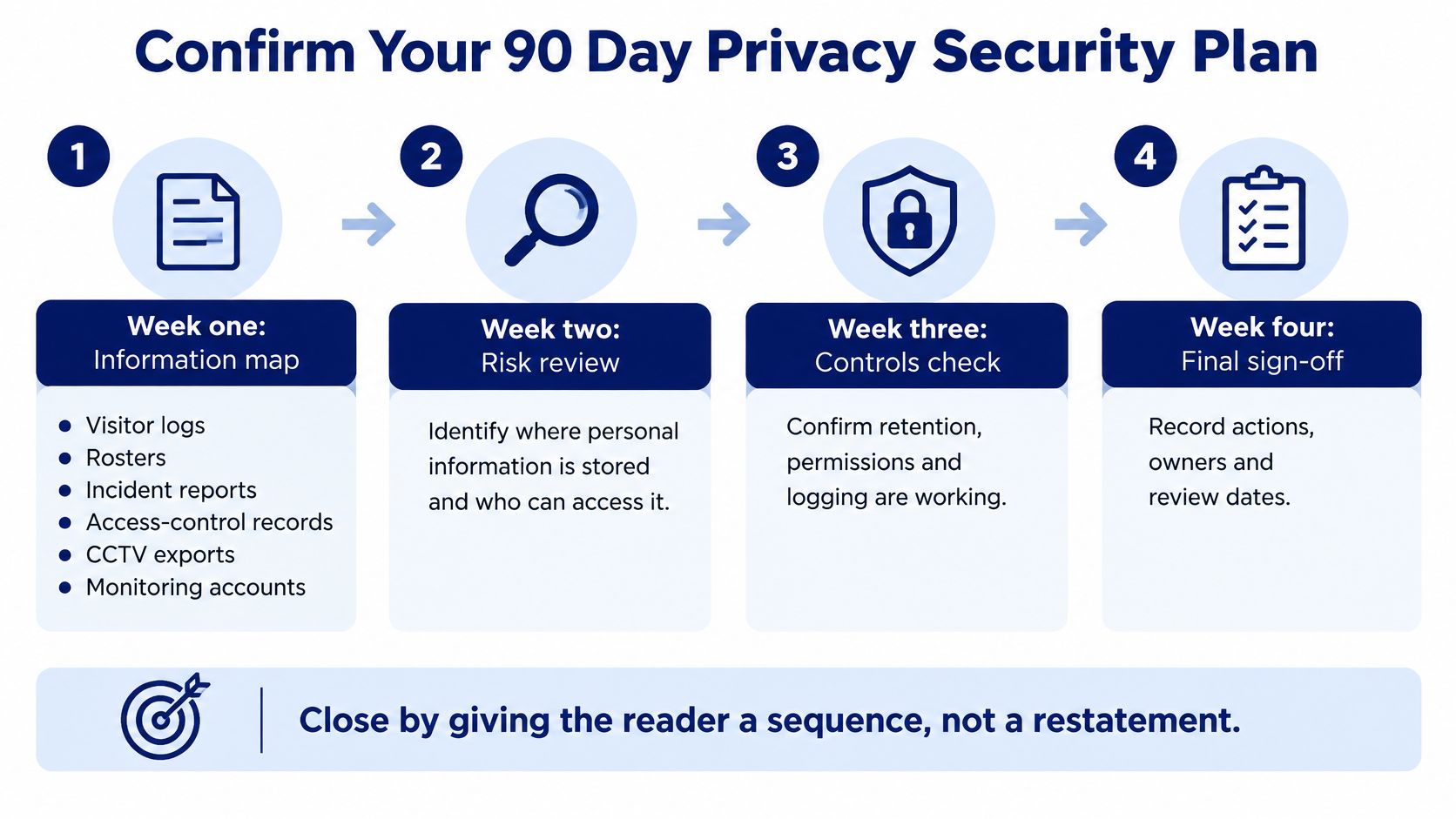
The visual checklist can support sign-off, but owners should record completion against the actual work programme.
Start with a map people can maintain
In the opening week, create an information register rather than buying another platform. Each entry needs a purpose, storage location, authorised users and an accountable owner.
Use this completion checklist:
- Visitor logs have an owner and known storage locations.
- Rosters have controlled distribution and a disposal decision.
- Incident reports have an approved reporting channel.
- Access-control records have defined administrative responsibility.
- CCTV exports have an approval and tracking process.
- Monitoring accounts are assigned to identifiable users.
- Shared passwords are removed from operational use.
- Administrator authentication includes multifactor protection.
- Connected building systems receive a separation review.
- Personal-device archives are replaced with approved storage.
- Staff instructions and departure checks are tested with guarding and concierge teams.
- Roster-theft and exposed-camera-link exercises produce documented decisions and follow-up actions.
Sequence the remaining work
During the following weeks, close the highest-harm gaps first. Prioritise broad administrative access, exposed information and systems that could give an attacker a route across the organisation.
Use the middle of the programme to write short operating instructions and brief staff. Confirm that people who have left no longer retain access, and that suppliers understand their maintenance and reporting responsibilities.
Finish with tabletop exercises. Record detection time, escalation time, decision ownership and whether remedial action would prevent serious harm; use the applicable assessment deadline rather than treating the exercise as an informal discussion.
Reasonable steps are the ones you can explain, evidence and switch off when the purpose ends.
Schedule a quarterly retention review so footage and visitor data continue to serve a justified purpose. Keep the OAIC's notification guidance available to the people authorised to make breach decisions.
If your organisation can assign the information owners, maintain the patch process and conduct breach assessments internally, begin the information map now. If those responsibilities cross several contractors, establish who will coordinate them before adding more surveillance.
Licensed security personnel, monitored CCTV and access control need a shared operating process for handling personal information. Visit ABCO Security Services Australia to discuss its integrated guarding, patrol, monitoring and electronic security services, including how site responsibilities, access permissions and incident escalation would be coordinated.
about
avada factory
Sempery ultricies nibh at dolor cras urna eleifend nec. Atiam efficitur tempor.